Enterprise deals don't fail on discovery calls or final negotiations. They stall in the quiet stretches between: When buyers are evaluating internally, champions are coordinating stakeholders, and momentum either builds or quietly dies.
This is where digital sales rooms were supposed to make a difference: Centralize content, track engagement, keep deals moving when reps aren't in the room.
The promise was compelling. Yet, the execution has been mixed so far.
We spent the last few months analyzing engagement patterns across 30,000+ deal rooms and surveying revenue teams across the industry to understand what separates the rooms that actually close enterprise deals faster from the ones that go silent after the first share.
What we found wasn't about having a more sophisticated platform or access to better features. There were certain patterns across the rooms attached to deals that closed faster than average. And none of them requires a massive budget or additional tools.
Here are the seven data-backed tips to keep enterprise deals moving with a DSR.
The average time between room creation and the first buyer view is seven days.
In enterprise sales, that's a week of dead momentum during a 3-9 month-long sales cycle where multiple stakeholders are coordinating evaluations, budget discussions are happening in parallel, and your deal is competing for attention against 5-10 other vendors doing the exact same thing.
The technology is there, yet the gap exists because of how people use it.
Most reps build the room after the call ends and send it as a follow-up: "Here's the workspace I mentioned." The buyer opens their inbox, sees another link from another vendor, and adds it to a mental queue that never gets shorter. There's no urgency. No specific reason to click today.
What works instead: Introduce the room during the conversation itself and show it to them live.
Pull up the room before the call (use a template based on the deal size or use case). During the call, walk them through the structure: "Here's where I've organized everything we discussed. Once we wrap up, this will automatically update with today's conversation takeaways and you'll have the link in your inbox within minutes."
Now the buyer has context. They've seen the room. They know where to find what they need. And they know it's already built and waiting for them, not something that will arrive days later after the rep "gets around to it."
The delivery happens immediately after the call through automated workflows that capture the conversation, update the room with relevant content, and send the link while the discussion is still fresh in everyone's mind.
❗️ Bonus: One more thing that matters in enterprise deals is ownership.
With buying committees spread across IT, finance, procurement, and executive leadership, room activation can't be "someone will handle it." When a specific person owns activation within 24 hours, following up directly with the champion to confirm they received access and can share it internally, the seven-day gap closes.
When no one owns it, the room sits unopened while everyone assumes someone else is handling it. And in a deal with eight stakeholders across four departments, a week of inactivity compounds fast.
Enterprise deals don't close on a single PDF and a pricing spreadsheet. They require technical evaluation, financial justification, legal review, security assessment, implementation planning, and executive sign-off. Lightweight rooms built for speed demos don't support that process.
The problem with thin rooms is that buyers have no reason to return to them. A room with three assets gets opened once, reviewed, and forgotten. A room with depth becomes a reference point that buying committees return to throughout the evaluation.
High-performing deal rooms in our dataset average 5.94 sections, 18 content steps, and 18.96 action items – roughly 37 structured elements total. They generate an average of 18.8 sessions per room.
.webp)
What works: Structure your rooms by the stages enterprise buying committees actually move through.
Don't organize around "Videos," "Documents," "Case Studies." Organize around how enterprise buying committees actually move through evaluation:
Build depth within each stage. The average room in our dataset contains 18 content pieces – that's enough to address different stakeholder concerns without overwhelming any single person.
Format matters for enterprise audiences: The most-consumed content types by engagement time are plain text (220,273 seconds), video (197,845 seconds), and slides (197,801 seconds). Interactive demos barely register – only 898 rooms out of 30,000+ used them.
Enterprise stakeholders are busy. The CFO reviewing your business case at 10 pm isn't launching an interactive product tour. They're scanning a text summary or skimming slides. Give them formats they can consume quickly.
❗ Bonus: Keep the room current as the deal evolves.
A room built in week 2 of discovery shouldn't look the same in week 10 when the deal is in legal review. Refresh content as new stakeholders enter, new objections surface, or new requirements emerge. The 18.8 sessions per room tell us buyers come back repeatedly – make sure there's a reason to.
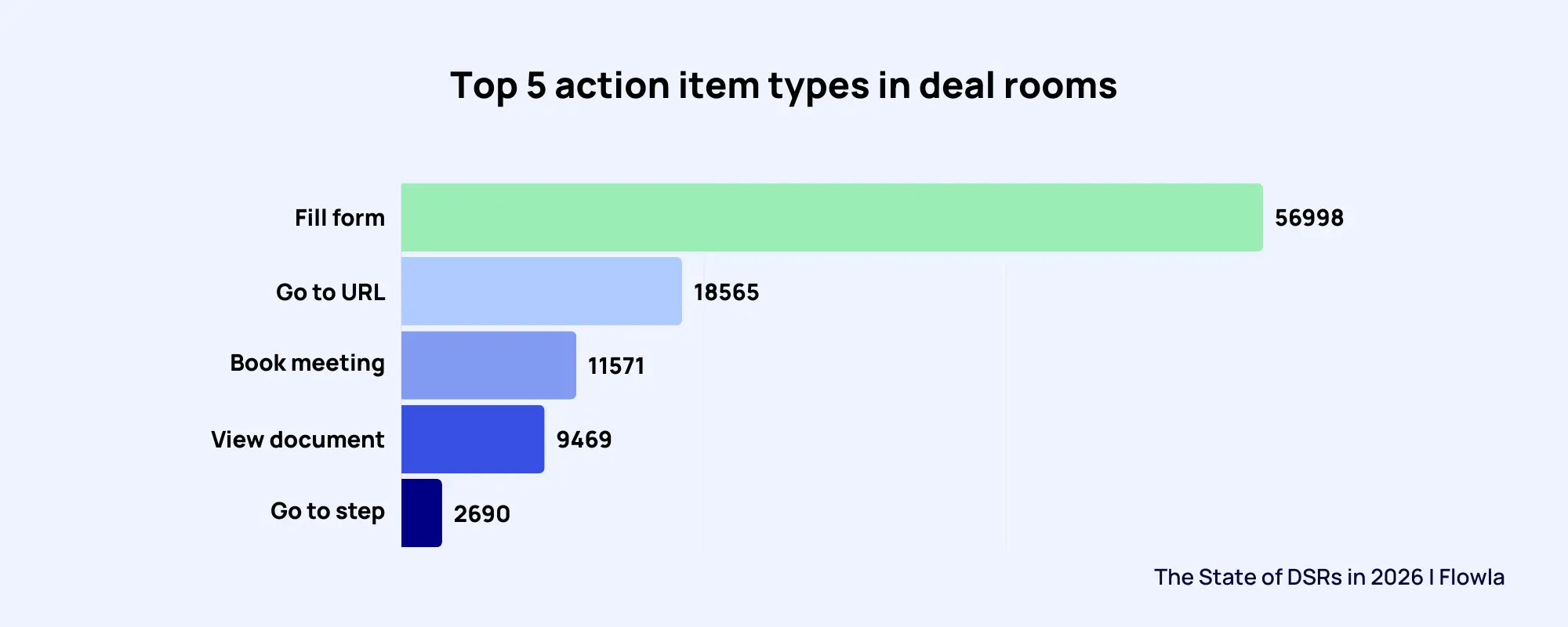
The average deal room contains 18.9 action items. The most common types: Fill form (56,998 rooms), go to URL (18,565 rooms), and book a meeting (11,571 rooms). In enterprise deals with eight stakeholders across four departments, it's a necessary infrastructure to keep the deals on track.
Multi-department deals require coordination across procurement timelines, legal review processes, technical validation steps, budget approval workflows, and executive briefings. Email-based task tracking breaks down when the IT lead, procurement manager, legal counsel, and CFO all need to complete different steps on different timelines while the champion tries to keep everything moving forward.
What works: Embed a live mutual action plan directly in the room with tasks assigned to specific buyer roles.
Not generic tasks like "review proposal" or "schedule follow-up." Enterprise-specific actions tied to real buying milestones:
Each task has an owner, a due date, and a clear deliverable. The room becomes the single source of truth for "who needs to do what by when" across the entire buying committee.
This matters because enterprise deals stall when stakeholders don't know what's expected of them or when coordination falls on a single champion who's juggling their day job plus managing a vendor evaluation.
❗ Bonus: Automate the follow-through
In a 14-week sales cycle, reps can't manually track whether the procurement manager submitted vendor paperwork or whether legal completed their review. Automated reminders trigger when tasks pass their due dates, keeping enterprise stakeholders accountable without the rep having to chase down each person individually.
Budget approval deadlines, contract review timelines, technical validation milestones – these are the checkpoints that determine whether an enterprise deal closes in Q2 or slips to Q3. The room should manage them, not rely on the champion's memory.
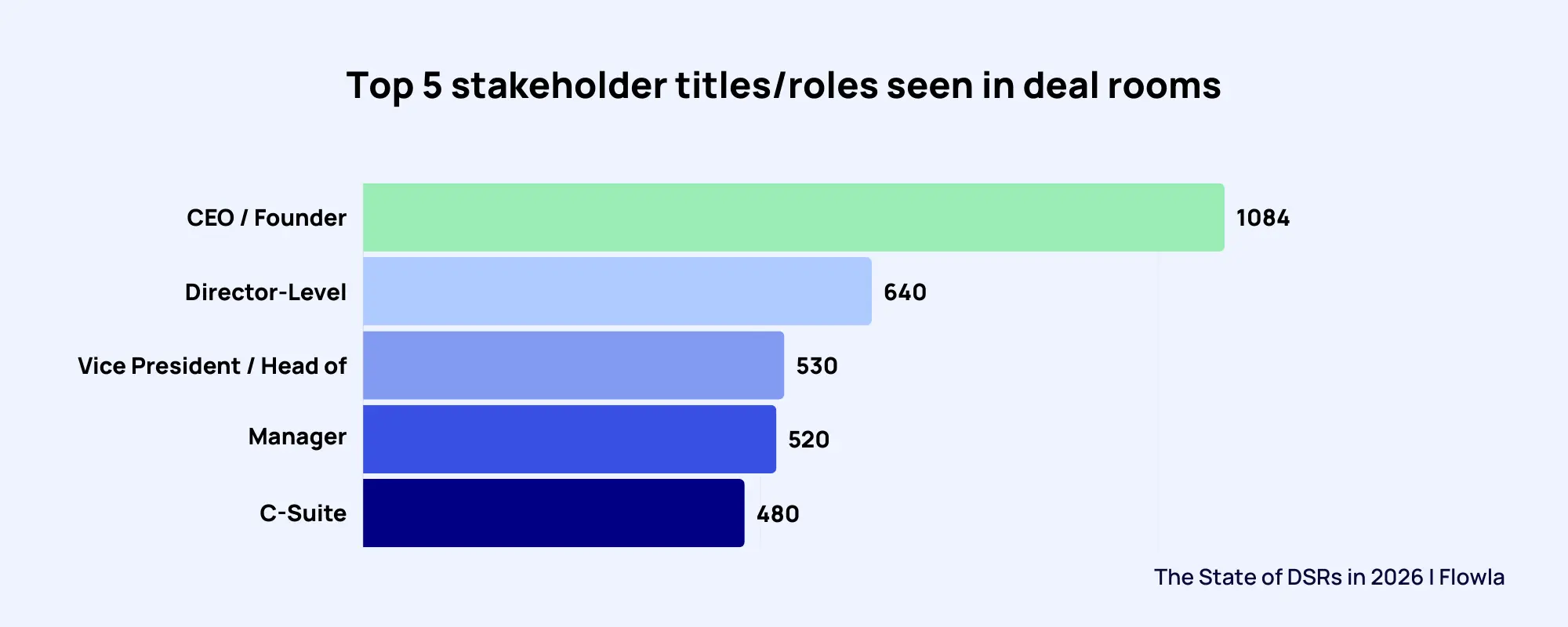
Executive involvement isn't optional in enterprise deals. The most active stakeholder titles in our dataset: CEO/Founder (1,084 rooms), Director (640), VP/Head (530), C-Suite (480), and Manager (520).
And executives almost never enter at the beginning. The CFO joins in week 8 of a 12-week cycle when the budget needs final approval. The CIO gets pulled in during week 9 when IT flags integration concerns. The CEO shows up in week 11 to understand strategic fit before signing the contract.
None of them has time to sit through a rep walkthrough. None of them were on the original discovery calls. And all of them need to understand why this deal matters to their organization in less than five minutes.
What works:
1. Put the executive summary at the top. Plain language. No jargon. Three questions answered immediately:
Add a 30-second video from the account executive speaking directly to late-joining stakeholders: "Here's why this matters to your team and what we've agreed on so far."
2. Build multi-persona tracks for different C-suite concerns. Don't make the CFO wade through technical architecture to find pricing. Don't make the CIO dig through ROI models to find integration requirements.
3. Create labeled sections by executive role:
This does two things: It helps executives find what they need immediately, and it makes the champion's job easier when they forward the room internally. "I'm looping in our CFO – everything relevant to finance is in the section labeled for her."
4. Use executive-friendly formats – plain text summaries, slides, short videos. The data shows these formats dominate engagement time – 220,273 seconds for plain text, 197,845 for video, 197,801 for slides.
Interactive product demos appear in fewer than 900 rooms out of 30,000+. Executives don't have time to click through guided tours. They need information they can scan in two minutes between meetings.
5. The test for enterprise-readiness. Could the CFO who joins in week 10 understand the business case and strategic rationale in five minutes without a rep present? If the answer is no, the room isn't designed for how enterprise deals actually close.
Fewer than one in ten teams prioritize automation when choosing a DSR platform. Yet 60% cite "reps not keeping rooms updated" as their number one problem.
The disconnect is striking – and expensive.
In enterprise deals, manual room maintenance doesn't scale. Reps are managing 15-20 active opportunities simultaneously. They're on discovery calls, demo calls, technical deep dives, procurement discussions, executive briefings, and contract negotiations.
Expecting them to manually update deal rooms after every stakeholder conversation, every milestone reached, every new objection surfaced, and every stage transition is unrealistic. The room goes stale. Content becomes outdated. Buyers disengage because what they're seeing no longer reflects where the deal actually is.
What works: Automate the execution layer so rooms maintain themselves as deals progress.
1. Auto-populate rooms from discovery and demo calls
Transcripts from discovery calls contain everything buyers said matters to them – pain points, success criteria, stakeholder concerns, technical requirements, and budget constraints. Instead of reps manually building rooms from memory after the call, auto-generate an initial room structure from the transcript. Saves 30 minutes per call. Across 12 calls in a typical enterprise deal cycle, that's six hours per deal.
2. Trigger stakeholder-specific follow-ups based on engagement
When the CFO views the pricing section three times in one day, that's a signal. Automatically add an ROI calculator to that section with a note: "Based on the numbers we discussed, here's what the financial impact looks like over 36 months." The rep approves it, but they didn't have to remember to do it or manually build it.
When a new stakeholder from IT opens the room for the first time, trigger a Slack alert to the rep with context (title, department, what they viewed) and a draft intro email they can personalize and send. The rep stays informed without manually checking the dashboard every hour.
3. Auto-generate handoff summaries as deals progress through stages
When a deal moves from technical evaluation to procurement, the room should reflect that transition automatically. New content becomes visible (vendor forms, contract terms, procurement workflows). Old content gets archived (early-stage discovery materials). Stakeholders see what's relevant to the current stage without the rep manually reorganizing sections.
When deals close, auto-generate a sales-to-CS handoff summary from everything that happened in the room: stakeholder map, key commitments made, custom terms agreed to, technical requirements flagged, and implementation timeline discussed. The CS team gets full context without the rep writing a handoff doc from scratch. Result: 25% fewer kickoff delays because nothing gets lost in translation.
4. Re-engage automatically when rooms go dark during long evaluation cycles
Enterprise deals have natural quiet periods – budget review takes two weeks, legal review takes three weeks, the champion is out on parental leave for a month. When a room hasn't been viewed by the primary contact in seven days, trigger a re-engagement workflow: "I noticed the room hasn't been accessed this week – anything you need from us to keep things moving?"
Nine percent of these workflows revive deals that would have otherwise gone cold. Saves 40 minutes per deal the rep would have spent deciding whether to follow up and crafting the message.
The impact at scale is tangible: Thirty minutes saved per call × twelve calls per deal × fifty enterprise deals per quarter = 300 hours saved. That's seven full work weeks per quarter that reps can redirect toward actual selling instead of room administration.
More importantly, rooms stay current without requiring superhuman organizational discipline from reps. Buyers see content that reflects where the deal actually is. Signals get acted on within hours instead of days. And deals move faster because the infrastructure managing them doesn't depend on someone remembering to update a checklist.
The average deal room in our dataset has 2.98 stakeholders. For enterprise deals that typically involve six to ten decision-makers across IT, finance, procurement, legal, and executive leadership, those numbers represent a massive undercount.
The problem isn't that champions aren't sharing rooms internally. They are. The problem is that internal sharing happens invisibly.
A champion forwards the room link to the CISO, the VP of Finance, and the procurement manager. All three open it, review the content, form opinions, and raise concerns, but the rep has no idea they exist until week 10 when one of them surfaces an objection that should have been addressed in week 3.
What works:
1. Gate the content that enterprise stakeholders care most about
Keep the majority of the room open – business case, product overview, customer case studies, general FAQs. Anyone with the link can access these without friction.
But require email entry for decision-critical assets:
When the champion shares the room internally, and the CFO clicks on pricing, or the CISO clicks on security docs, or legal clicks on contract terms, they have to identify themselves to access it.
Now what was invisible becomes actionable. The rep knows the CFO is engaged. They know the CISO is evaluating. They know legal has entered the process. And they know it in week 4, not week 11.
2. Build role-specific content sections to make internal sharing easier
Don't make champions explain what different stakeholders should look at. Label it for them:
When a champion needs to loop in the CFO, they can say: "Everything relevant to finance is in the section labeled for you – takes about 5 minutes to review."
This does two things: It reduces the burden on champions to curate and explain content, and it increases the likelihood that stakeholders actually engage because they can immediately find what matters to them.
3. Automate stakeholder discovery
When a new viewer with a title like "Chief Information Security Officer," "VP of Finance," or "General Counsel" accesses the room, trigger a Slack alert to the rep with their information and a draft intro email:
"Hi [Champion], I noticed [Name, Title] accessed the room this week and spent time in the security section. I'd love to connect directly to address any questions they might have – would you be open to making an introduction?"
The rep gets visibility. The champion gets an easy path to facilitate the connection. And the stakeholder gets their concerns addressed proactively instead of surfacing objections late in the cycle when they're harder to resolve.
Early visibility into the full buying committee prevents late-stage surprises. When you know the CISO is involved in week 4, you schedule a dedicated security deep dive in week 5. When you know procurement is evaluating in week 6, you get ahead of vendor requirements in week 7. When you know legal is reviewing in week 8, you proactively address contract concerns in week 9.
The alternative is discovering these stakeholders exist when they block the deal three weeks before close. By then, you're out of time to build relationships, address concerns thoughtfully, or influence their perspective. You're reacting instead of orchestrating.
Not all digital sales room platforms are built for complex enterprise deals. Here's what matters when you're managing 16-week cycles with ten stakeholders across five departments.
1. Enterprise CRM integration
Basic integrations push events to Salesforce. Enterprise integrations are bidirectional.
What to look for:
Why it matters: With 15-20 active deals per rep, manual CRM updates don't happen. The room should keep records current automatically.
Where Flowla stands: Flowla's deep CRM integration keeps opportunity records current without manual updates. When deals progress through stages, rooms automatically reflect the transition – new content becomes visible, old content gets archived, and stakeholders see what's relevant to where the deal actually is.
2. Multi-stakeholder collaboration
What to look for:
Why it matters: Champions shouldn't manage multiple room versions. Reps need visibility into which departments are engaged and which are missing.
Where Flowla stands: Flowla's multi-persona content tracks let you build one room that serves ten different stakeholders. Each department navigates to content labeled for them. And engagement analytics show you which departments are active versus which are missing from the evaluation, so you can address gaps before they become blockers.
3. Enterprise security & compliance
What to look for:
Why it matters: Security objections in week 12 kill deals. The platform needs to pass enterprise IT and legal review without friction.
Where Flowla stands: Flowla meets enterprise security standards with SOC 2 Type II certification, GDPR compliance, and full SSO support. Granular access controls let you gate sensitive content, set expiration dates, and restrict downloads, giving you the security posture enterprise IT and legal teams require.
4. Advanced workflow automation
What to look for:
Why it matters: Fourteen-week cycles have dozens of cross-department handoffs. Automation ensures the right stakeholder gets engaged at the right time.
Where Flowla stands: Flowla's AutoPilot workflows automate execution across long enterprise cycles. When a buyer revisits pricing repeatedly, Flowla automatically adds an ROI calculator. When a new stakeholder accesses the room, it triggers alerts and draft intro emails. When deals close, it auto-generates CS handoff summaries. The platform executes the follow-through so reps can focus on selling.
5. Centralized content governance
What to look for:
Why it matters: Buyers making decisions based on 90-day-old pricing create problems during contract negotiation.
Where Flowla stands: Flowla's content management keeps rooms current across long enterprise cycles. Version control tracks changes to pricing and terms. Content can be flagged for expiration. And rooms evolve as deals progress – buyers always see information that reflects where the deal actually is, not where it was three months ago.
6. Post-sale continuity
What to look for:
Why it matters: Twenty-five percent fewer kickoff delays when context transfers cleanly. CS teams with full deal context deliver better outcomes.
Where Flowla stands: Flowla's Sales-to-CS Handoff workflow auto-generates handoff summaries when deals close, capturing technical requirements, custom terms, stakeholder relationships, and key commitments in one document. The onboarding team gets full context without the sales rep writing summaries from scratch.
7. Enterprise analytics
What to look for:
Why it matters: Reps can't manually track engagement health across 15 deals. Analytics should surface which deals need attention and why.
Where Flowla stands: Flowla's analytics show which stakeholders are engaged, which departments are active, and where deals are stalling. You can see if IT hasn't engaged in a technical evaluation, if procurement is missing in week 8, or if a buying committee is incomplete, surfacing gaps before they become late-stage blockers.
Don't accept generic demos. Ask vendors to walk through enterprise-specific scenarios:
Enterprise sales require enterprise infrastructure. The teams closing complex deals faster are using tools purpose-built for the complexity they're managing.
The pattern across 30,000+ deal rooms is clear: Enterprise deals move faster when the infrastructure managing them can handle the actual complexity of enterprise sales – buying committees that span six departments, cycles that run four months, stakeholders who join in week 10 and need context immediately, and execution gaps that open up the moment a rep moves to the next call.
Flowla works really well in this environment. The platform runs the execution layer that keeps enterprise deals moving without requiring reps to maintain rooms manually across 15 simultaneous opportunities. AutoPilot workflows handle what breaks at scale: Room updates after every stakeholder conversation, follow-ups triggered by specific engagement signals, handoff documentation when deals transition from sales to procurement to legal to implementation. Deep CRM integration means rooms stay syncronized with where deals actually are, not where they were three weeks ago when someone last remembered to update them.
Enterprise sales teams don't need another place to put their content. They need systems that execute the coordination, follow-through, and stakeholder management that determines whether complex deals close on time or slip indefinitely.
Book a 30-minute demo to see Flowla up close.
Get in touchBook a 15-minute chat with a product expert. We'll walk you through every step of the way as you get set up.
.webp)
.webp)
.webp)


.webp)

.webp)
.webp)
.webp)




.webp)
%20(3).webp)
.webp)


.webp)
.webp)
.webp)
.svg)

.webp)
.webp)