






The holidays are right around the corner, and before we all sign off for some well-deserved rest, we’ve got two early gifts for you to unwrap:
- The third edition of our annual Sales Almanac, packed with the biggest sales and CS trends from 2025
- A fresh Flowla product update, designed to help you hit the ground running in 2026 – with smarter automation, clearer visibility, and more control
Let’s start with the big picture, then dive into what’s new in the product 👇
The 2025 Sales Almanac is live 📖
Our 2025 Sales Almanac brings together the most prominent sales and customer success trends from the past year – straight from operators in the field.
It’s built to help you:
- Reflect on what actually worked in 2025
- Spot patterns across sales, CS, and enablement
- Prepare your strategy, systems, and workflows for 2026
👉 Read the Almanac for free and join the discussion on LinkedIn to share what resonated most for you.

A clear, credit-based system for automations 🎟️
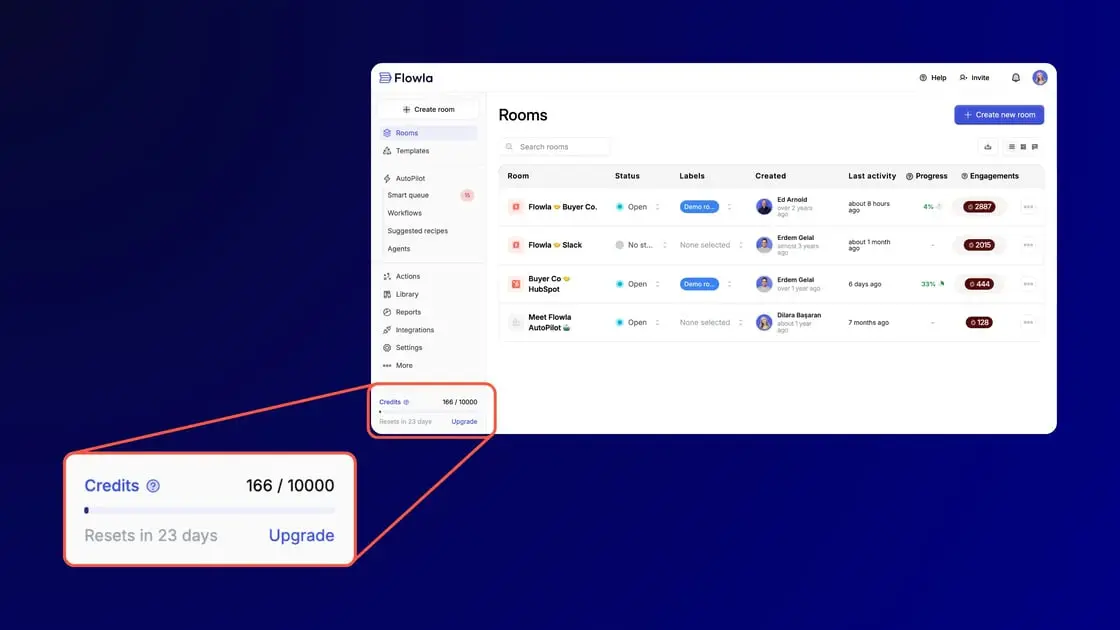
Automation only works if you understand what’s happening under the hood. That’s why we’ve introduced a transparent credit-based system for workflow usage.
Here’s how it works:
- Standard workflow actions consume 1 credit
- AI-powered actions consume 2 credits
Why this matters:
- You get clear visibility into how automation is being used across your team
- It’s easier to balance standard vs. AI actions based on impact
- RevOps and team leads can manage usage intentionally, not reactively
Instead of guessing what automation “costs,” you now have a simple, predictable model that helps you plan, scale, and optimize with confidence.
🎁 A holiday gift: 100 free monthly credits
Everyone should experience the magic of automation. 🪄
That’s why we’re rolling out 100 free monthly credits to users on Starter and Pro plans, so you can experience Flowla’s most powerful automation and AI features firsthand.
What this unlocks:
- Test real workflows in real deals
- See which automations actually save you time
- Build confidence before deciding to upgrade
Think of it as a sandbox for automation – no pressure, just proof.
Take Flowla’s most powerful AI & automation features for a spin before deciding to upgrade.
👉 Sign in to Flowla to claim your holiday credits 🎁
Configure workflows directly inside your rooms 🔧
Automation works best when it’s close to the work itself.
You can now create, view, and manage workflows directly inside individual rooms and templates – no tab-hopping required.
What’s new:
- Clear indicators showing which workflows apply to a room
- Visibility into which sections and actions are automated
- Easier adjustments as deals progress

Why this matters:
- Reps understand why a room behaves the way it does
- Teams avoid duplicate or conflicting automations
- Automation becomes part of the deal workflow, not a separate system
This makes rooms easier to manage, easier to trust, and easier to scale.
Workflow setup that speaks your language ✍️
Not everyone thinks in triggers, conditions, and logic trees – and they shouldn’t have to.
We’ve updated workflow setup so triggers and conditions follow natural, human-readable language. Setting up automation now feels more like describing what you want to happen than configuring rules.

The impact:
- Faster setup for first-time users
- Fewer mistakes caused by overly technical logic
- Less reliance on RevOps for everyday automation needs
Automation becomes something your whole team can confidently use – not something only specialists touch.
(And if you ever want guidance, you can still book time with Delia, your Account Manager.)
AI brings drafts where you work 📥
Speed matters – but control matters too.
You can now enable “Save as draft” on any Send Email workflow action. When this toggle is on:
- AutoPilot writes the email for you
- The draft lands directly in your Gmail inbox
- You review, personalize, and send when ready

Why this matters:
- You get the speed of automation without sacrificing judgment
- No more copying text from tools into Gmail
- Reps stay in their natural workflow while still benefiting from AI
It’s automation with a human-in-the-loop – fast, safe, and confidence-building.
Wrapping up 🍬
These updates are all about setting you up for a strong start to 2026:
- More clarity around automation
- Less friction in setup and day-to-day use
- Better balance between speed and control
On behalf of the entire Flowla team, Happy Holidays and a wonderful New Year! ✨