.webp)
When we launched Flowla 2.0 last year, we introduced AutoPilot as the automation engine underneath your rooms – the layer that writes, reminds, nudges, syncs, and follows through so your team doesn’t have to. Since then, we’ve shipped a significant number of updates that have made AutoPilot considerably more powerful, flexible, and easier to get started with.
Since then, we've shipped a significant number of updates that have made AutoPilot considerably more powerful, flexible, and easier to get started with.
This post is a practical guide to everything we shipped last year. Whether you're just getting started with AutoPilot or you're a power user looking to squeeze more out of your workflows, here's what's new and exactly how to put it to work.
AutoPilot used to be a Team plan exclusive. That changed. AutoPilot is now available to Pro and Starter plan users as well, which means more of your team can start building workflows without a plan upgrade.
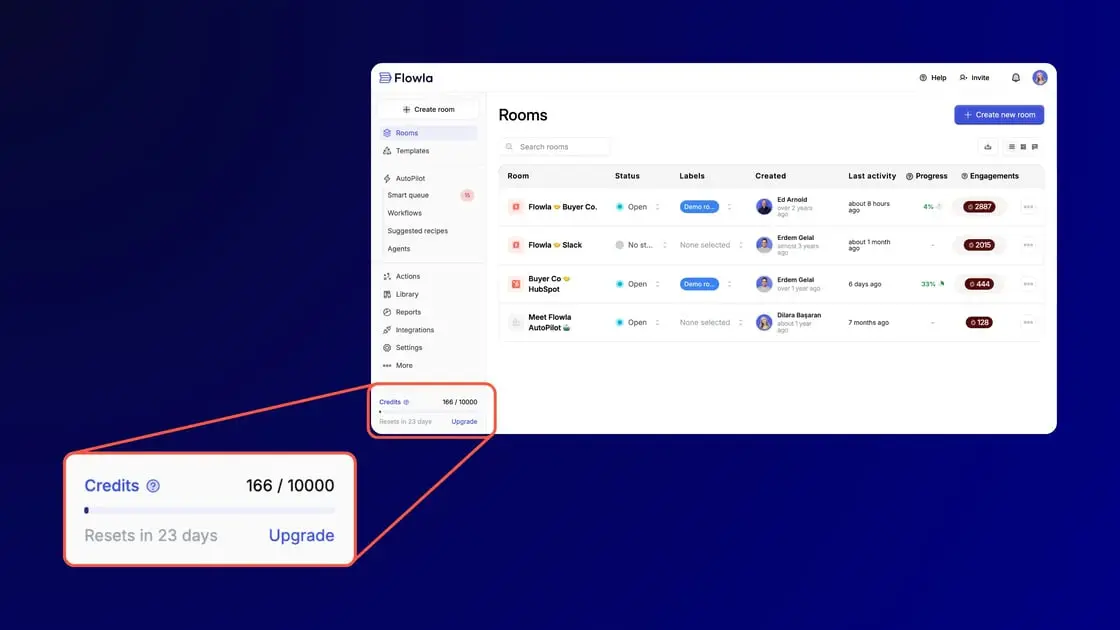
We also rethought how access is controlled. Instead of locking features by plan tier, blocking now works based on credit consumption – a more flexible model that scales with how you actually use the product. Alongside this, you'll now see detailed credit tracking per organisation and per month, covering both AI token usage and the number of workflow actions executed.
What this means in practice:
When we first launched the AutoPilot, the product was barely a rough MVP – most processes were handled on the backend by our team manually. The product matured, yet, for many users, setting up automation from scratch was still intimidating.
Easy Setup Workflows were introduced to solve exactly that. These are pre-built automation recipes for the most common sales and CS scenarios, available to everyone, that let you deploy a working workflow without any manual configuration.
The templates available right now cover:
These are the highest-leverage starting points for most teams. Pick the one closest to a pain point you already feel, deploy it, and build from there.
One of the most important things we built into AutoPilot from the beginning is the idea that automation should never feel like a loss of control. The Smart Queue is how we deliver on that promise in practice.
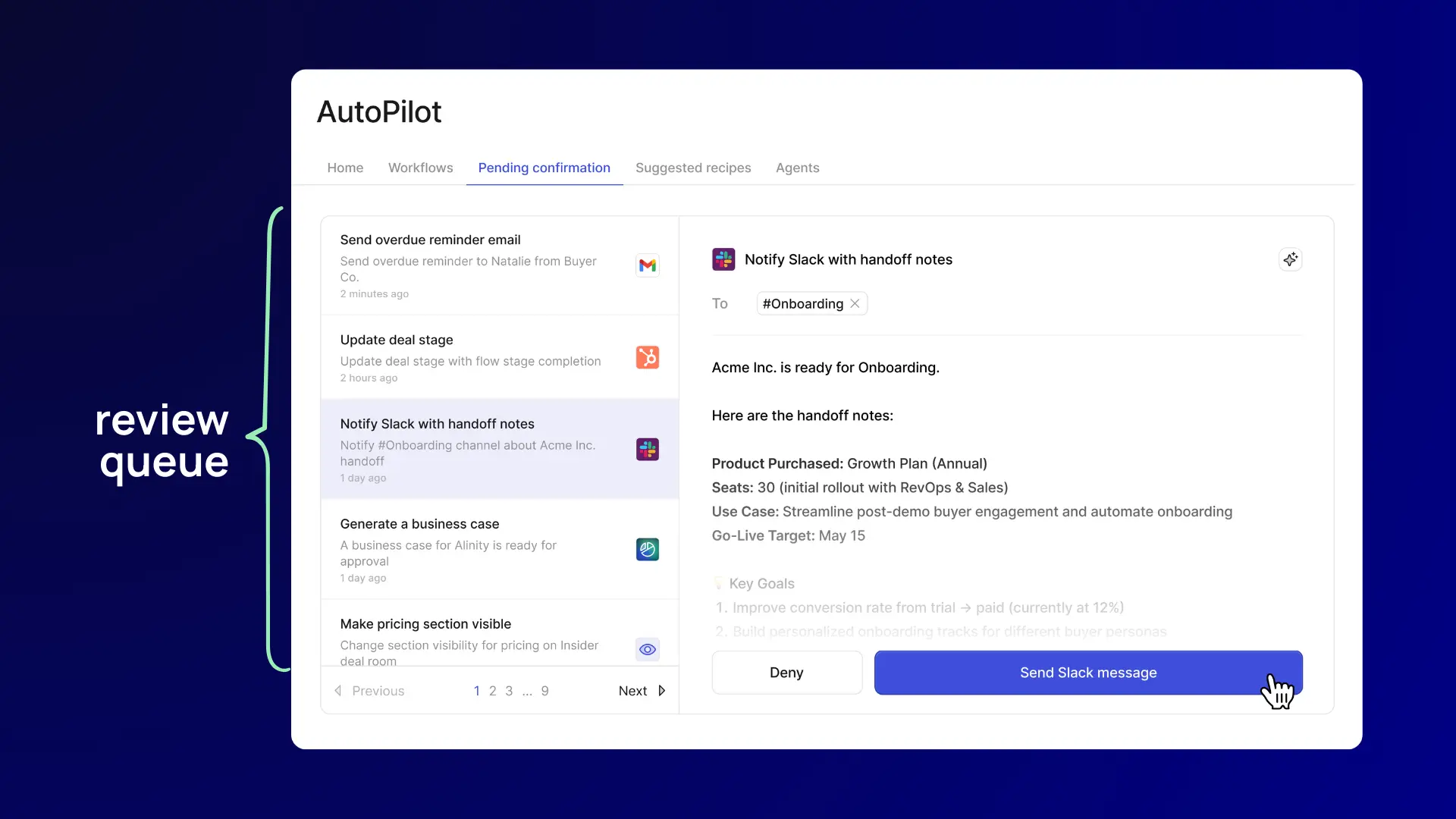
When setting up a workflow, you can now check “Add to queue for review” on any action. When that action is reached, the workflow pauses. The action lands in your Smart Queue, where you can review it, make edits if needed, and either approve (the workflow continues) or dismiss (the workflow stops).
This is especially useful for:
Each person on your team has their own personal queue, so they only see and act on tasks related to the rooms and deals they own. No noise, no confusion about whose job it is.
The workflow builder itself got a series of meaningful upgrades this year. Here's what changed and what it unlocks for you.
You can now branch a workflow and assign a condition to each path. If a condition holds, that path executes. Importantly, paths are not mutually exclusive – if multiple conditions are true, all matching paths will run. This lets you build genuinely sophisticated logic without needing to create separate workflows for every scenario.
.webp)
You can now create and manage workflows directly inside individual rooms and templates, without leaving the room context. There's a dedicated UI that shows you clearly which workflows apply to the room, its sections, and its actions. This makes it much faster to set up room-specific automation and easier to audit what's running.
When an action or trigger hasn't been configured yet, the interface now flags exactly which components need attention and lets you navigate directly to them. This alone eliminates one of the most common sources of workflow setup errors.
The overall interface has been cleaned up for easier navigation – better access to help resources, cleaner workflow management, and a more intuitive layout throughout.
A new category of pre-built workflow that automatically detects decision makers or new contacts joining rooms, enriches their data, and notifies room owners. Multithreading goes from manual and reactive to fully automated.

Triggers are the starting gun for every workflow – if they're imprecise, everything downstream suffers. We made several important improvements here.
This is one of the most powerful triggers we've added. When a meeting transcription finishes processing in Gong or Fireflies, this trigger fires instantly. It passes through participant emails, transcript content, meeting metadata, and host information which means you can immediately kick off follow-up actions, CRM updates, or room creation based on what happened in the call. No delay, no manual handoff.
.webp)
You can now exclude already-added contacts from triggering this workflow. In practice, this means you can reliably detect genuinely new contacts visiting your room – a key signal for stakeholder mapping and multithreading workflows – without generating noise from people who were already in your CRM.
Trigger a workflow when a room matches a specific set of conditions you define, e.g., deal size, engagement level, contact role, or any other room data. Rather than reacting to a single event, this lets you build workflows that activate when a broader situation is true, giving you much more precise control over when automation kicks in.
Setting up reminders for overdue tasks used to be fiddly. The trigger has been redesigned with a cleaner interface that lets you specify timing in plain language, making it much easier to build chaser sequences for actions that haven't been completed.
The scoping system for triggers has been redesigned to read closer to natural language. If you've previously found trigger setup confusing, it's worth going back and exploring – it's significantly more intuitive now.
.webp)
The action library got some significant additions this year. Each one opens up new categories of automation that weren't possible before.
Hand off a sales room to a teammate mid-deal with a single action. The room owner, branding, and all related variables update automatically. This is a must-have for teams with dedicated AEs and CSMs where the room needs to transition ownership at close.
Send room data to any external tool directly from AutoPilot via HTTP request. If your CRM, data warehouse, or internal tool isn't natively connected to Flowla, this is your bridge. No extra integration layer required – just configure the endpoint and let the workflow do the syncing.
.webp)
Run custom JavaScript directly inside AutoPilot. This is for teams with more complex logic needs – conditional data transformations, custom formatting, calculations, etc. – that don't fit neatly into the existing action types. If you can write it in JavaScript, you can now run it inside your workflow.
Notify your team the moment something important happens in a room or deal, e.g., a new stakeholder visits, an action goes overdue, a contract gets signed. Keeps everyone in the loop without anyone having to check manually.
Pull in additional data on a contact automatically as part of your workflow – role, company info, seniority, and more. Pair this with the "Room Viewed First Time" trigger to instantly research new visitors the moment they show up.
.webp)
Look up and reference contacts already associated with a room from within a workflow. Useful when subsequent actions need to be scoped or personalised to specific people in the deal.
Retrieve a call transcript from Fireflies or Gong as a workflow step, making it available as an input for AI Agents downstream — to generate a business case, draft a follow-up, or build a handoff summary, for example.
Email is still where a lot of deal communication lives. The Gmail integration update bridges AutoPilot with your inbox in a way that makes follow-ups meaningfully smarter.
When you share a room by email (with Gmail connected), Flowla automatically tracks the related email thread. AutoPilot can then monitor that thread for new replies and, when one comes in, draft a contextual response based on the full conversation. The result is follow-up suggestions that actually reflect where the conversation is, rather than generic nudges.
.webp)
Additional Gmail capabilities:
This is a great complement to the Smart – you get the time savings of AI-drafted emails without sacrificing the ability to personalise before sending.
We recently launched a native integration with Attio and it's worth calling out specifically because of how well it plays with AutoPilot.
The integration creates a live, two-way connection between your Attio deals and your Flowla rooms. CRM data – company names, contact details, deal information – flows in automatically and buyer engagement flows back out, logged to Attio as notes without anyone lifting a finger. But where it really clicks into AutoPilot is when Attio signals start triggering workflows.
.webp)
Two examples of how teams are already using this:
The practical effect is that Attio stops being just a system of record and starts directing execution. Reps keep working in Attio as normal. Buyers interact with the room. AutoPilot handles everything in between.
The integration is available now for all Flowla customers and takes under 15 minutes to set up. Head to Integrations in Flowla, select Attio under the CRM section, and you're off.
If you're new to Flowla AutoPilot, the Easy Setup Workflows are the fastest path to your first working automation. Pick a template that matches a pain point your team already feels, deploy it, and watch how it runs before building anything more complex.
If you're already using AutoPilot, the biggest unlock this year is probably the combination of conditional paths, the new triggers (especially Gong/Fireflies), and the HTTP request and Code actions – these three together let you build workflows that were simply not possible before.
And if you want full confidence before anything touches a prospect or a CRM, set up the Smart Queue on your highest-stakes actions. It's the best of both worlds: automation speed with human judgment at the moments that matter.
As always, there's a lot more in the pipeline. If you'd like to see any of this in action, book a chat with us or explore the workflow builder directly in your account.
Book a 15-minute call for an automation audit of your current system, and learn what you can streamline with Flowla.
Book a demoBook a 15-minute chat with a product expert. We'll walk you through every step of the way as you get set up.
.webp)
.webp)
.webp)


.webp)

.webp)
.webp)
.webp)




.webp)
%20(3).webp)
.webp)
.webp)


.webp)
.webp)
.webp)
.svg)

.webp)
.webp)