.webp)
Client portals aren’t new. What’s new is why teams are finally forced to care.
B2B buying and delivery have quietly changed:
And yet, most teams are still trying to run that reality on email threads, shared drives, spreadsheets, or popular project management tools not tailored for the task.
That setup breaks the moment an onboarding process becomes even slightly complex.
What teams actually need to effectively run high-touch onboarding and customer success processes now is:
That’s where client portals are stepping back into the spotlight.
But here’s the catch: “Client portal software” has become an overloaded term. Different tools solve very different problems, and many buying mistakes happen because teams don’t realize that until it’s too late.
Ask ten revenue or CS leaders what a client portal is, and you’ll get ten different answers.
That’s because “client portal” isn’t a category – it’s an umbrella term. Under it, there are at least four distinct types of software, each built for a different job. They look similar on the surface, but they behave very differently in practice.
Best for: Ongoing collaboration and information sharing
These are shared workspaces where clients can:
They work well for long-term relationships, service delivery, or agency-style work.
Where they fall short: They rarely drive momentum. There’s usually no strong concept of deal progression, onboarding milestones, or buyer signals — just a place to “check things.”
Best for: getting customers live without chaos
These portals are focused on:
They’re excellent for structured onboarding motions where speed, clarity, and accountability matter.
Where they fall short: They’re usually blind to pre-sale context. Sales promises, decision criteria, and stakeholder history often don’t carry over cleanly.
Best for: ticketing and self-serve help
These are typically part of helpdesk platforms and focus on:
They’re essential for support — but not for deal execution or onboarding momentum.
Where they fall short: They’re reactive by design. Great for issues, terrible for alignment.
Client portal software looks deceptively similar on the surface. Almost every product promises “one place for clients,” better collaboration, and improved visibility.
The differences only become obvious once the portal is live – when multiple stakeholders are involved, timelines slip, and teams need to move work forward rather than just store information.
Below is a consistent, use-case-driven analysis of the most common options teams evaluate today.
Best for: Teams running complex sales and onboarding motions that require continuity and execution
Flowla is built around the idea that client-facing work shouldn’t reset between sales, onboarding, and early delivery. Instead of separate tools for deal rooms and onboarding portals, it uses a single client workspace that evolves over time.
In practice, this means sales context, stakeholders, decisions, and next steps can carry into onboarding without being rebuilt elsewhere. The portal supports structured execution through tasks, forms, mutual action plans, and timelines, alongside visibility into client engagement and progress.
Flowla is typically used by revenue teams that want a consistent way to manage execution across stages, rather than treating the portal as a static content hub.
.webp)
Core features:
Typical limitations:
Best for: CS teams standardizing onboarding and post-sale workflows
Dock is most often adopted as an onboarding and lifecycle workspace. Its strength lies in making onboarding clear and predictable for customers, with defined tasks, ownership, and progress tracking.
Customers typically see a straightforward checklist-style experience, which helps adoption and accountability during implementation. Dock works well when onboarding is the primary focus and when repeatability matters more than deep customization.
Pre-sale usage is possible but limited, and sales context usually lives outside the platform.
.webp)
Core features:
Typical limitations
Best for: CS organizations focused on renewals, health, and internal visibility
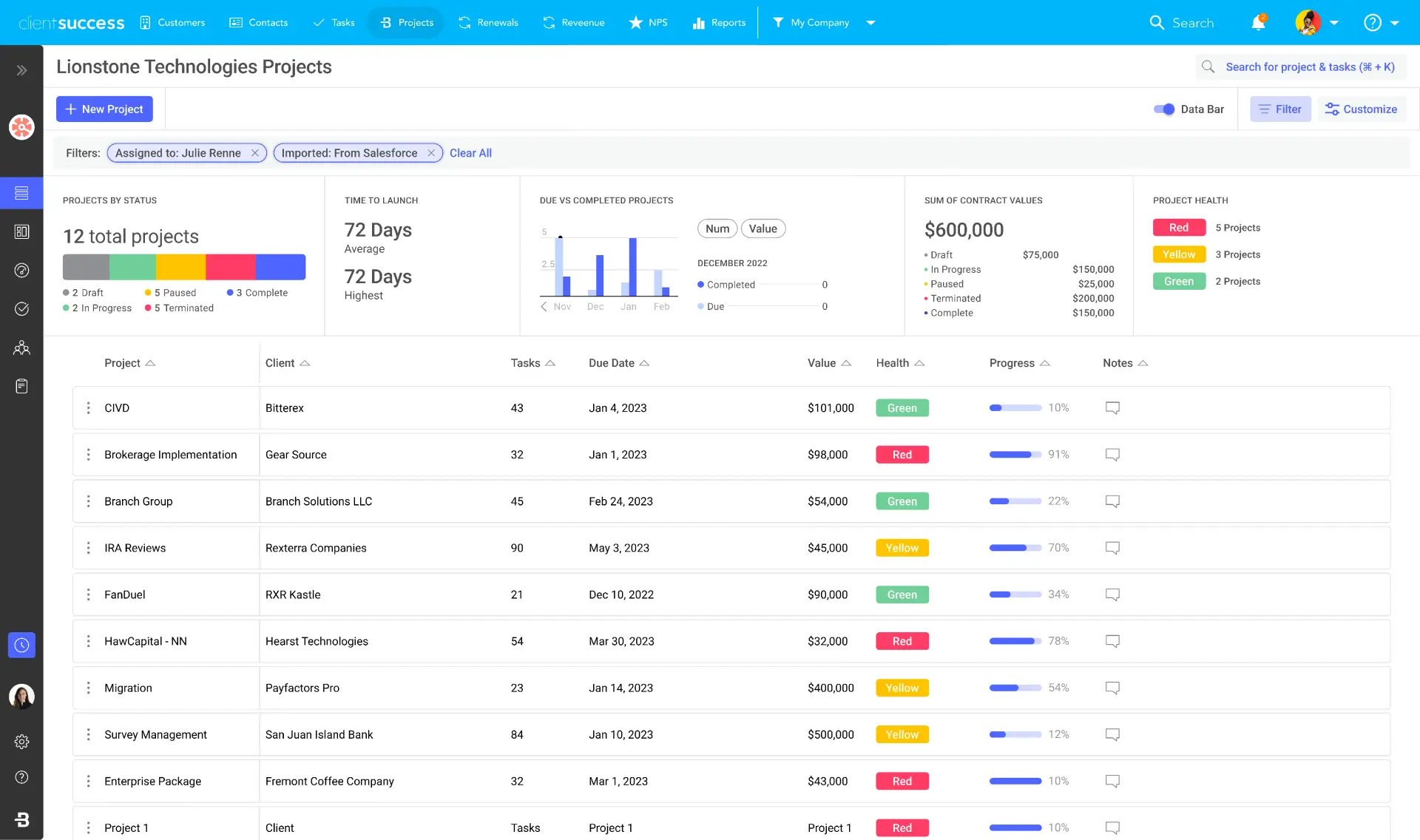
ClientSuccess is primarily a Customer Success management platform. While it includes customer-facing elements, its core strength is internal alignment: health scoring, renewal forecasting, and account tracking.
The “portal” aspect is typically passive from the customer’s perspective. It’s not designed to guide clients through structured work like onboarding tasks or phased execution.
Teams evaluating ClientSuccess are usually prioritizing renewal visibility over client-side collaboration.
Core features:
Typical limitations
Best for: Enterprise onboarding programs with formal governance
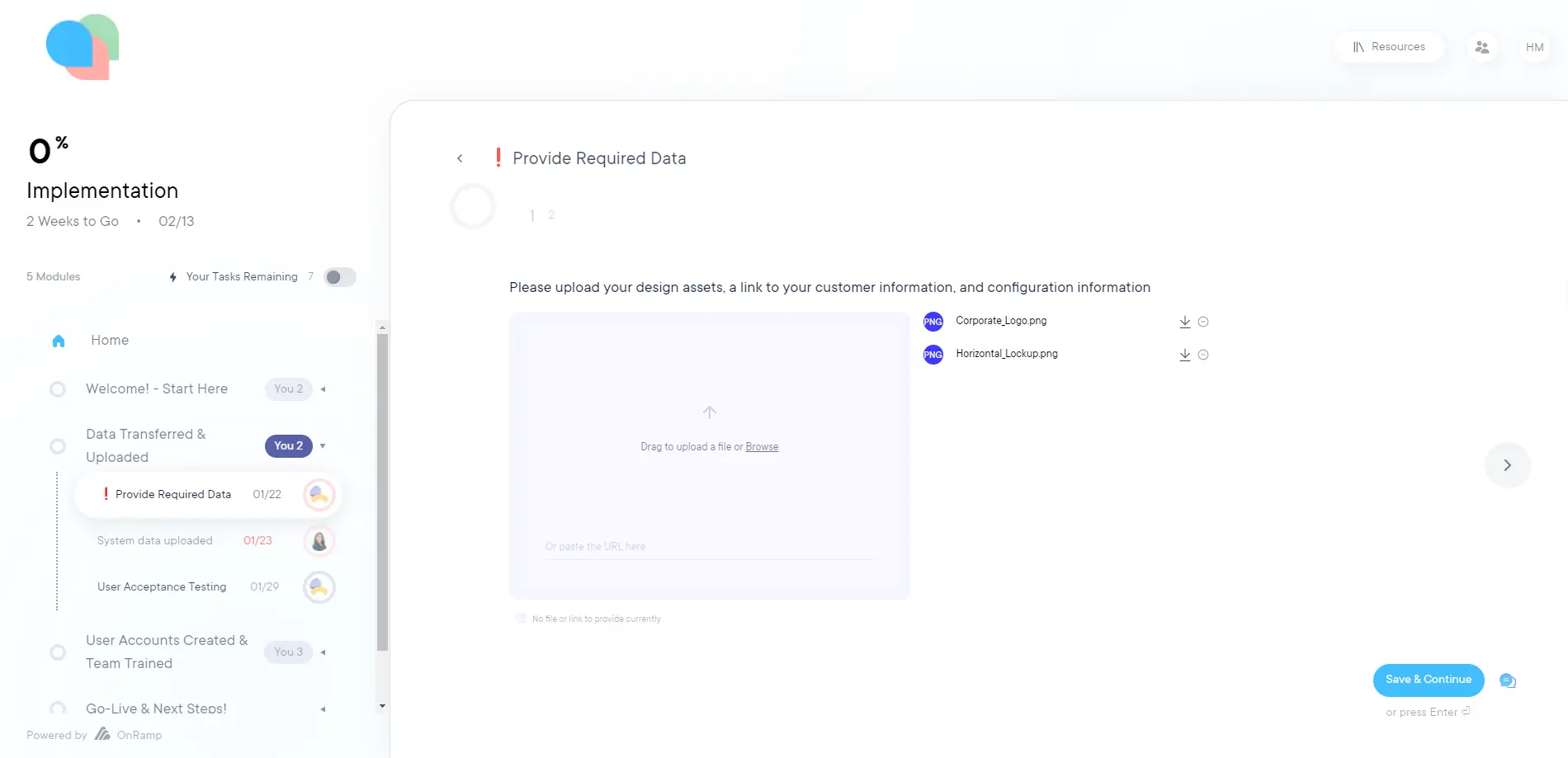
OnRamp is purpose-built for onboarding at scale, especially in environments where onboarding is treated as a defined program rather than an ad hoc process.
It supports complex workflows, dependencies, milestones, and reporting, making it well suited for enterprise implementations that require consistency and executive oversight.
That structure can be heavy for smaller teams, and the platform typically sits firmly post-sale, with limited relevance earlier in the buyer journey.
Core features spotlight
Typical limitations
Best for: Agencies and service firms consolidating multiple client-facing tools
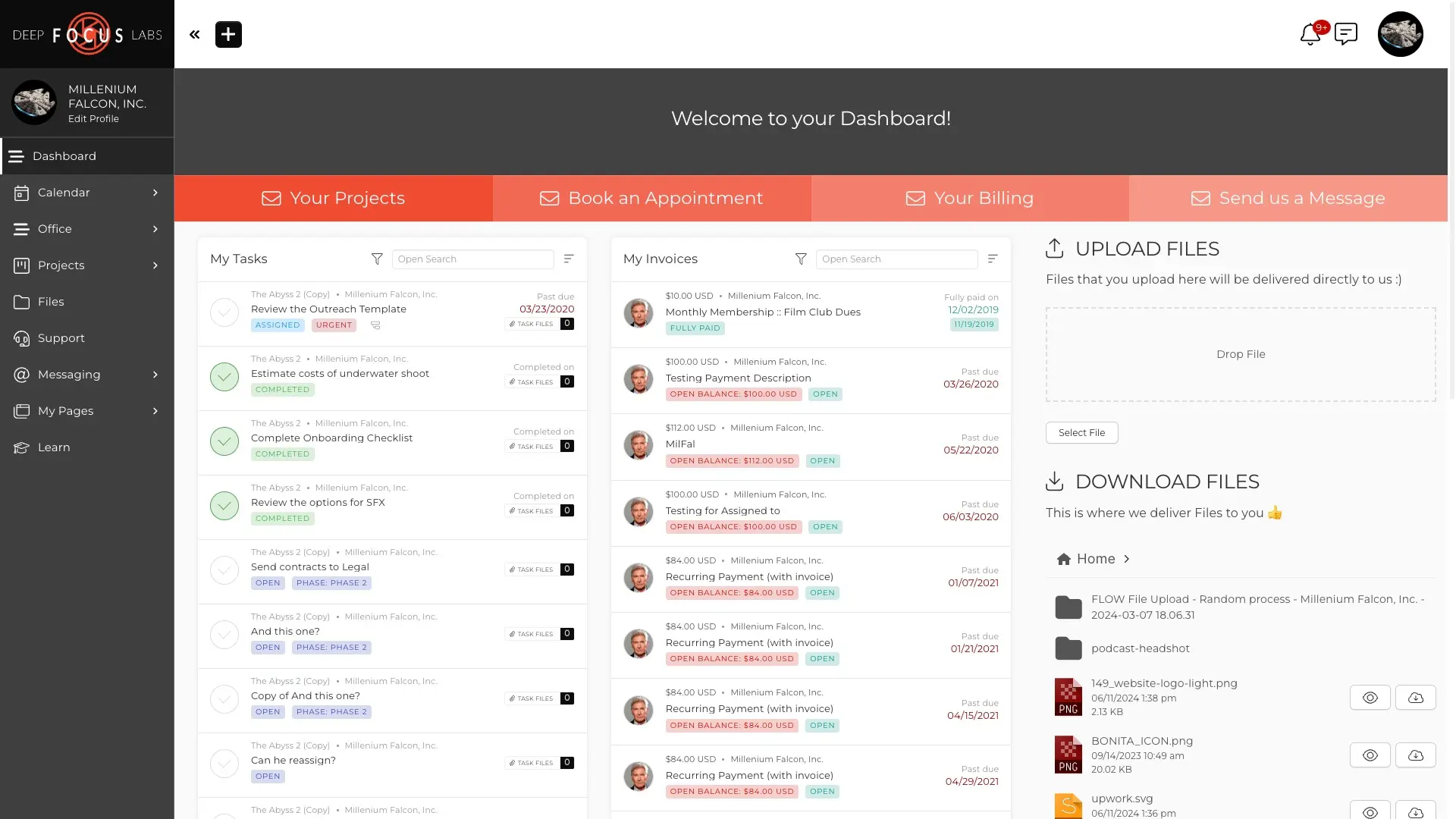
SuiteDash positions itself as an all-in-one client portal covering documents, messaging, billing, tasks, and more. It’s often adopted to reduce tool sprawl in service-based businesses.
The breadth is appealing, but execution workflows are largely generic. Teams need to configure much of the experience themselves, and there’s limited opinionation around sales or onboarding processes.
Core features:
Typical limitations
Best for: Secure document exchange and controlled collaboration
Clinked is commonly chosen for security-first use cases. It offers strong permission controls and secure document sharing, making it suitable for regulated industries or sensitive client data.
However, it functions primarily as an access and storage layer. There’s little built-in structure for workflows, milestones, or lifecycle progression.
.webp)
Core features:
Typical limitations
Best for: Ongoing collaboration with long-term clients
Assembly focuses on shared spaces for communication and collaboration over time. It works best where client work is continuous rather than stage-based.
There’s less emphasis on defined phases, deadlines, or next-step enforcement, which can limit its usefulness for transactional or milestone-driven motions.
.webp)
Core features:
Typical limitations
Best for: Freelancers and very small service teams
Bonsai includes a lightweight client portal alongside proposals, contracts, and invoicing. It’s designed to reduce admin for solo operators rather than support complex collaboration.
The portal experience is intentionally simple, which works well for small engagements but doesn’t scale to multi-stakeholder B2B environments.
.webp)
Core features:
Typical limitations
Best for: Self-serve support and ticket management
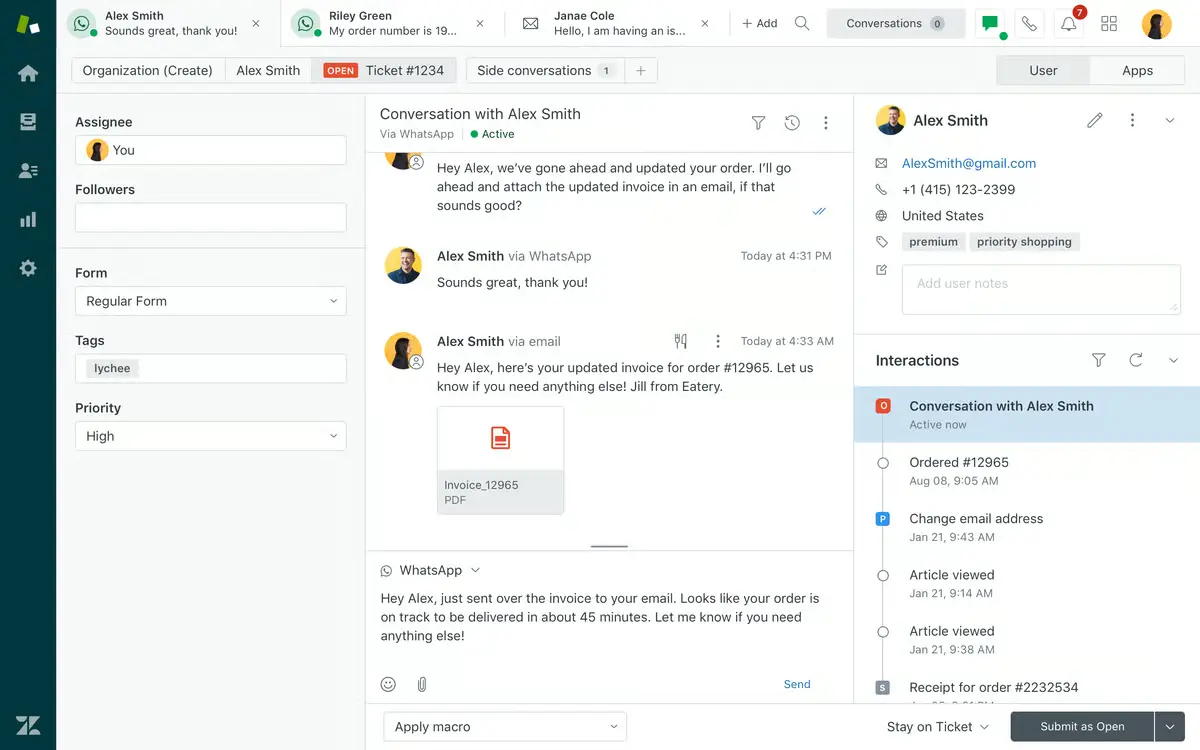
Zendesk’s customer portal is optimized for reactive support. Customers can submit tickets, track issues, and access help content.
It’s effective within support workflows but not designed to manage onboarding, sales execution, or proactive collaboration.
Core features
Typical limitations
Best for: Teams building fully custom client portals on internal data
Softr provides the building blocks to create custom portals on top of tools like Airtable or internal databases. This offers flexibility but shifts responsibility for structure, logic, and adoption to the team.
It works best when requirements are highly specific and internal resources are available to maintain the experience.
.webp)
Core features:
Typical limitations
Most teams don’t fail with client portals because they chose a bad tool. They fail because they chose a tool designed for a different job.
Common patterns we see:
On the surface, these tools look interchangeable. In practice, they optimize for very different outcomes.
The result is familiar:
A client portal only works if it matches what you expect clients to actually do inside it.
Now that you’ve seen how different client portal tools behave in practice, the goal isn’t to compare feature lists line by line. It’s to evaluate fit.
Use the framework below as a scoring rubric when shortlisting tools. You don’t need to max out every category — but you do need to be clear which ones matter most for your motion.
1. External UX & adoption – Can clients use it without training?
This is the first filter. If clients don’t engage with the portal, nothing else matters.
Evaluate:
Red flags:
2. Security & permissions – Can you control access without creating friction?
As soon as more stakeholders get involved, access control becomes critical.
Look for:
This matters most in enterprise, regulated industries, or multi-threaded deals — but it becomes relevant faster than most teams expect.
3. Content + workflow depth – Does the portal just show information, or does it support execution?
This is where many portals look similar but behave very differently.
Evaluate whether the tool supports:
If the portal can’t represent work, execution will still happen elsewhere.
4. Signals & visibility – Do you know what’s actually happening?
Visibility isn’t just “the client has access.”
Look for:
Without signals, teams rely on gut feel and follow-ups instead of data.
5. Automation & scale – What happens automatically vs manually?
This is the difference between tools that work in pilots and tools that hold up at scale.
Evaluate:
If execution depends entirely on human discipline, adoption will degrade over time.
6. Integrations – Does the portal fit naturally into your stack?
Client portals don’t live in isolation.
Check for:
The more context lives elsewhere, the more fragmented the experience becomes.
7. Branding – Does the portal feel like your product or someone else’s tool?
Branding isn’t cosmetic – it affects trust and adoption.
Evaluate:
This matters most in mid-market and enterprise contexts, where perception and professionalism carry weight.
If you’re evaluating client portal software, don’t start with demos.
Start with clarity.
Use the framework in this guide to narrow the category first, then shortlist tools that support the level of structure, automation, and scale your motion requires.
That’s how teams avoid buying a portal that looks good in a demo but quietly breaks once real customers are involved.
At the end of the day, choosing a client portal isn’t really about ticking feature boxes – it’s about how much work you expect the portal to do for you. If automation, continuity from sales to onboarding, and clear next steps matter, execution-first platforms like Flowla tend to feel like a more natural fit.
Manage deals, handoffs, and onboarding from a single client room – powered by automated workflows.
See in actionBook a 15-minute chat with a product expert. We'll walk you through every step of the way as you get set up.
.webp)
.webp)
.webp)


.webp)

.webp)
.webp)
.webp)




.webp)
%20(3).webp)
.webp)


.webp)
.webp)
.webp)
.svg)

.webp)
.webp)