.webp)
If you’ve shortlisted Aligned and GetAccept, chances are you’re trying to fix a very real problem: deals slow down once more people get involved. Stakeholders lose track of next steps, documents live in too many places, and momentum fades between meetings.
Both tools aim to solve that, but approach it from different angles.
Aligned focuses on keeping everyone aligned throughout the deal. It’s built around shared deal spaces and mutual action plans that help sellers and buyers stay clear on who’s doing what, and by when. It’s especially common in complex, multi-stakeholder sales cycles where coordination is the biggest risk.
GetAccept, on the other hand, is more execution-driven. It shines when proposals, contracts, and signatures are the bottleneck. Its deal rooms are closely tied to documents and e-signatures, helping teams move faster from proposal to close.
In this post, we’ll walk through how Aligned and GetAccept compare across features, use cases, pricing, and real user feedback, and highlight where each one works best. Along the way, we’ll also point out how newer automation-first platforms like Flowla approach the same problems differently, for teams that want both alignment and execution in one place.
Let’s start with a closer look at what each platform is built for.
Teams comparing Aligned and GetAccept are usually trying to bring more structure into deals that involve multiple people, steps, and handoffs. While both platforms operate in the broader “digital sales room” space, they tend to be adopted for different reasons and at different points in the sales cycle.
Aligned is generally used when the primary challenge is deal coordination rather than document execution. It centers around shared deal spaces and mutual action plans that are visible to both sellers and buyers. The goal is to make responsibilities, timelines, and dependencies explicit throughout the deal.
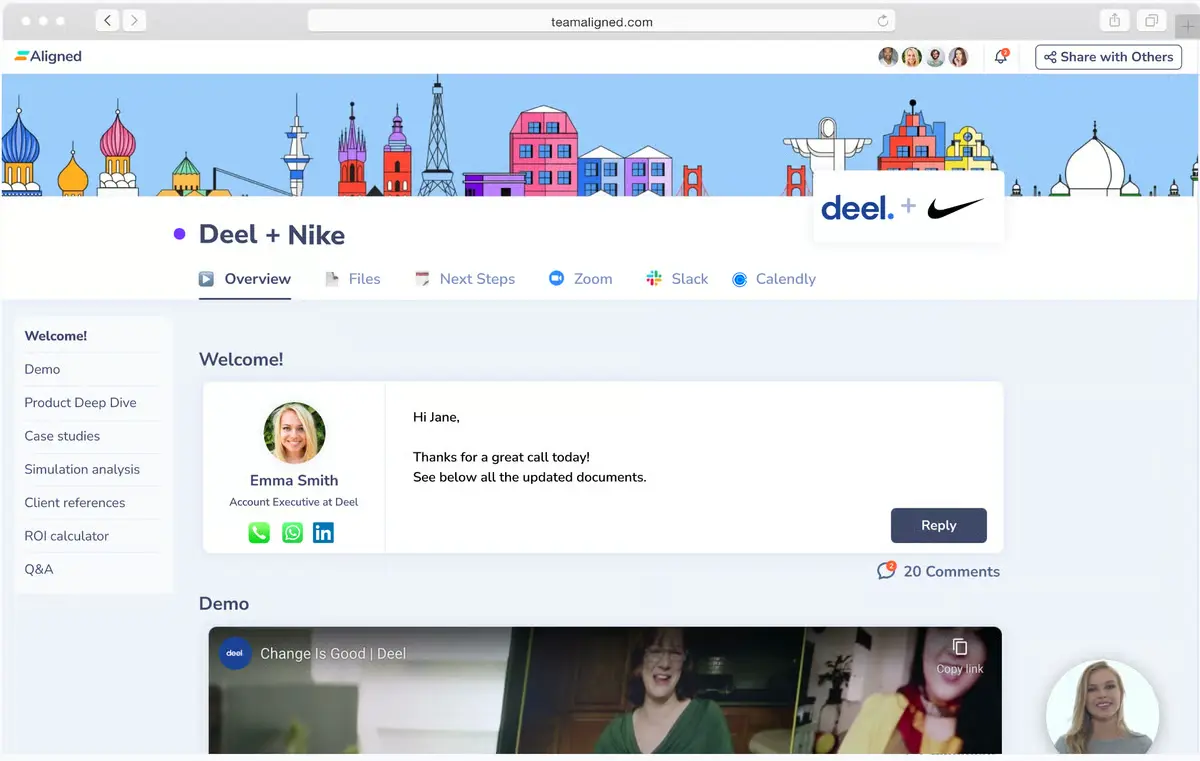
In practice, teams use Aligned to:
Aligned offers a free tier, which allows teams to test the product in lighter use cases before committing to paid plans that expand limits and controls. It is most commonly seen in mid-market and enterprise sales motions where deals involve longer timelines and more internal coordination on the buyer side.
GetAccept is more commonly adopted when the main friction point is proposal and contract execution. Its core functionality revolves around document creation, engagement tracking, approvals, and e-signatures, with deal rooms acting as a container for those assets.
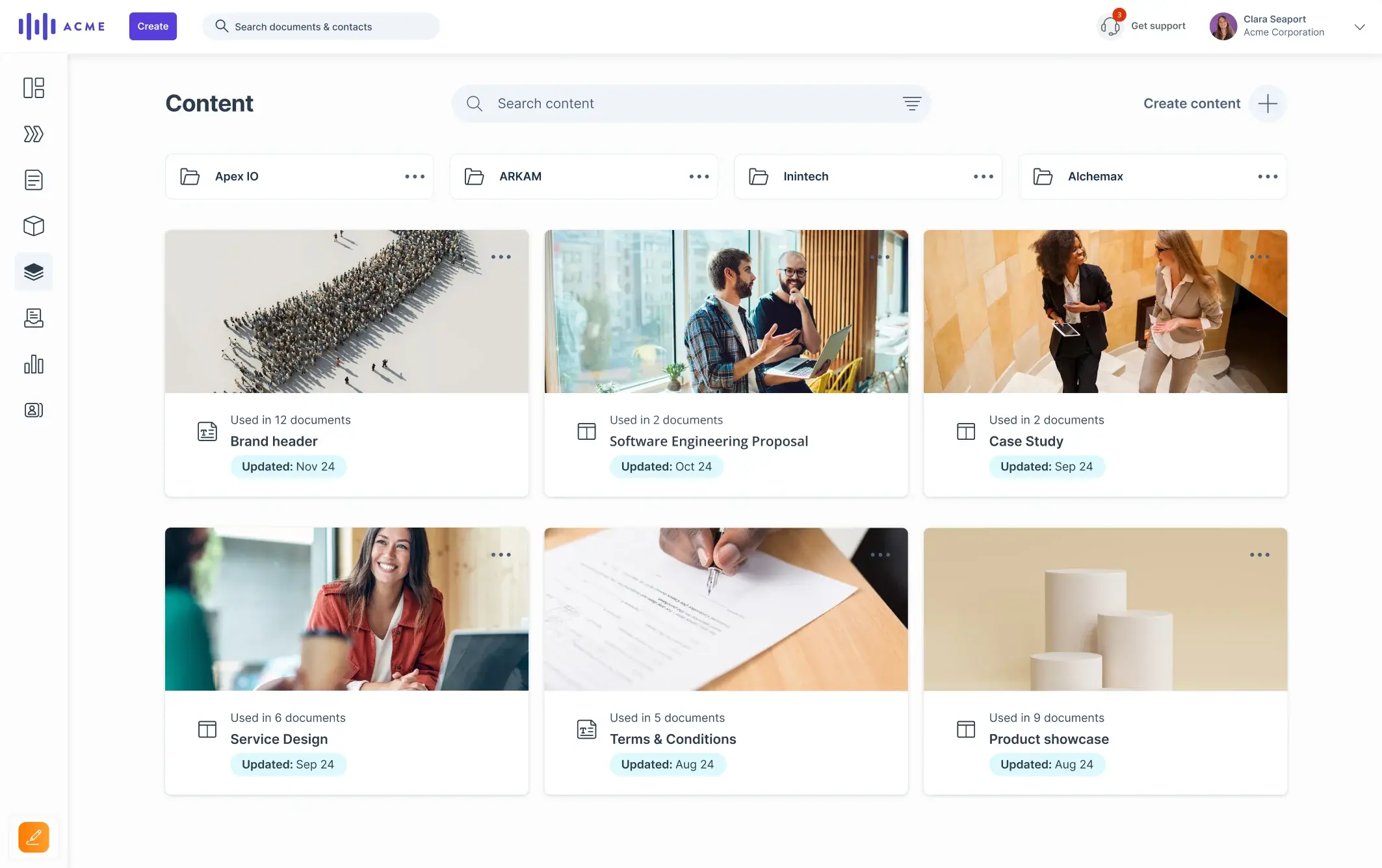
Teams typically use GetAccept to:
GetAccept offers a lower-cost entry tier focused on e-signatures, with more advanced digital sales room and workflow features available in higher plans. It tends to fit sales organizations where documents, legal review, and signing processes are the main sources of delay.
Some teams evaluating Aligned or GetAccept are looking for a tool that covers both coordination and follow-through, especially when sales and post-sale teams need to work from the same shared context.
Flowla sits in that overlap, combining shared deal spaces with workflow automation across sales and onboarding. Rather than replacing alignment or document tools outright, it’s often considered by teams that want fewer handoffs between systems as deals progress.
Now, let’s take a closer look at how Aligned and GetAccept compare feature by feature, starting with how each approaches digital sales rooms and deal structure.
1. DSR and deal rooms
Aligned’s deal rooms function primarily as collaborative workspaces. They are structured around shared context: deal goals, milestones, responsibilities, and supporting materials. The room is intended to stay active throughout the sales cycle, serving as a reference point for both buyers and sellers between meetings.
Rooms in Aligned are typically used to:
GetAccept’s deal rooms are more execution-oriented. They are closely tied to proposals, contracts, and approvals, and often represent the final phase of the deal. The room exists primarily to support review, negotiation, and signing of documents rather than ongoing collaboration.
Rooms in GetAccept are typically used to:
Our verdict:
How Flowla compares?
Flowla supports deal rooms that combine ongoing collaboration with execution tasks, allowing rooms to remain relevant from discovery through onboarding – rather than expiring after signature.
2. Mutual Action Plans
Mutual Action Plans are a core structural element of Aligned. Plans are collaborative, buyer-visible, and designed to coordinate parallel workstreams across stakeholders. Progress tracking and accountability are central to how deals advance inside the platform.
GetAccept includes Mutual Action Plans, but they function as one component within a broader proposal-centric workflow. MAPs are commonly used to support closing motions rather than to manage the entire deal lifecycle.
Our verdict:
How Flowla compares?
Flowla supports structured plans and next-step frameworks but extends them with automation – for example, triggering reminders, follow-ups, or internal workflows when steps stall or stakeholders disengage.
3. Stakeholder collaboration
Aligned is optimized for multi-stakeholder coordination. Buyers are expected to actively participate in the workspace, contribute updates, and collaborate on shared plans. This makes it well-suited to buying committees and consensus-driven decisions.
Stakeholder collaboration in GetAccept is more document-centric. Interaction typically happens around proposal review, comments, approvals, and signatures, rather than ongoing joint planning.
Our verdict:
How Flowla compares?
Flowla supports buyer collaboration but also tracks stakeholder behavior across rooms, using that data to prompt sellers when engagement drops or when additional stakeholders should be involved.
4. Proposals, contracts & e-signature
Aligned does not position native proposal or contract execution as a primary capability. Teams typically integrate external proposal or contract tools when those workflows are required.
This is GetAccept’s strongest area. Proposal creation, pricing tables, contract workflows, and e-signature are native capabilities. For teams where legal review and signing are the main bottlenecks, GetAccept significantly reduces friction.
Our verdict:
How Flowla compares?
Flowla includes e-signature and proposal delivery within deal rooms but does not aim to replace full CPQ systems. It is typically used where proposals are part of a broader workflow rather than the sole focus.
5. Automation & workflow execution
Aligned emphasizes visibility and coordination rather than automation. While integrations exist, most actions inside the platform are human-driven.
See an in-depth AI-powered DSR tools comparison here.
GetAccept supports automation around document workflows – such as reminders, approval routing, and CRM updates – primarily focused on accelerating close.
Our verdict:
How Flowla compares?
Automation is a core design principle in Flowla. Beyond document workflows, it automates follow-ups, stakeholder nudges, handoffs to onboarding, and renewal preparation, extending automation beyond the close.
6. Analytics & buyer engagement insights
Analytics in Aligned focus on deal health and progress – highlighting stalled steps, missing owners, or disengaged stakeholders.
In GetAccept, analytics are closely tied to document engagement: Views, time spent, interaction with proposals, and readiness to sign.
Our verdict:
How Flowla compares?
Flowla combines engagement analytics with workflow signals, using them to trigger actions, not just inform reporting.
7. Integrations & CRM sync
In Aligned, CRM integrations are used to keep deal context and plans aligned with opportunity data. Sync is focused on visibility rather than orchestration.
GetAccept integrates deeply with CRMs and contract tools, syncing proposal status, signatures, and activity back to the system of record.
Our verdict:
How Flowla compares?
Flowla connects CRM, email, Slack, call intelligence, and deal rooms into a unified workflow layer designed to reduce manual admin. It’s also one of the best DSR tools for HubSpot-centric teams.
Choosing between Aligned and GetAccept usually comes down to where deals tend to break down in your process.
Aligned is typically a better fit if:
GetAccept is typically a better fit if:
Some teams find themselves between these two use cases, needing both alignment and execution, plus better follow-through once humans stop responding. Flowla is often considered in those scenarios, as it combines shared deal spaces with automation across sales and post-sale workflows.
Pricing is often the final deciding factor once teams understand the functional differences. While Aligned and GetAccept both publish enough information to evaluate entry points, their pricing structures reflect their different product focus.
Aligned offers a free tier, which allows teams to experiment with deal rooms and alignment workflows without upfront commitment. This free plan is typically used for lighter use cases or early evaluation.
Paid plans scale based on:
Pricing beyond the free tier is quote-based, which is common for tools adopted in more complex, enterprise-style sales motions. As a result, costs tend to increase with deal volume, team size, and operational requirements rather than per-document usage.
Aligned’s pricing works best for teams that expect to standardize deal execution across many stakeholders and are comfortable engaging in a sales process once the tool proves value.
GetAccept uses a tiered, published pricing model, with plans clearly differentiated by functionality:
eSign plan (entry-level): focused on electronic signatures and basic document workflows
Professional plan: includes digital sales rooms, proposals, Mutual Action Plans, and CRM integrations
Enterprise plan: custom pricing, typically adding advanced security, API access, and more complex contract workflows
This structure makes it easy to start small, especially for teams that only need e-signatures, but unlocking full deal room and workflow capabilities generally requires moving to higher tiers.
GetAccept’s pricing is predictable for proposal-heavy teams, but total cost can rise quickly as more users, documents, and advanced workflows are added.
How Flowla compares in terms of pricing?
Flowla takes a more transparent, modular approach. Pricing is publicly available and designed to scale with team needs without forcing early upgrades to enterprise-only tiers. This essentially means:
Features and pricing tell part of the story, but how these tools perform day-to-day is often clearer in user feedback. Looking at verified reviews on G2, Aligned and GetAccept receive consistently strong ratings, but for different reasons, and with different recurring trade-offs.
Users consistently describe Aligned as easy to adopt and effective at keeping deals organized – especially when multiple stakeholders are involved.
What users praise:
“I love how intuitive the platform is. It doesn’t take long to set up, and even clients who aren’t tech-savvy can navigate it easily.”
“What I like most is how simple it is to give buyers one link with everything they need: proposal, deck, plan, case studies, and follow‑up materials. Instead of scattered emails and random links, the whole buying team can come back to the same shared space, comment, and stay on the same page.”
“There isn't a paywall restricting access, so we can actually use the product, try it out a few times, and then decide whether we want to commit further.”
What users flag as limitations
“Occasionally I wish there were a few more customization options… deeper templates or branding.”
“I feel like the analytics aren't as detailed as some of their competitors. The tool I used at a previous company would give me analytics not only on what the prospect was looking at, but also details like what pages they were looking at in a slide deck, as well as for how long.”
GetAccept reviews consistently emphasize how much faster proposals and contracts move once teams adopt the platform.
What users praise
“The ability to monitor when and how customers are viewing documents gives valuable insight and helps us stay more engaged throughout the process. Overall, it’s user-friendly and highly effective.”
“I love how professional and standardized our proposals and request forms are with GetAccept.”
“The team is very available and attentive, especially during onboarding and training. Our account manager is extremely responsive and helpful, which makes a real difference in day-to-day operations.”
What users flag as limitations
“I did find that the platform can be a little difficult to navigate at first. Some of the features take a bit of time to get used to, but with a little training and practice, it becomes much smoother to work with.”
“When we originally rolled this out, we needed our Sales Reps to make changes directly in the quote template itself which was a little clunky; the layout of the Quoting tool can perhaps be a little complex looking to a Sales user if they're having to make edits or build from scratch.”
Aligned and GetAccept each solve a specific slice of the deal problem well – alignment on one side, execution on the other. Teams typically start looking beyond them when they realize their challenges don’t sit neatly in just one category.
Flowla is designed for that in-between reality.
Aligned is strongest during coordination-heavy phases, and GetAccept is strongest at proposal and contract execution. Flowla is built to support the entire flow of a deal – from early alignment through closing and into onboarding, without forcing teams to switch tools or recreate context along the way.
Flowla supports shared deal spaces and structured next steps similar to Aligned, while also handling proposal delivery and e-signature like GetAccept. The difference is that these capabilities live in a single, evolving workspace, rather than separate tools or stages.
Where Aligned relies largely on human-driven coordination and GetAccept focuses automation around documents, Flowla applies automation across the workflow:
This reduces the operational gaps that often appear once deals move beyond planning or signing.
Flowla is commonly evaluated by teams that want Sales and Customer Success working from the same system, rather than exporting deal context from one tool to another after close. This continuity is difficult to achieve when alignment, execution, and onboarding live in separate platforms.
Aligned offers a free tier but moves quickly to custom pricing; GetAccept publishes tiers but gates full DSR functionality higher up the stack. Flowla combines a free entry point with transparent paid tiers, making it easier for teams to adopt without committing to enterprise pricing too early.
Final verdict:
See how it can help you save 10 hours a week with AI workflows that automate sales & onboarding.
Book a 15-min walkthroughBook a 15-minute chat with a product expert. We'll walk you through every step of the way as you get set up.
.webp)
.webp)
.webp)


.webp)

.webp)
.webp)
.webp)




.webp)
%20(3).webp)
.webp)
.webp)


.webp)
.webp)
.webp)
.svg)

.webp)
.webp)