Post-demo follow-up is one of the most common failure points in B2B sales. Deals stall when reps are too slow, too generic, or too scattered in how they follow up after a discovery call. This guide covers why the post-demo window is so critical, a six-step playbook for building a repeatable follow-up process, and how to automate that process using Flowla's AutoPilot workflow so that every call triggers a personalized Digital Sales Room, a meeting recap, and a tailored follow-up email, all without manual effort from your rep.
The demo went well. The prospect was engaged, asked great questions, and even said "this looks really promising." And then… nothing.
Sound familiar?
Research shows that 80% of deals require at least five follow-ups to close, yet nearly half of reps give up after just one attempt. Add to that the fact that response rates drop sharply the longer you wait, and it's clear: What happens in the hours after a demo matters just as much as the demo itself.
The post-demo window is when buying intent is at its peak – and when it's most fragile. Prospects are comparing vendors, looping in stakeholders, and getting pulled back into their day-to-day. Without a fast, structured, and personalized follow-up, even the best demo can fade into the background.
The good news: This is a fixable problem. With the right process, and the right tools, you can hit prospects with a personalized, value-packed follow-up before they've even closed their laptop.
In this post, we'll break down exactly how to do that, and how tools like Flowla can take the manual work off your plate entirely.
A great demo creates momentum. Yet, the moment your call ends, your prospect's attention starts shifting. They have other vendors to evaluate (up to 5, according to our research), other meetings to join, and internal priorities competing for their focus. The window where your demo is fresh and the excitement is real is short, and how you use it can define whether the deal moves forward or quietly dies.
The stakes are especially high in high-ticket B2B sales, where buying decisions are inherently complex. The same research found that 86% of buying processes involve multiple stakeholders and take up to six months to complete. This means your follow-up should be setting the tone for an entire committee. And yet, when asked what they see as their team's most common misstep, sales leaders cited lack of follow-up as one of the top five – alongside poor discovery and failure to multithread.
What does poor follow-up actually look like in practice? A few patterns come up again and again:
The cost is the compounding effect of an inconsistent process across your entire team – where some reps follow up well, most don't, and there's no reliable playbook to fix it.
The solution is building a repeatable system that makes doing it right the default, not the exception.
Knowing that follow-up matters is one thing. Knowing exactly what to do is another. Here's what a structured, high-converting post-demo process looks like in practice.
The follow-up actually starts before the call ends. Use the final 3–5 minutes to briefly recap the key takeaways, confirm what was discussed, and make sure everyone leaves with the same understanding. This is a good way to reduce misalignment before it has a chance to take root.
Your wrap-up should cover two essentials: A quick summary of who attended and what was discussed, and a reference to any resources or next steps that came up during the call. Sharing this in a structured format – ideally in a Digital Sales Room rather than a wall of text in chat – means prospects have something to refer back to and share with colleagues who weren't on the call.
A Digital Sales Room is a personalized, shareable hub where the full buying committee can find meeting recaps, pricing, case studies, and next steps in one place. Prospects have something to refer back to and share with colleagues who weren't on the call.
Ambiguity kills deals. If your prospect leaves the call unsure of what happens next, you've lost control of the process. Before signing off, spell out the next steps clearly – who's responsible for what, by when, and what decisions need to be made.
The best way to do this is through a mutual action plan: A shared, documented timeline that both sides agree to. It doesn't need to be complex – even a simple breakdown of three or four steps with owners and due dates is enough to keep the deal moving. The key is getting it out of the verbal conversation and into writing, so your champion can relay it internally without losing anything in translation.
Timing is everything. A follow-up sent within minutes of the call lands while the conversation is still live in the prospect's mind. One sent the next morning is already competing with a full inbox and a new day's priorities.
Your follow-up email should be concise, easy to forward, and contain everything a stakeholder who wasn't on the call would need to get up to speed: a recap of key points, agreed next steps with owners, and links to relevant resources.
A pro tip: Instead of attaching five documents and writing three paragraphs of context, simply embed a link to a personalized Digital Sales Room. Everything lives in one place, it's easy to share internally, and you can track who's actually engaging with it.
Your champion is your biggest asset, but only if you give them what they need to sell internally on your behalf. When you're not in the room, they're the ones making the case to the CFO, the IT team, or the procurement lead. If they're underprepared, the deal stalls.
Equipping your champion means more than sending over a deck. It means giving them tailored messaging that speaks to their company's specific goals, concrete social proof that addresses the objections they're likely to face, and a clear narrative that connects your solution to their business outcomes. Anticipate the pushback they'll get and provide preemptive answers – the easier you make their job, the more likely they are to secure the internal buy-in you need.
⭐️ Check out this guide on how to build a business case your champion can present in 10 minutes.
Relying on a single contact to carry the deal forward is one of the most common – and costly – mistakes in B2B sales. Flowla's own research reinforces this: Lack of consensus and absence of an internal champion were the top two reasons for losing winnable deals.
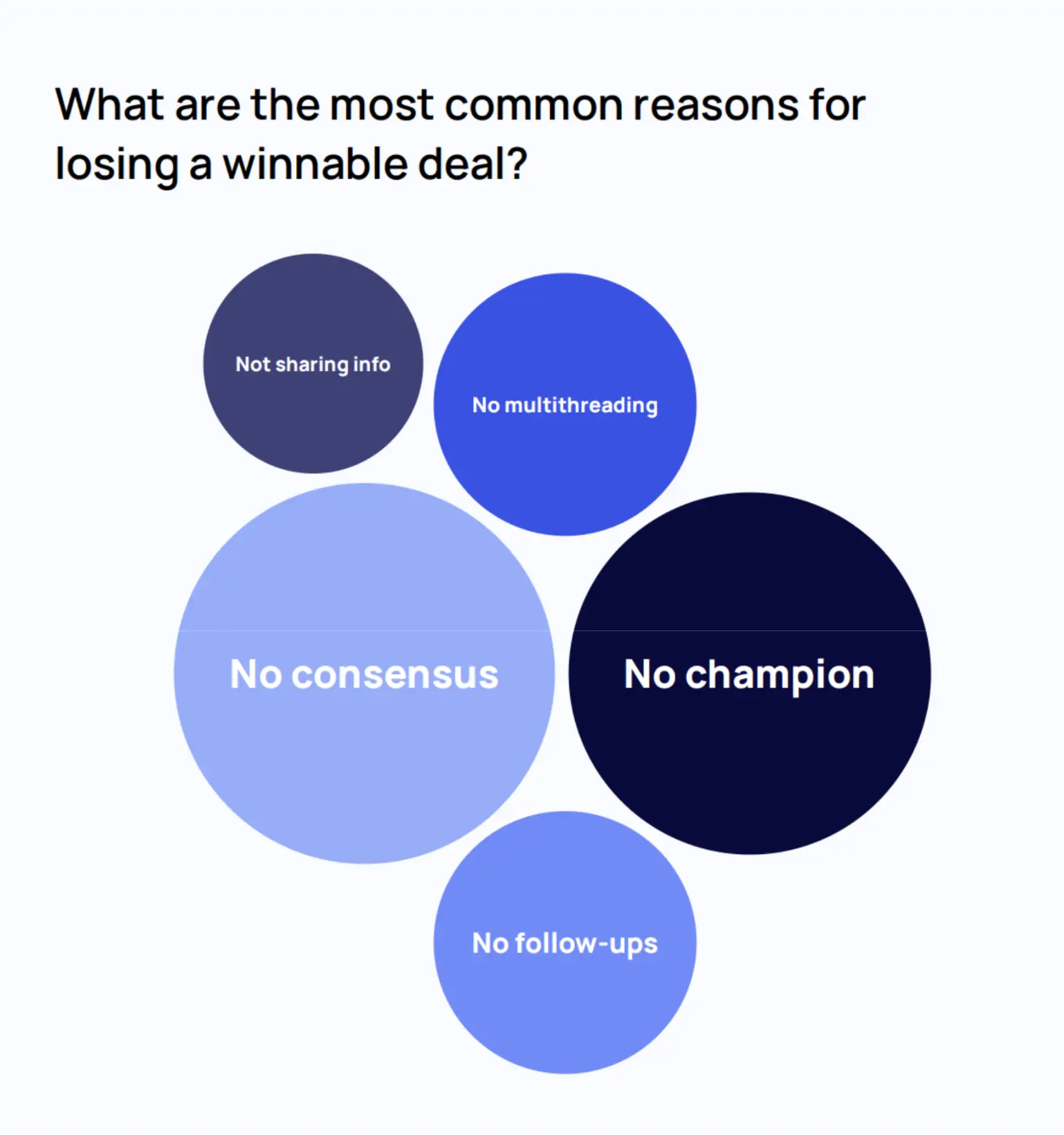
That means the post-demo phase is exactly the right moment to start engaging the broader buying committee.
Multithreading doesn't mean bombarding everyone with the same email. It means tailoring your outreach to what each stakeholder actually cares about: The CFO wants to see ROI and risk reduction, the end-user wants to know the product is easy to adopt, and IT wants to understand the technical fit. The more people who independently see value in your solution, the harder it becomes for the deal to stall due to internal misalignment.
❗️ See how to automate multithreading and engage more stakeholders with Flowla.
Staying top of mind between touchpoints is just as important as what you do immediately after the demo. Value-added touchpoints are strategic, low-pressure follow-ups designed to keep the conversation alive without feeling pushy.
The key word is value – every touchpoint should give the prospect something useful, relevant, or genuinely interesting. Here are some practical examples across different categories:
"You mentioned your planned kickoff date was last week – how did it go?"
"You seemed skeptical about X results when we spoke. Curious how they panned out?"
"Are we still on track to finish the integration by X date?"
"We'll need Jack's input this week if we're still aiming to go live within Q4."
"Saw this report from X — it touches directly on what we discussed. Curious if you agree with their take."
"We just went live with a company in your space and have some interesting learnings. Worth a quick Loom?"
"We just launched the automation feature we talked about on our call. No reply needed — just wanted to keep you in the loop."
This last format is particularly powerful: It delivers value with zero pressure, and more often than not, it gets a reply anyway.
Everything in the previous section works in practice. Until you try doing it manually after every single demo. Preparing personalized notes, building deal rooms, drafting tailored emails, and logging everything to your CRM can eat up 30+ minutes per call. Multiply that across a full pipeline, and you're looking at hours of repetitive work every week – the time that could be spent actually building relationships and closing deals.
That's exactly the problem Flowla's instant demo follow-up workflow was built to solve.
What the workflow does
The moment a call transcript is ready in your notetaker (Gong, Fireflies, Fathom, or similar), Flowla kicks in automatically. It builds a personalized Digital Sales Room for the prospect, summarizes the call, drafts a tailored follow-up email, sends it, and logs everything back to your CRM – all without the rep lifting a finger. Here's how each step works.
Step 1: Set your trigger – a completed call transcript
The workflow starts when a new call transcript appears in your notetaker tool. Inside Flowla's AutoPilot, you navigate to Workflows > Create new workflow, select your notetaker (e.g., Fireflies, Fathom, or Gong), and choose "Transcription completed" as the triggering event. From this point on, every completed call sets the entire sequence in motion automatically.
Step 2: Auto-create a personalized Digital Sales Room
The first action AutoPilot takes is building a branded Digital Sales Room from a pre-set template — populated with context pulled directly from the call transcript. You can configure this step with static values (e.g., always assigning a specific AE as room owner) or dynamic ones (e.g. automatically assigning ownership to whoever hosted the call). The room is also linked to the relevant HubSpot deal or Salesforce opportunity, keeping everything connected from the start.
Step 3: Generate a meeting recap with the Summarizer agent
Next, the Summarizer agent reads the transcript and extracts the most important information – the prospect's top pain points, key priorities, and the next steps agreed on during the call. This recap is then automatically added to the Digital Sales Room, so the prospect has a clear, organized summary waiting for them when they open their room link. No more "per our conversation" emails that summarize nothing useful.
Step 4: Draft a personalized follow-up email with the Email Composer agent
Using the transcript and the Summarizer's output, the Email Composer agent writes a fully personalized follow-up email tailored to that specific prospect and conversation. No generic templates, no copy-paste – the email references what was actually discussed and speaks directly to the prospect's situation.
Step 5: Send the email and log activity to your CRM
The final step sends the email to the prospect and records all activity back to HubSpot or Salesforce automatically. One important option here: the "Add to queue for review" toggle. When switched on, AutoPilot holds the drafted email in a review queue so the AE can read it, edit if needed, and approve before it goes out. This gives teams the best of both worlds – the speed of automation with a human check for high-stakes deals.
The result
Once the workflow is live, every completed demo triggers the full sequence: a personalized room is created, a meeting recap is added, a tailored email is drafted and sent, and everything is synced to your CRM. Teams using this workflow report saving around 30 minutes per call on post-demo tasks, a 12% improvement in deal velocity, and – perhaps most importantly – prospects receiving immediate, personalized value right after the demo, while the conversation is still fresh.
Automating the follow-up email is a great start, but the deals that close are the ones that stay organized, transparent, and moving forward across every touchpoint, not just the first one. Flowla's broader platform is built around exactly that: Giving sales teams the structure and visibility to manage the entire post-demo journey, not just the moment right after the call.
The post-demo follow-up is more than a single email – it's a process. And like any process, the teams that win are the ones who make it repeatable, consistent, and scalable across every rep and every deal.
Flowla gives your team the infrastructure to execute this playbook at scale, without sacrificing the personal touch that actually builds trust with buyers. From the moment a call ends to the moment a deal closes, every step is tracked, organized, and working in your favor.
Ready to see it in action? Set up the workflow for your team in 15 minutes →
How soon should you follow up after a B2B demo?
Within the same hour if possible, and no later than the same business day. Response rates drop significantly the longer you wait. The post-demo window is when your prospect's interest is highest, and a fast follow-up signals seriousness. Generic follow-ups sent the next morning are already competing with a full inbox and a completely different headspace.
What should a post-demo follow-up email include?
A good follow-up email covers four things: a recap of what was discussed, the next steps with clear owners and dates, links to any relevant resources, and a single call to action. Attaching multiple documents or writing a long summary tends to slow things down. A link to a shared Digital Sales Room where everything lives in one place works better, both for your prospect and for tracking engagement.
How many times should you follow up after a demo?
Research shows that 80% of deals require at least five follow-ups to close, but nearly half of sales reps give up after one. The goal is not to nag, it's to add value at each touchpoint. Each follow-up should give the prospect something relevant: a check-in on an agreed action, a piece of content tied to their specific situation, or a product update that addresses something they raised on the call.
What is a mutual action plan in sales?
A mutual action plan is a shared, documented timeline that both the seller and the buyer agree to after a demo. It breaks down the remaining steps to a decision, assigns owners, and sets due dates. It keeps your internal champion equipped to move things forward without losing detail in translation, and it gives both sides a single source of truth for what happens next.
What is a Digital Sales Room?
A Digital Sales Room is a branded, shareable link that holds everything a prospect needs throughout the buying process: meeting recaps, pricing, case studies, next steps, and more. Instead of scattering resources across email threads and chat, it gives the full buying committee one place to access and reference content. Tools like Flowla let you create and personalize these rooms automatically from call transcripts.
How do you automate post-demo follow-ups?
The most effective automation approach starts with your call transcript. Once a transcript is ready in a tool like Fireflies, Gong, or Fathom, an automated workflow can build a personalized Digital Sales Room, generate a meeting recap, draft a follow-up email based on what was actually discussed, and log everything to your CRM. Flowla's AutoPilot workflow handles all of this without any manual steps from the rep, while still allowing for a human review before the email goes out.
What does poor post-demo follow-up actually cost?
Beyond individual lost deals, the real cost is inconsistency across your team. When some reps follow up well and most don't, there's no reliable way to improve. Research from Flowla found that lack of follow-up is one of the top five mistakes sales leaders cite, alongside poor discovery and failure to engage multiple stakeholders. The compounding effect over a full pipeline is significant.
Book a 15-minute chat with a product expert. We'll walk you through every step of the way as you get set up.
.webp)
.webp)
.webp)


.webp)

.webp)
.webp)
.webp)




.webp)
%20(3).webp)
.webp)
.webp)
.webp)

.webp)
.webp)
.webp)
.svg)

.webp)
.webp)