New in Flowla: Fathom Integration, Collaborative Forms, and More

By
Delia Barbat
January 21, 2026
0 min read
Share this post
product updates main visual

Table of contents

Welcome to the first Flowla product update of the year. 👋 We’re kicking off 2026 with a release that introduces two new capabilities that directly change how information moves during a deal:

With the new Fathom integration, your customer conversations now turn directly into deal room content. 

Collaborative forms allow buyers and sellers finally build shared understanding together, all in one place.

We’ve also shipped improvements to room management and automation access, and introduced native Attio CRM integration (we’ve shared more on that here 👀).

Below is a breakdown of what’s new and how teams can use it in practice 👇

Flowla x Attio integration is here! 🔄

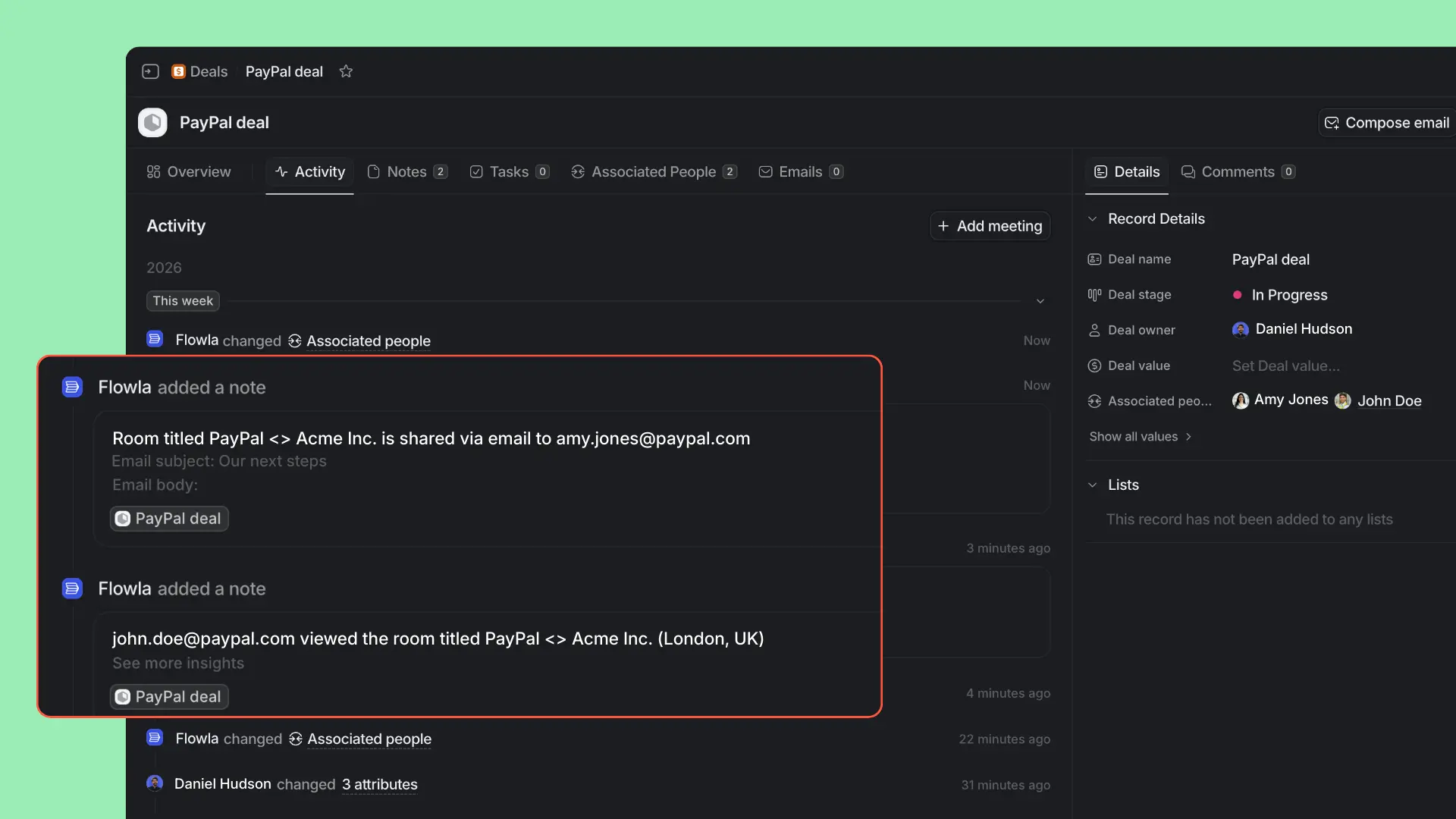
Flowla now integrates directly with Attio, creating a live connection between your CRM and your deal rooms or onboarding hubs.
flowla attio integration

When you associate an Attio deal with a Flowla room, it becomes a customer-facing extension of your CRM:

  • Deal and company data stay in sync automatically. Names, contacts, and deal details flow into the room the moment they’re created or updated in Attio – no copy-pasting, no stale information.
  • Buyer engagement flows back to Attio. Document views, form submissions, and action completions in Flowla are logged as engagement notes in Attio, giving sales leaders visibility without leaving the CRM.
  • Rooms can be created and managed directly from Attio. Teams can link an existing room or spin up a new one from a template without switching tools, reducing admin at critical deal moments.

Why this matters?

For AEs, this removes 20–30 minutes of manual work per deal spent syncing notes, contacts, and activity.

For managers, it means pipeline reviews are based on actual buyer engagement, not status updates.

And for the business, it turns Attio from a system of record into an active command center that reflects what’s really happening in deals.

If you’re already using Attio and Flowla together, you can connect them in minutes and eliminate a surprising amount of admin.

We’ve shared a deeper dive into Attio-Flowla integration, including specific use cases here.

Turn calls into content & actions with Fathom integration 📼

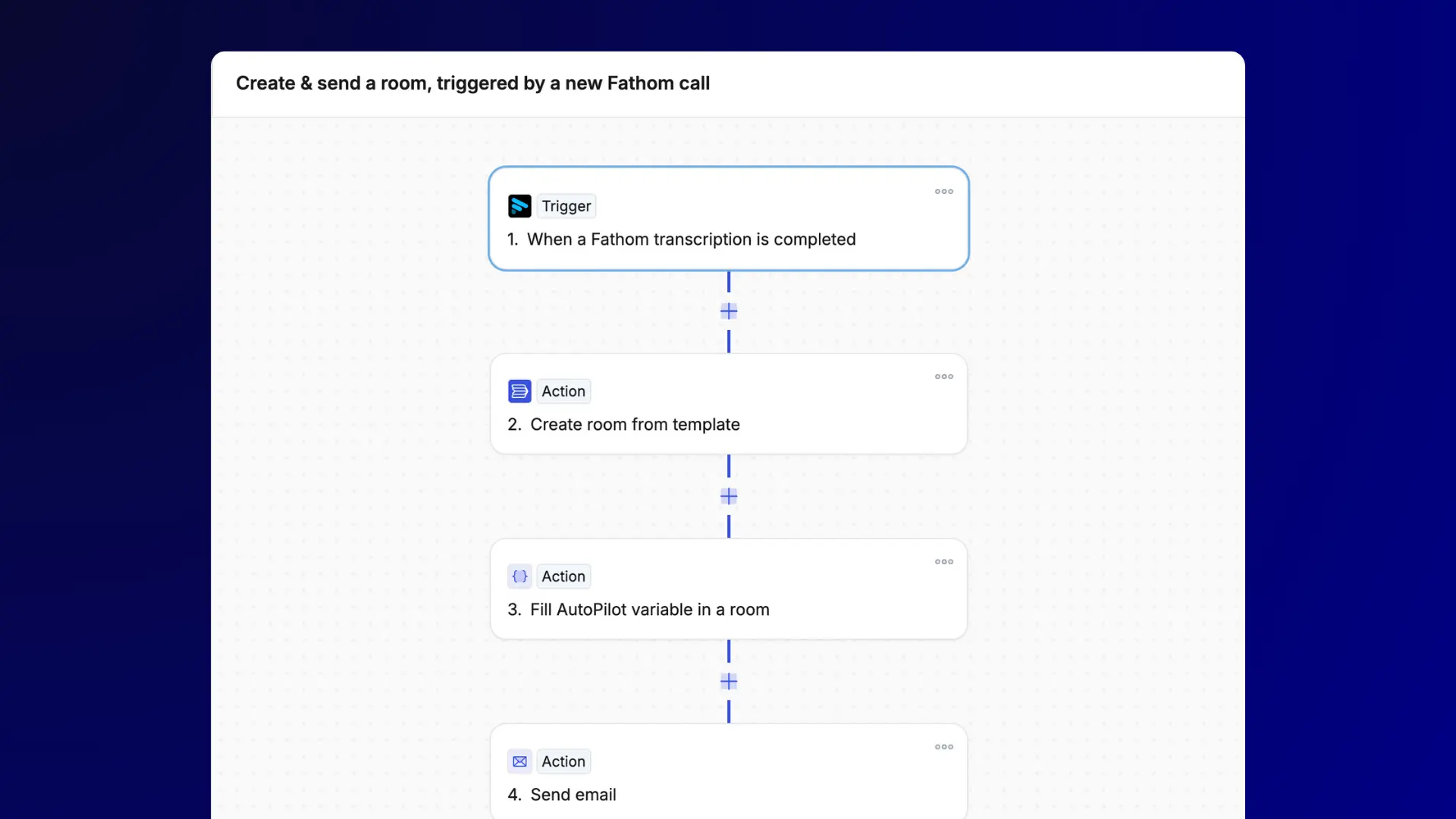
Flowla now integrates with Fathom, making it possible to turn your sales calls into structured, buyer-facing deal room content, automatically.
fathom integration - example workflow

Once a call is recorded and transcribed in Fathom, Flowla can extract the most relevant parts of the conversation and add them directly to the associated deal room. No manual summaries. No copy-pasting. No delay between the call and the follow-up.

What this looks like in practice:

  • Clean meeting summaries, not raw transcripts. Instead of dropping a long transcript into a follow-up email, Flowla generates a clear recap of what was discussed – key points, decisions, and context – formatted for buyers.
  • Next steps captured and shared automatically. Agreements made on the call (e.g., “send pricing,” “schedule a technical review”) can appear directly in the room, keeping both sides aligned without extra follow-up.
  • Call insights turned into shareable content. Champions can forward a concise recap from the room to internal stakeholders, so decision-makers stay informed without joining every call or listening to recordings.

Why this matters?

Sales conversations contain the most valuable information in a deal, but that information often disappears into call tools, notes, or inboxes. The Fathom integration ensures that insights don’t stop at the meeting. They become part of the shared workspace your buyers actually use to evaluate and decide.

The result is faster follow-up, clearer alignment, and a noticeably more professional buying experience, without adding extra work for the sales team.

Your calls no longer end when the meeting does, they continue working for you inside the deal room.

Setting up Fathom and Flowla integration

Getting started with Fathom and Flowla integration takes about 10 minutes:

  1. Connect Fathom to Flowla: Navigate to the Integrations page in Flowla, find Fathom, and authorize the connection. Fathom will start sending transcription data to Flowla automatically.
  2. Create your first workflow: Go to AutoPilot in Flowla and build a simple workflow: "When Fathom transcription completed → Create summary in deal room." Start simple and add sophistication as you see what works. Your meetings are automatically associated with right rooms.
  3. Customize what gets shared: Not everything from a call needs to go in the deal room. Configure your workflows to extract only customer-relevant insights, keeping internal sales strategy discussions separate.

Within a week, you'll wonder how you ever ran deals without this integration.

Using another call recorder? Flowla already integrates natively with Gong and Fireflies (and can connect with almost any other tool via Zapier). Check out more integrations here.

Align stakeholders with Collaborative Forms 📋

Forms are often where deals slow down. Requirements get sent over email, feedback comes back piecemeal, and one person ends up chasing inputs from five different stakeholders.

With this release, Flowla forms can now be completed collaboratively by multiple people, at the same time, in the same place.

collaborative forms in flowla

What’s new?

  • Multiple stakeholders can contribute to a single form. Buyers from different teams (IT, security, finance, ops) can all add their input without overwriting each other or passing versions back and forth.
  • Works across both linear and table-style forms. Whether you’re gathering step-by-step responses or building a shared dataset (e.g., requirements, risks, timelines), collaboration is supported.
  • Full visibility into contributions.  Flowla tracks who added what, and when so nothing gets lost and accountability stays clear.

Common use cases

Teams can use Collaborative Forms to replace spreadsheets and external tools in scenarios like:

  • Technical requirements gathering. Collect infrastructure, integration, and security requirements from multiple customer teams in a single shared form.
  • Security questionnaires. Share questionnaires directly in the deal room and see responses update in real time – without emailing files back and forth.
  • Onboarding information collection. Gather implementation details contextually as deals move into onboarding, with forms placed alongside relevant materials.
  • Multi-location or multi-team rollout planning. Use table-style forms to let different regions or departments add their own rollout details, building a complete plan together.

Why this matters?

Complex deals rarely involve just one person. Collaborative forms make it possible to gather accurate information faster, without endless follow-up emails or unclear ownership.

Teams are already using this to:

  • Build mutual action plans together with buyers
  • Collect technical and security requirements from multiple departments
  • Align stakeholders on implementation scope and timelines
  • Reduce delays caused by missing or partial information

Instead of chasing inputs, sellers and buyers build shared understanding in real time inside the deal room where the rest of the process already lives.

Simplify room management at scale ⚙️

As deals get more complex and more people get involved, room ownership and visibility can quickly become messy. This update introduces a set of room management improvements designed to support larger teams and smoother handoffs, without adding admin overhead.

What’s new?

  • Filter rooms by internal contacts. Sales managers and team leads can now quickly see all rooms associated with a specific team member. This makes coaching, deal reviews, and coverage checks far easier, especially across busy pipelines.
  • Join rooms without owner intervention. With the new Join feature, internal team members can add themselves to relevant rooms without waiting for the owner to manually invite them. This is especially useful for solutions engineers, CSMs, or managers stepping in to support a deal.
  • Improved room owner reassignment. Reassigning room ownership is now faster and more reliable, with search built directly into the ownership change flow. This makes transitions smoother when deals move between reps or teams.
add room owner in flowla

Why this matters?

These updates remove friction around collaboration and ownership – two things that often slow deals down quietly. Teams get better visibility, coverage gaps are easier to spot, and ownership changes no longer risk breaking momentum.

The result: rooms stay accurate, supported, and aligned with how your team actually works, especially as headcount and deal volume grow.

Wider access to Flowla AutoPilot 🤖

AutoPilot – Flowla’s workflow automation engine – is now available to more teams, with better visibility and control over how it’s used.

What’s new?

  • AutoPilot is now available on Starter and Pro plans. Automation is no longer limited to higher-tier plans, making it easier for smaller teams to start experimenting and scaling workflows earlier.
  • Access is managed through credits, not plan tiers. Instead of locking features behind plans, AutoPilot usage is now governed by credit consumption. This allows teams to test automation gradually and expand usage based on real value.
  • Detailed usage tracking at the organization level. Teams can now see exactly how many credits are being used each month, broken down by workflow actions and AI-powered steps.
  • Clear visibility into AI vs. non-AI usage. Flowla tracks both workflow execution volume and AI token usage, giving finance, RevOps, and team leads a much clearer picture of automation costs and impact.

Why this matters? 

These changes make automation easier to adopt responsibly. Teams can start small, understand usage patterns, and scale with confidence, without worrying about surprise limits or unclear billing.

  • For RevOps and leaders, this means better governance.
  • For reps, it means easier access to automation.
  • For the business, it means smarter, more predictable scaling of AI-powered workflows.

More workflow automation enhancements

As teams rely more on automation, small gaps in timing and logic start to matter. This release includes several workflow enhancements that make it easier to build reliable, real-world automations without workarounds.

What’s new?

  • Delay actions for better timing control. Workflows can now pause for a defined period before continuing. This makes it possible to run sequences like “wait 24 hours after a room is viewed, then follow up” or “pause until the next business day.”
  • Clearer loop handling with iteration context. Loop actions now expose iteration numbers, allowing workflows to reference specific items (for example, “the 3rd contact added” or “every 5th row in a table”). This improves accuracy when automating multi-item processes.
  • Smarter ‘Add contact to room’ behavior. When adding a contact via automation, Flowla now intelligently checks whether the contact already exists and enriches it if needed, instead of creating duplicates.

Why this matters?

These updates reduce the need for manual cleanup and edge-case logic. Workflows behave more predictably, timing feels intentional, and data stays cleaner across rooms and systems.

For teams running complex sales or onboarding motions, this means fewer brittle automations and more confidence that workflows will behave the way they expect, even as deals scale.

Wrapping up

This release sets the tone for how Flowla will evolve in 2026: Focusing on clarity, connected workflows, and reducing the effort it takes to keep deals moving.

If you’re already using Flowla, these updates are available now. Hope they make your life easier and experience with Flowla – more enjoyable.

If you’re new, this release offers a clear picture of how Flowla brings conversations, collaboration, and execution together in one place. Contact us to get a personal walk-through of what’s possible in Fowla.

And feel free to get in touch with us to share your feedback and suggestions.

Want a closer look?

Get a personal walk-through to explore the latest Flowla updates and how they work in real sales and onboarding scenarios.

Let's chat!

Handpicked revenue content delivered each month.

Subscribe to The Current & keep up with the latest from the revenue world, curated just for you.

Want to discover Flowla?

Your first 5 rooms are free. No credit cards, no commitments.