.webp)
.webp)


.webp)

.webp)
.webp)
.webp)




.webp)
%20(3).webp)
.webp)

.webp)
- Flowla MCP is live. Connect Claude to your deal rooms and act on them without leaving your AI.
- API v2 is live. Wire Flowla into your own tools so rooms build themselves, action items stay in sync with triggers from your tools, and engagement data flows into your dashboards automatically.
- Asset Intelligence runs AI extraction on every asset upload, auto-tagging them by type, persona, use case, and competitors mentioned. It's the foundation for Flowla's upcoming AI agent.
- Smarter Meeting Auto-Sync maps every call from your notetaker to the right room automatically. The room updates itself, and AI blocks can now regenerate from the latest transcript without any manual trigger.
Welcome to Flowla's June 2026 product update. 👋
Our last release closed a lot of gaps in how rooms connect to your CRM and meeting intelligence. This release goes a layer deeper: into what your content library actually knows, and how much less manual work a rep needs to do between calls.
Below is a full breakdown of what's new. 👇
Connect Claude directly to your deal rooms with Flowla MCP 🔌
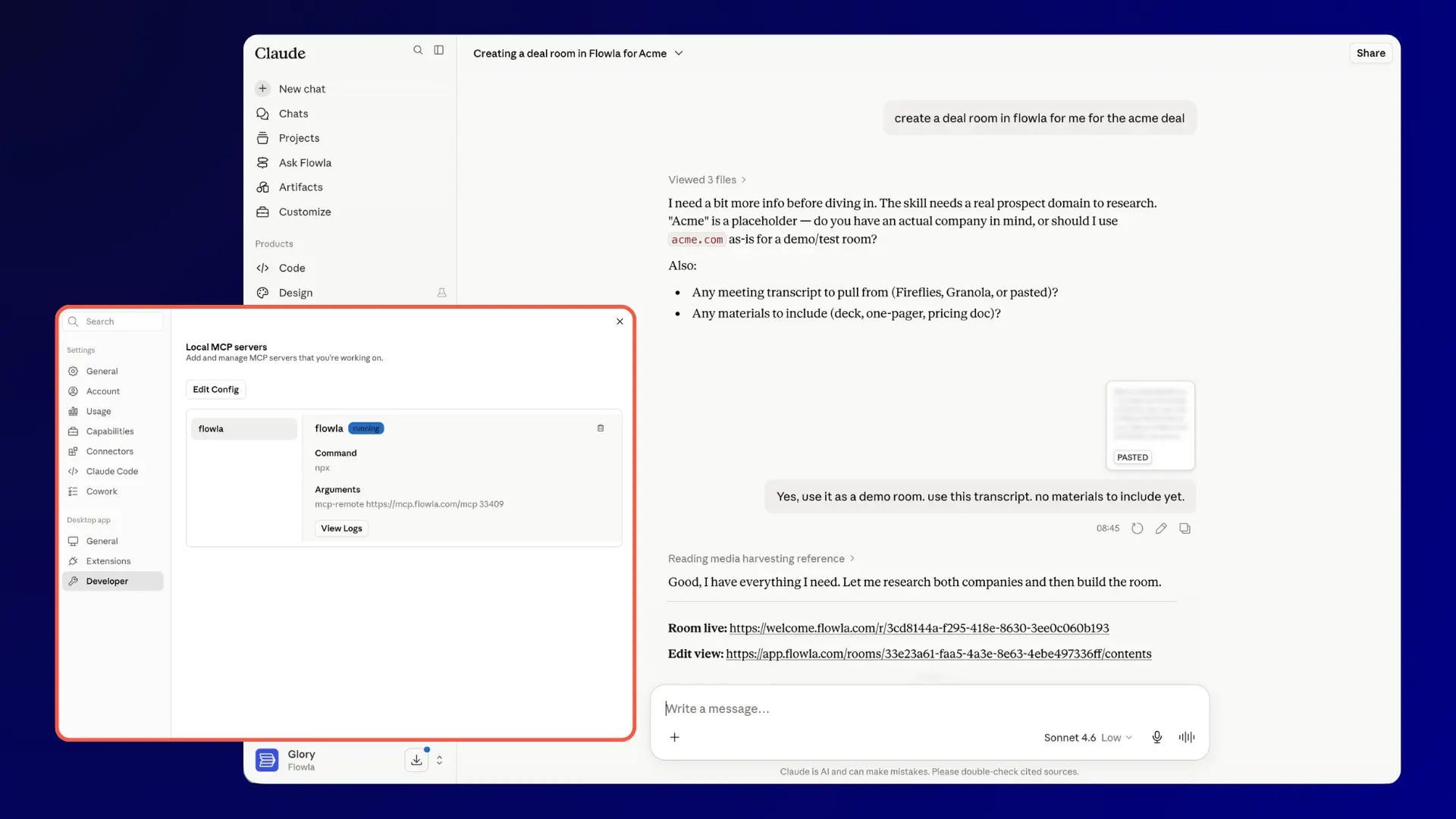
Flowla MCP is now live.
MCP is the open standard that lets AI agents like Claude take action inside external tools, not just generate output about them. We published a full breakdown of what MCP is, how it works, and what it means for sales and CS teams here.
The product update version: you can now connect Claude to Flowla and give it the ability to act inside your rooms directly.
Who this is for
AEs who live inside their AI and want to act on deal rooms without switching tools, CS teams using Claude for account research and handoff prep, and RevOps teams building AI-native workflows.
Why this matters?
The gap MCP closes is the one between what AI produces and what actually reaches the buyer. Without it, every useful output from Claude has to be manually carried across into Flowla by a human. With MCP, Claude can act directly.
Common use cases
- Send a room right after a call. Ask Claude to spin up a room for an account mid-conversation. The room is built, the link is ready, and the buyer receives something live and trackable instead of a static attachment.
- Follow up with context, not guesswork. Ask Claude who viewed the room, which sections got the most attention, and when the last activity was. "Did anyone open the ROI section in the Acme room?" Claude answers. You follow up knowing exactly what to say.
- Find and add the right content instantly. Ask Claude to pull the right case study or one-pager from your Flowla library and add it to the room. No tab-switching, no folder-diving.
- Manage action items without opening the app. Ask Claude to add a task, update a due date, or check what's still outstanding on a mutual action plan.
- Pick up full account context at handoff. Before an onboarding call, ask Claude for everything that happened in the deal room during the sales process: what the buying committee engaged with, what concerns came up, what the mutual action plan looked like. The customer doesn't have to repeat themselves.
- Spot expansion signals before they go cold. Ask Claude which accounts have had new stakeholders engaging with rooms recently. Act while the interest is live.
Works with Claude Desktop and any MCP-compatible AI client. Setup guide and full documentation at docs.flowla.com/mcp/getting-started.
Wire Flowla into your own tools with API v2 🛠️
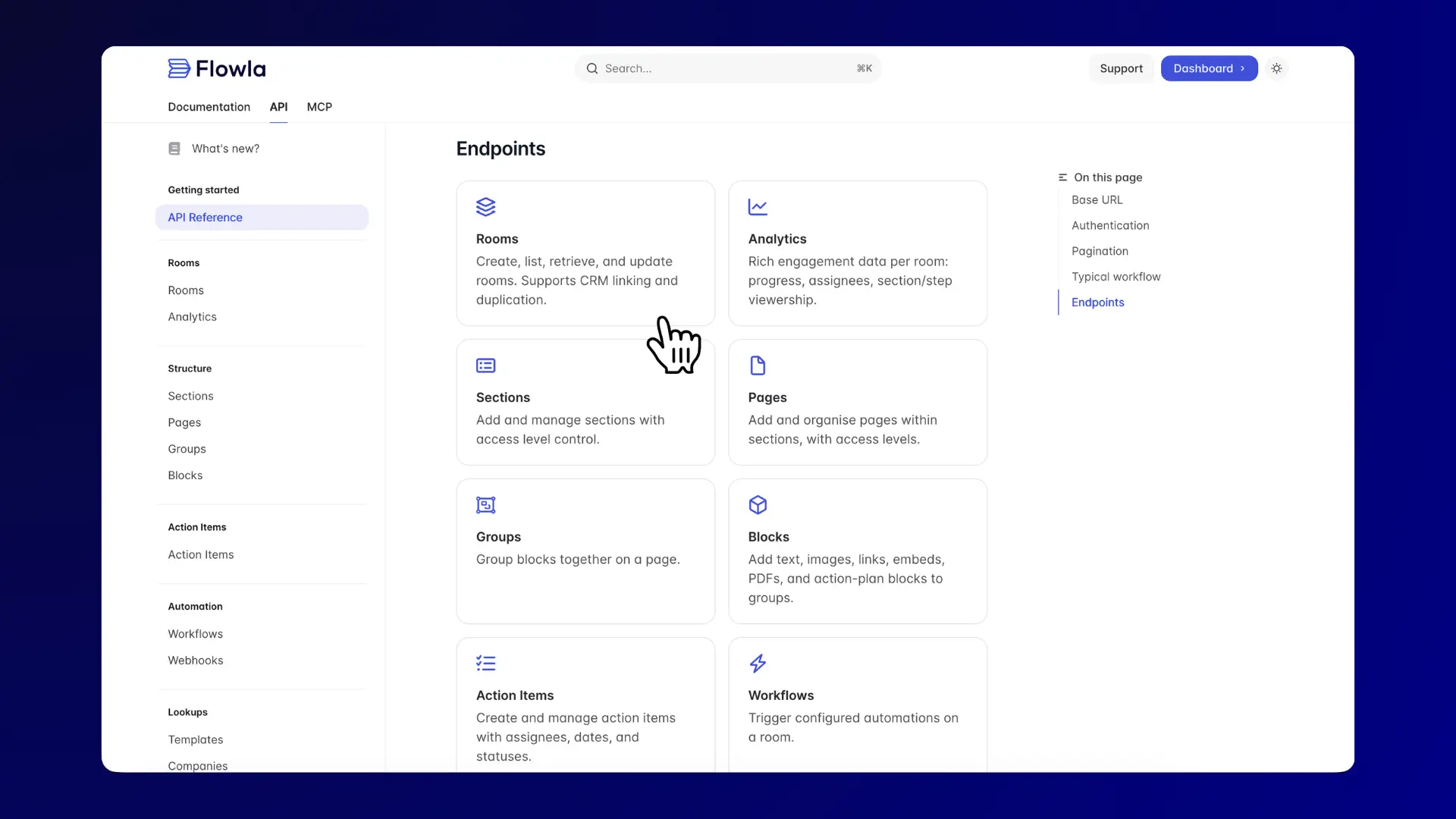
Flowla's REST API v2 is now live. Not every workflow runs through a rep, and not every team wants to rely on built-in automations. Some teams need to wire Flowla directly into their own stack: trigger room creation from an internal system, or sync action items with whatever project management tool they already use. Our API v2 makes all of that possible.
Who this is for
RevOps teams building automated room workflows, engineers integrating Flowla into existing tooling, and ops teams who want rooms to appear at the right moment in a customer journey without anyone having to build them manually.
Why this matters?
The rep-built room is the default today. It works, but it depends on a rep remembering to do it, having time to do it well, and knowing which template fits this particular deal. At scale, that introduces inconsistency. Some rooms are great. Some never get built.
Our API v2 makes room creation a system output, not a rep task. When a deal hits a certain stage, the room exists. When a contract is signed, the onboarding workspace is ready. When a prospect completes the room, the next step fires automatically. The rep focuses on the conversation. The infrastructure handles the rest.
Common use cases
- Automated post-demo rooms. When a deal moves to a certain stage in HubSpot or Salesforce, a personalised room generates automatically and gets linked to the CRM record.
- Onboarding workspaces on contract sign. Connect Flowla to DocuSign or your billing tool so a fully built onboarding room is waiting for the customer before the ink is dry.
- Engagement data in your dashboards. Pull per-room analytics into your data warehouse or BI tool so RevOps can track buyer engagement across the entire book of business.
- Instant follow-up on room completion. The FLOW_COMPLETED webhook fires the moment a prospect finishes a room, triggering whatever comes next in your stack without anyone monitoring manually.
Full documentation at docs.flowla.com/api/overview.
Your content library now knows what's in it 📚
Most content libraries are storage. You upload a file, maybe rename it something descriptive, and hope the right person finds it when they need it. At any scale, that breaks down fast.
Flowla's library now does something different.
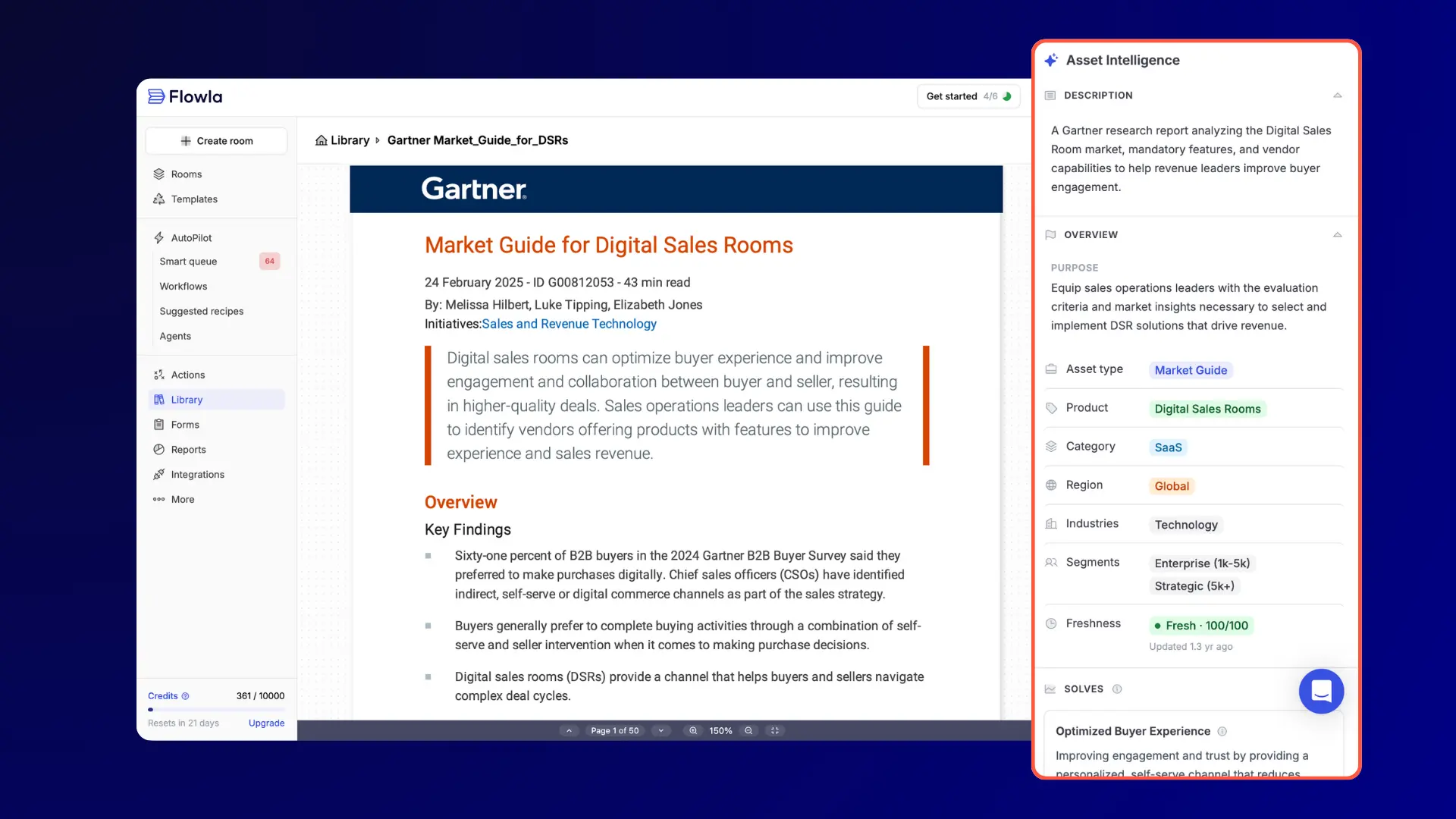
When you upload an asset, Flowla runs AI data extraction on it automatically. It reads the file and understands it: what type of asset it is (battle card, one-pager, sales deck, market report), what product areas it covers, which personas it's aimed at, which competitors it mentions, and what use cases it supports. That intelligence makes search work the way it should — reps can look up "a case study for a logistics company evaluating Salesforce integration" and get the right asset back, instead of scanning filenames.
It also feeds Flowla's upcoming AI agent, which will suggest relevant assets to reps based on what came up in the most recent call.
What's new?
- Asset Intelligence: AI data extraction runs on every asset you upload, tagging it across asset type, product area, persona, integrations, and competitors mentioned
- Auto-extraction toggle: turn it on in settings and extraction runs on every upload automatically
- Bulk upload: add multiple assets to your library at once
- Shareable asset links: share any asset directly from the library without adding it to a room first. Get the link, send it, done
Who this is for
AEs who spend time hunting for the right asset before a follow-up, CS teams managing large onboarding content libraries, and RevOps teams building room templates that need to pull the right content automatically.
Why this matters?
For reps, the practical difference is time. Finding the right case study or battle card before a follow-up currently means searching a folder, asking a colleague, or hoping something comes up in Slack. Asset Intelligence cuts that lookup down to seconds.
The longer-term significance is the agent layer. Flowla already connects to Fireflies, Gong, Fathom, and Granola. Once a call ends, Flowla has the transcript. With Asset Intelligence extracting full context from every file in the library, Flowla can match what was discussed in the call to what's available. The agent that suggests "add this case study, it's relevant to what your prospect asked about in the last call" becomes possible because both sides of that connection now exist.
Common use cases
- Reps searching the library by deal context ("enterprise fintech evaluating Salesforce") rather than filename
- CS teams maintaining an onboarding library where managers can find phase-specific resources without scrolling through folders
- RevOps building templates that reference library assets, knowing the extraction data makes those assets findable and matchable
Rooms that stay current between calls, automatically 🤝
The meeting auto-sync problem has always existed. A call ends, the AI notetaker produces a summary, and somebody (usually the rep) has to manually connect that call to the right deal room. The rep means to do it, but it gets skipped. The room falls behind, and the buyer shows up to the next meeting with nothing updated.
Flowla already had meeting sync. This release makes it smarter.
Now, when a call ends and your AI notetaker has joined, Flowla automatically identifies the meeting, matches it to the right room based on participant emails and company domain, and adds it to that room's meeting archive.
What's new?
- Smarter auto-matching: Flowla now maps each call to the right room based on attendee emails and domain, not just manual room selection
- Supported integrations: Fireflies, Gong, Fathom, Granola and more
- Each integration has its own toggle so you can enable or disable auto-sync per tool
- The meeting archive in each room builds automatically as new calls are matched and synced
Who this is for
AEs running multiple active deals, CS teams managing long-term accounts where call history matters, and any team where reps change accounts and context needs to transfer.
Why this matters?
For reps, it removes a consistent source of admin. The room is already updated by the time they open it before the next call.
For buyers, the meeting archive gives them somewhere to revisit what was discussed and what was decided, without digging through email.
For CS teams, the real value shows up when coverage changes. Any team member who picks up an account has the full call history sitting in the room from day one.
AI blocks that generate themselves after every call 🤖
AI blocks shipped in April. What's new now is what triggers them.
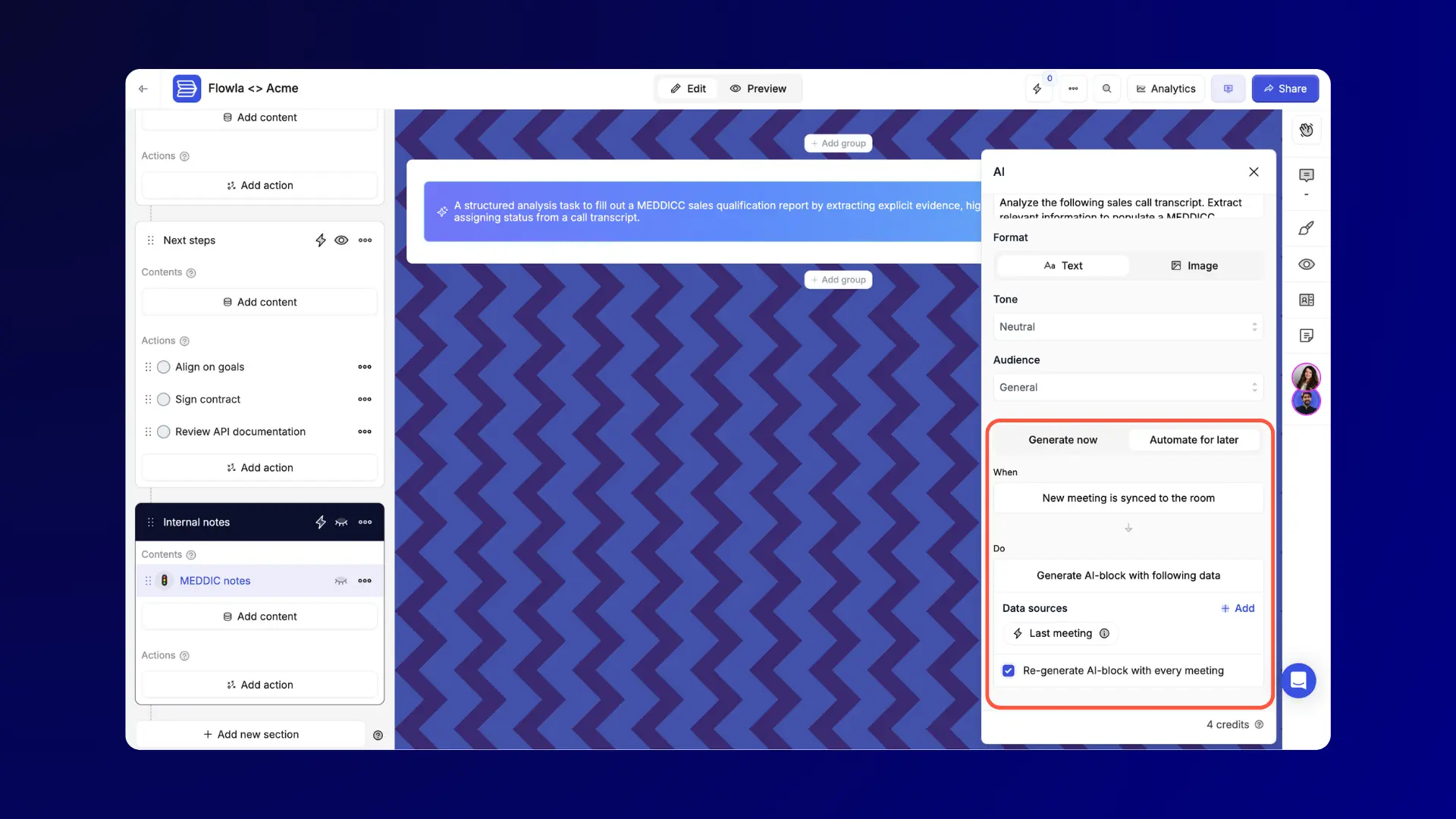
Previously, a rep had to open the room and manually kick off generation. Now you can set any AI block to trigger automatically using the most recent meeting transcript synced to the room. The call ends, the transcript lands, the AI block updates.
Generation also runs in the background — navigate to other steps or rooms while content populates, and a notification tells you when it's ready. When you re-generate, Flowla feeds the previous output back in as additional context, so results improve over time rather than starting from scratch each time.
What's new?
- Automated AI blocks: set an AI block to trigger automatically when a new meeting transcript is synced to the room
- Async generation: a small pop-up notification inside Flowla tells you when generation is complete. No need to wait on the page
- Context-aware re-generation: re-running an AI block feeds the previous output back in as context, producing better results on each iteration
Who this is for
AEs who use AI blocks for follow-up summaries or next-step recaps, and CS teams using them to generate onboarding progress updates after each call.
Why this matters?
A rep finishes a call, forgets to open the room, and the AI block sits there stale. With auto-generation, that doesn't happen. The room reflects the most recent conversation before the rep even opens it.
Combined with smarter meeting auto-sync, the full loop is closed: call ends → transcript lands in the right room → AI block regenerates → room is current.
Also in this release ⚡
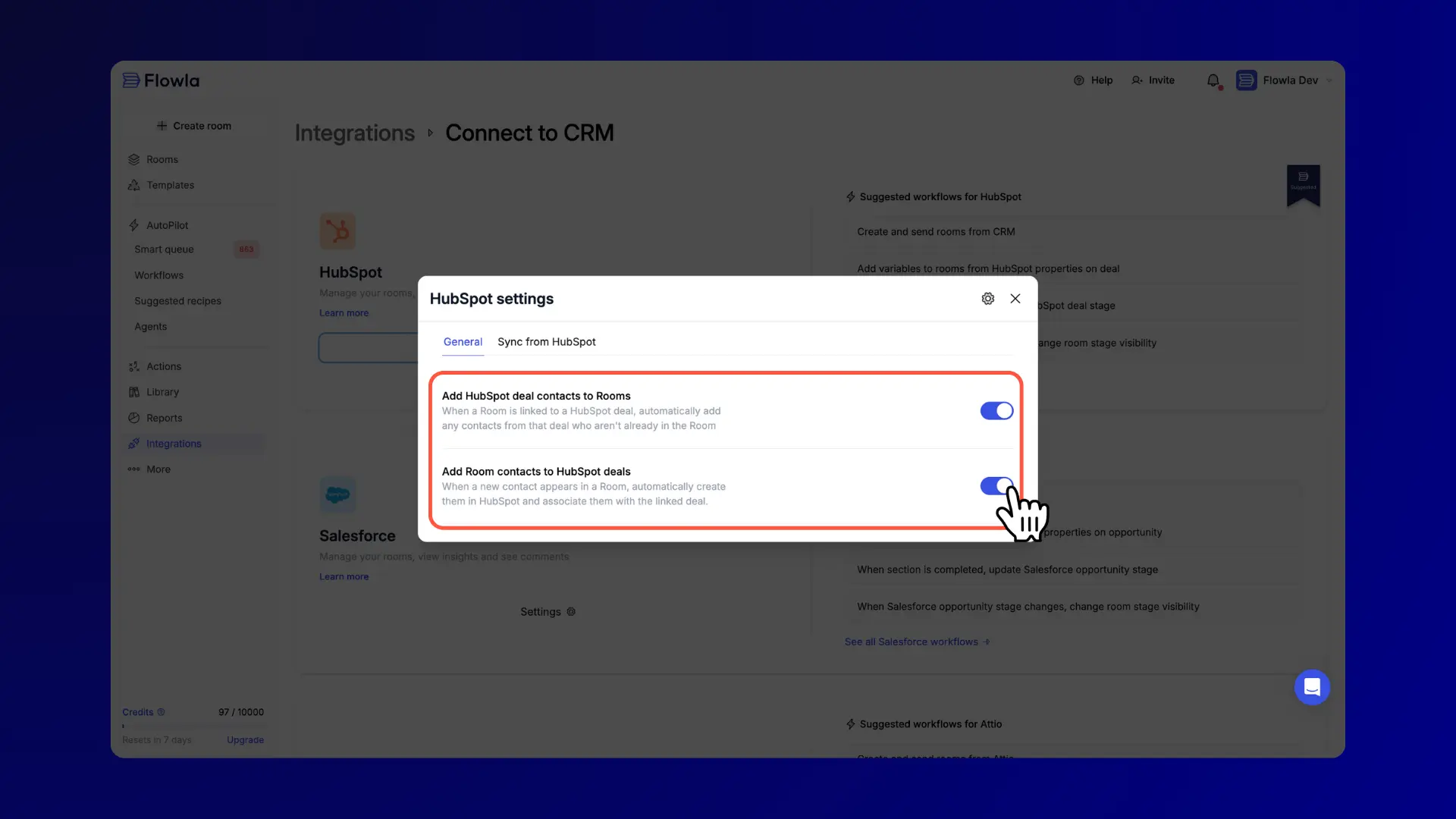
- HubSpot contact sync controls: two new toggles let you independently control whether deal contacts are added to rooms, and whether room contacts are pushed back to HubSpot deals. Previously it was all or nothing
- Deal stage labels in HubSpot sync: the HubSpot deal stage now syncs as a readable label ("Proposal Sent") instead of an internal ID string. Useful anywhere the field shows up in rooms or automation flows
- Stale CRM variable fix: when the primary company or contact on a deal changes in HubSpot or Salesforce, all synced variables now refresh immediately. No more rooms showing the previous contact's name or email
- Granular integration permissions: roles now control integrations at a fine-grained level, with separate view, connect, edit, and disconnect rights per role. A teammate can adjust integration settings without being able to disconnect them
Wrapping up
This release is about the infrastructure around a room: content that finds itself, calls that sync themselves, rooms that build themselves, and an AI that can act on all of it without you switching tabs.
If you need help getting set up with any of these features, book a call with your account manager.
As always, feel free to share your feedback or suggestions. 💙
Frequently asked questions
Does smarter auto-sync work with all call recorders?
Currently it works with Fireflies, Gong, Fathom, and Granola. Each integration has its own toggle so you can enable or disable per tool. Flowla also connects with most other tools via Zapier.
Does AI data extraction run automatically on upload?
You can turn on auto-extraction in settings and it will run on every new upload. You can also trigger it manually per asset by clicking "Generate Asset Intelligence."
What does Asset Intelligence actually extract from a file?
Flowla reads the file and tags it by asset type, product areas covered, target personas, integrations mentioned, and competitors referenced. All of that becomes searchable.
Can I share an asset without building a room?
Yes. The shareable asset link lets you get a direct link to any file in your library and send it without adding it to a room first.
What AI clients does Flowla MCP work with?
Any MCP-compatible client, including Claude Desktop. Setup guide at docs.flowla.com/mcp/getting-started.
What can I actually do with Flowla MCP today?
Create rooms, check engagement, pull content from your library, manage action items, duplicate rooms, and get full deal context before a call — all from inside Claude without opening Flowla.
Do AI blocks generate automatically, or do I still need to trigger them?
You can set AI blocks to generate automatically when a new meeting transcript is synced to the room. You can also still trigger them manually. Either way, generation runs in the background so you can navigate away while it processes.
Can I control which HubSpot contacts sync into a room?
Yes. Two new toggles in HubSpot settings let you independently control whether deal contacts are added to rooms, and whether room contacts are pushed back to HubSpot deals.
What can I build with the Flowla REST API?
You can bulk-generate rooms, sync action items with external tools, pull engagement analytics into your dashboards, link rooms to CRM records, and fire webhooks on room completion. Full documentation at docs.flowla.com/api/overview.
Who is the API for, and do I need an engineer?
The API is designed for teams with technical resources: RevOps engineers, solutions engineers, or developers integrating Flowla into an existing stack. If you want rooms to build themselves as part of an automated workflow, the API is how you get there.
.webp)
.webp)
.webp)
.webp)
.webp)
.webp)
.svg)

.webp)
.webp)