.webp)
.webp)


.webp)

.webp)
.webp)
.webp)




.webp)
%20(3).webp)
.webp)

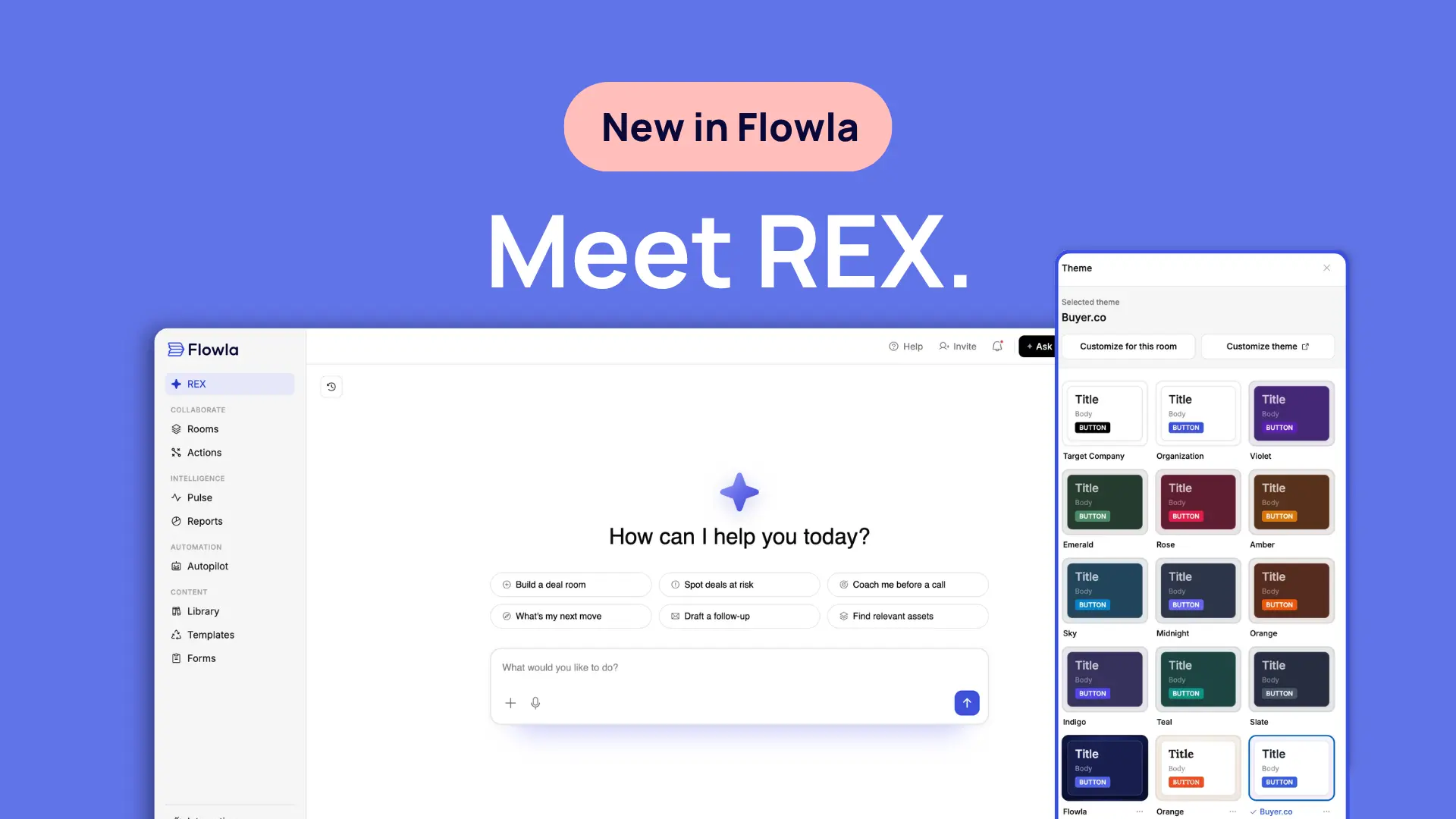
- REX is live. Flowla's revenue execution agent reads your meetings, CRM and deal room activity, works out what each deal needs next, and takes the steps to move it forward. Anything that reaches your buyer waits for your approval.
- REX acts with the right content, powered by Asset Intelligence. It finds the right piece by meaning, matches it to the buyer's persona and stage, and attaches it directly, no digging through folders.
- Signals & Next Best Actions pairs every observation on a deal with a move REX can run on the spot, per room or across your whole pipeline.
- Themes let every room carry your brand, or your buyer's, using presets, Target Company themes, or the full customize panel.
This is the biggest change we have made to Flowla since we started the company.
Flowla is evolving into a revenue execution platform, the layer that runs your deals across sales, onboarding and renewals. REX is the reason it can. CRM recorded your deals. Revenue intelligence analysed them. Neither one moved a deal forward on its own, and that gap is what REX closes.
Our last release taught the content library to understand what was in it and closed the loop between your calls and your rooms. All of it was groundwork for this one. And we are only at the start. REX gets more capable through the summer, and we will keep writing about each piece here as it ships.
Below is the full breakdown. 👇
Meet REX, your Revenue EXecution agent 🦖
Most sales tools are good at telling you what happened. The call summary lands, the dashboard refreshes, the health score turns amber. Then it sits there, and someone still has to read it, decide what to do, and go and do it. That last step is where deals quietly stall.
REX does that step.
REX stands for Revenue EXecution. It reads your meetings, your CRM and everything happening inside your deal rooms, works out what each deal needs next, and then carries out the steps to move it forward.
What's new?
- REX: one agent across the whole platform, with a live read on every deal in your pipeline
- REX Chat: Ask it to build or update a deal room, set up a mutual action plan, update your CRM stage, find the right asset and drop it into a room, or draft and send a follow-up, and it goes and does it, calling the tools it needs in sequence and showing its work as it goes
- Approval gates: anything your buyer could see waits for your sign-off. Emails, Slack messages, web research and any change REX makes to room content all need your approval first
- Full write access: REX updates deal, contact and company records directly in HubSpot, Salesforce and Attio
- Conversation history: open an earlier conversation with REX and carry on where you left off
Who this is for
AEs running several deals at once, CS teams handling onboarding at scale, and RevOps teams who would rather the motion ran without depending on whether a rep remembered.
Why this matters?
Reps rarely lose deals for lack of information. They lose them because the work between meetings never got done. The follow-up that needed sending on Tuesday. The case study that would have answered the security question. The CRM field that has been wrong since the second call. REX takes that work off the pile.
For managers, the effect is consistency. Your best rep already does most of this by instinct. Everyone else does some of it, some of the time, depending on how many deals they are carrying that week. When the agent runs the motion, the floor comes up.
The approval model matters more than it might sound. REX drafts, prepares and proposes, then stops. You read it, change what you want, and send. Nothing reaches your buyer that you have not seen.
REX acts with the right content 🎯
A recommendation is only useful if it's the right one. Search by filename or skim through folders during a call, and you're guessing under time pressure.
Asset Intelligence means REX doesn't guess. When REX recommends or attaches a piece of content, it's been searched by meaning, matched to the buyer's persona and stage, and checked for freshness before it goes anywhere near your buyer. REX finds it and attaches it directly, rather than leaving you to dig through folders.
What's new?
- Asset Intelligence: every file in your library is read and tagged by type, persona, use case and competitors mentioned
- Meaning-based search: REX finds the right asset by what it's about, not its filename
- Persona and stage matching: recommendations match who's reading and where they are in the deal
- Freshness checks: REX confirms an asset is current before it goes anywhere near your buyer
- Direct attachment: REX finds it and adds it to the room itself, no digging through folders required
Who this is for
AEs who want the right piece of content pulled into a room without digging through folders under time pressure, and CS teams who want onboarding assets kept current automatically.
Why this matters?
This is where Asset Intelligence pays off. When it shipped in June, every file in your library started getting read and tagged by type, persona, use case and competitors mentioned. At the time the useful version of that was better search. Now REX uses that same extraction data to find the right content and attach it directly: the right case study for this buyer, at this stage, checked for freshness before it goes out.
Every signal comes with a move ⚡
Deal intelligence usually stops at the observation. You learn that engagement dropped, or that a stakeholder went quiet, and then you are back where you started, holding a fact and a decision.
REX attaches something to do about it.
Signals & Next Best Actions, part of Deal Intelligence, turns everything happening on a deal into a short list of moves. REX spots the risk or the opening, then pairs it with the step it can run: draft the nudge, pull the case study, update the plan.
What's new?
- Signals: risks, opportunities, momentum shifts and unanswered questions, surfaced as they happen
- Next Best Actions: each signal arrives with a step REX can execute immediately
- Room engagement as a source: because REX watches what buyers do inside rooms, signals keep arriving in the quiet stretches between meetings
- Two views: per room when you are working one deal, or across the whole pipeline when you are deciding where to spend the day
- Resolution: mark a signal resolved when new information closes it
Who this is for
AEs deciding what to work on first, sales leaders who want to know which deals need help before the forecast call, and CS teams watching for renewal risk.
Why this matters?
The gap between meetings is where most deals actually go wrong. Nothing appears in the CRM because nothing happened, and the absence of news reads as fine. Room engagement is the tell. A buyer who returns to the pricing page three times on a Thursday afternoon is telling you something no call transcript will.
The pipeline view changes the shape of the morning. Instead of opening deals one at a time to check whether anything moved, you get one list, ordered by what needs attention.
Know where every deal stands in 30 seconds 📊
An agent that proposes moves is only as good as its picture of the deal. Guesswork dressed up as confidence is worse than nothing.
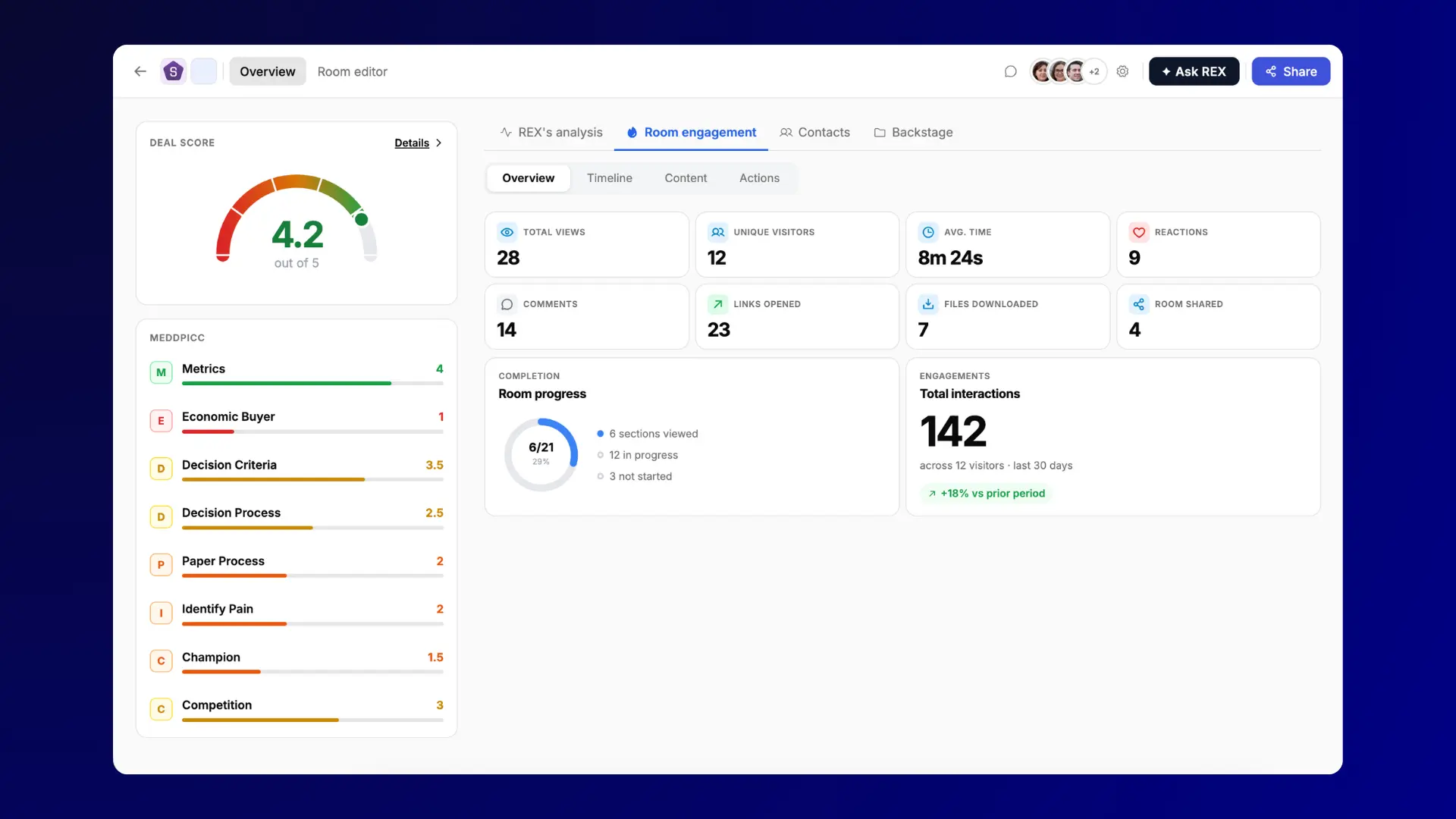
So REX keeps a live read on every deal as part of Deal Intelligence, and that read is visible to you.
What's new?
- Deal Score: one health number from 0 to 5 per deal, so you can see where your time is worth spending
- MEDDPICC: all eight qualification dimensions scored automatically, pointing at what is missing rather than what is done
- Insight Cards: a 30-second read on what is driving the deal, where you stand, what is at risk and what comes next
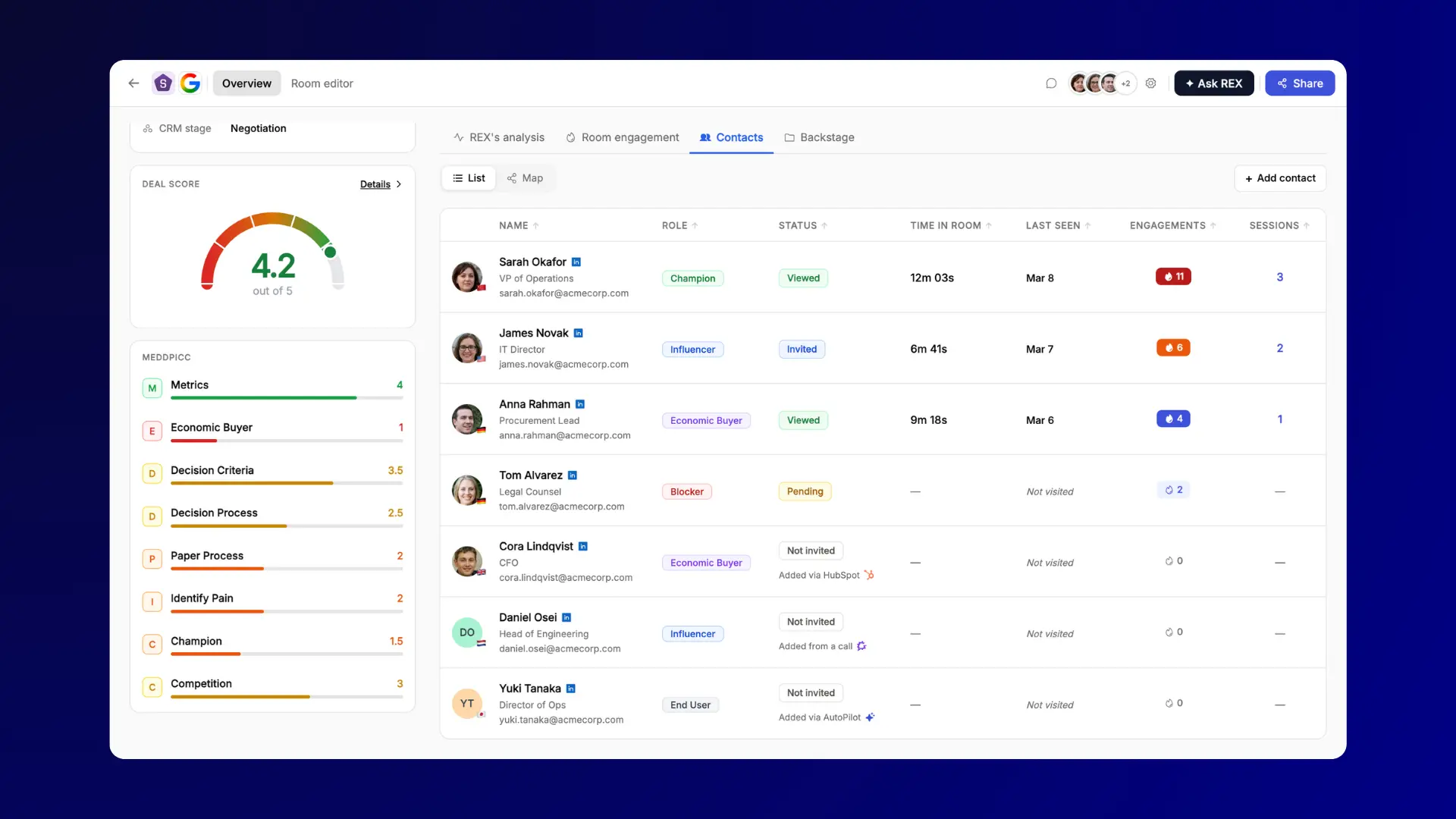
- Contacts tab: your buying committee assembled for you rather than maintained by hand, feeding directly into Stakeholder Mapping
Who this is for
AEs preparing for a call, managers running pipeline reviews, and anyone who has inherited an account and needs to catch up quickly.
Why this matters?
MEDDPICC scoring is the part most teams will feel first. Plenty of organisations adopt a qualification framework and then find that reps fill it in the week before quarter end, if at all. Scored automatically from what actually happened on the deal, it stops being an admin task and becomes a read.
Insight Cards are built for the ninety seconds before a call. Deal Score is built for the Monday morning question of where to start, the same question Revenue Analytics & Forecasting answers at the pipeline level. Along with the Contacts tab, they are also what REX draws on when it proposes a move, which is why the suggestions land where they do.
Rooms personalized to each buyer's brand 🎨
A generic room tells your buyer you sent the same link to everyone, because you did. One that carries their own colours says something different before anyone reads a word.
Themes make that a click.
What's new?
- Preset themes: ready-made looks for when you want a polished room in seconds with no setup
- Target Company themes: apply your buyer's brand to the room, their colours and their fonts
- Customize panel: start from any theme and adjust colours, fonts, spacing and backgrounds until it is right
- Per-room control: a high-stakes deal can look different from your standard template
Who this is for
AEs working enterprise deals where the first impression carries weight, CS teams who want onboarding to feel like an extension of the customer's own tools, and marketing teams keeping rooms on brand.
Why this matters?
Trust builds faster around things that look considered. A buyer opening a room styled to their own brand can tell someone spent time on it, and that impression arrives before the content does.
There is a practical version of this too. Teams selling into regulated or design-conscious industries have asked for control over how rooms look for years. The customize panel gives it to them without needing a designer.
Also in this release ⚡
- Engagement analytics on demand: ask REX who viewed what, how far the action plan has got, and which sections got the most attention
- Templates and automation: REX can browse your organisation's template library or Flowla's, trigger automation workflows, and create forms
- Web research: REX can look up public information about a company, person or market, with your approval first
- Company enrichment: contact lookups now come with company enrichment data and view history attached
Wrapping up
Flowla started as the room your buyer sees. That room is still here, and it is still what your buyer opens. What changed today is everything running around it. A live read on every opportunity, a move attached to every signal, an agent that does the work once you approve it, and rooms that look like they were made for the person opening them.
That is what we mean by a revenue execution platform. The deal does not only live here now. It gets run here.
This is the first release of a much bigger summer. More of the work moves across to REX, more of the actions run without you asking, and we will keep posting each release here as it lands.
If you want help getting set up with REX or Themes, book a call with your account manager, or see the full picture on the REX product page.
As always, feel free to share your feedback or suggestions. 💙
Frequently asked questions
What is REX in Flowla?
REX is Flowla's revenue execution agent. The name stands for Revenue EXecution. It reads your meetings, CRM records and deal room activity, builds a live picture of every deal, then works out and carries out the next step. Anything that reaches a buyer, like an email or a Slack message, waits for your approval first.
Can REX send emails without me seeing them?
No. REX drafts emails and Slack messages, then stops and waits. You read the draft, edit it if you want, and approve it before anything sends. The same applies to web research, and to any change REX makes to the content of a room, since your buyer would see that too.
What can I ask REX Chat to do?
Build or update a deal room, create sections and content blocks, set up or edit a mutual action plan, change a deal stage in your CRM, pull engagement analytics, find an asset and add it to a room, draft a follow-up, trigger an automation, or run web research. It calls the tools it needs in sequence.
Which CRMs can REX update?
REX reads and writes to HubSpot, Salesforce and Attio. It can update deal, contact and company records directly, including moving a deal to a different stage. You can ask in plain language, for example moving a named deal into Negotiation, and REX handles the field changes for you.
How does Flowla calculate the Deal Score?
Deal Score is a single health number from 0 to 5, built from everything REX can see across your calls, CRM records and room activity. It sits alongside automatic MEDDPICC scoring across eight qualification dimensions, so you get both the headline number and a view of which parts of the deal are thin.
Does REX work between meetings, or only after calls?
Both. REX watches engagement inside your deal rooms as well as your calls, so signals keep arriving when no meeting has happened. A buyer returning to the pricing section, or a stakeholder going quiet, both register. That is what makes the quiet stretches of a cycle visible.
Can I apply my customer's branding to a Flowla room?
Yes. Target Company themes let you apply your buyer's brand to a room, including their colours and fonts, so it looks built for them rather than sent to everyone. You can also start from a preset theme and adjust colours, fonts, spacing and backgrounds in the customize panel.
Can I pick up where I left off with REX?
Yes. Your conversation history is saved, so you can open an earlier conversation with REX and carry on from there. Each new conversation starts fresh rather than carrying context across from the last one. What REX always has to hand is the live read on the deal itself, drawn from your meetings, CRM and room activity.
.webp)
.webp)
.webp)
.webp)
.webp)
.webp)
.svg)

.webp)
.webp)