.webp)
.webp)


.webp)

.webp)
.webp)
.webp)




.webp)
%20(3).webp)
.webp)

- Customer onboarding gets a whole account live, and a human runs it, usually CS or implementation. User onboarding is the automated, in-app job of getting one person productive on their own.
- Which one you need is really a question about your motion. If a CSM shepherds new accounts, that's customer onboarding. If people sign up and find their own way, that's user onboarding.
- Picking the right category is the easy half. Flowla's research across 30,000+ rooms found nearly half never get opened, so the real work is keeping whatever you run alive.
Customer onboarding and user onboarding sound interchangeable. They're not, and the mix-up gets expensive fast.
Confuse them and the money leaks two ways. You put a CSM on a self-serve user who only wanted a tooltip, or you hand a six-figure enterprise account the same in-app checklist you built for free trials and then wonder why the admin never logged back in.
The difference is who's steering. Customer onboarding puts a human on getting the whole account live. User onboarding leaves a single user to find their own way inside the product. Which one you need comes down to your motion, and the rest of this guide sorts out the phases, the tooling, and when both are the answer.
Customer onboarding vs user onboarding, defined
What is customer onboarding?
Customer onboarding takes a new account from signed contract to live and getting value. It happens at the level of the whole organization, and a person owns it from start to finish.
You'll also see it called client onboarding. Same thing, different dialect: "client" shows up more in services businesses, "customer" more in SaaS. The term that describes something actually different is user onboarding, which comes next.
- Who it's for: CS, onboarding, and implementation teams at companies that sell through a rep, or sell anything that needs setting up before it works. Mid-market and enterprise territory.
- How it works: A deal closes, an onboarding project opens (often straight off the CRM), and a CSM or implementation manager takes the account. The customer gets invited into a shared space with a plan, owners, and dates. The CSM drives it from there, keeps progress moving, and pings whoever's gone quiet.
- What success looks like: Time to go-live, time to first value, completion rate, day-30 CSAT, and a low early-churn number in the opening months.
- When it works: When a human is on the hook for the account going live, and getting there means working through several steps with several stakeholders.
What is user onboarding?
User onboarding is the in-app experience that moves one person from first login to their first useful action. It works at the level of the individual. Nobody on your side is in the loop.
- Who it's for: Product and growth teams at product-led or self-serve companies, where people try the product and adopt it before a sales conversation ever happens.
- How it works: Someone signs up and meets guidance at the moments that matter: a first-run setup, a tooltip or two, a checklist, a nudge on an empty screen. The whole point is reaching the "aha" without a human there to walk them to it.
- What success looks like: Activation rate, feature adoption, time to activation, free-to-paid conversion.
- When it works: When the product explains itself well enough, and the contract is too small to put a person on it.
The difference in one line
Here's the cleanest cut: customer onboarding is something your team does for an account. User onboarding is something your product does for a person. One is a project you run. The other is an experience you build.
Customer onboarding vs user onboarding at a glance
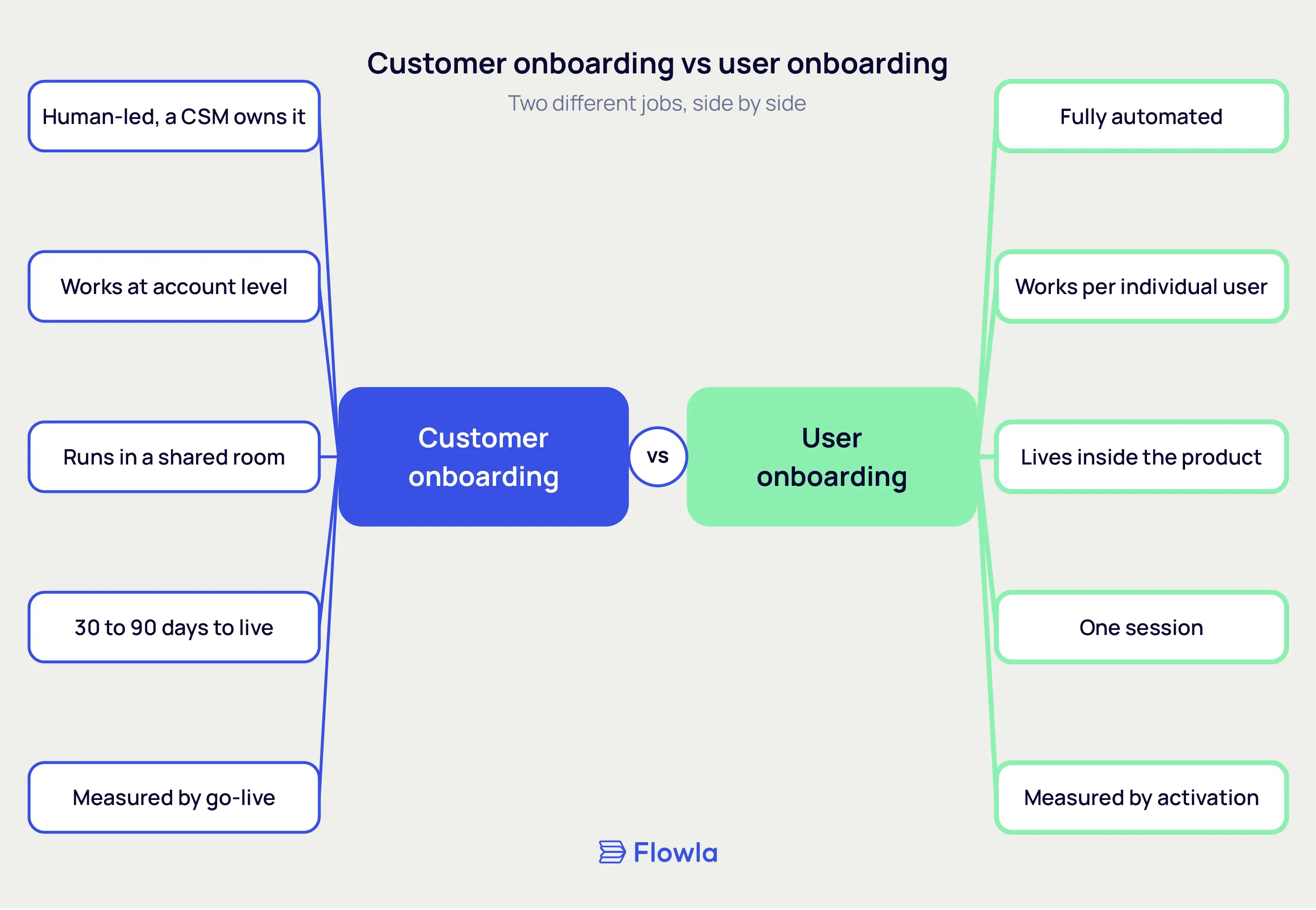
The phases each one moves through
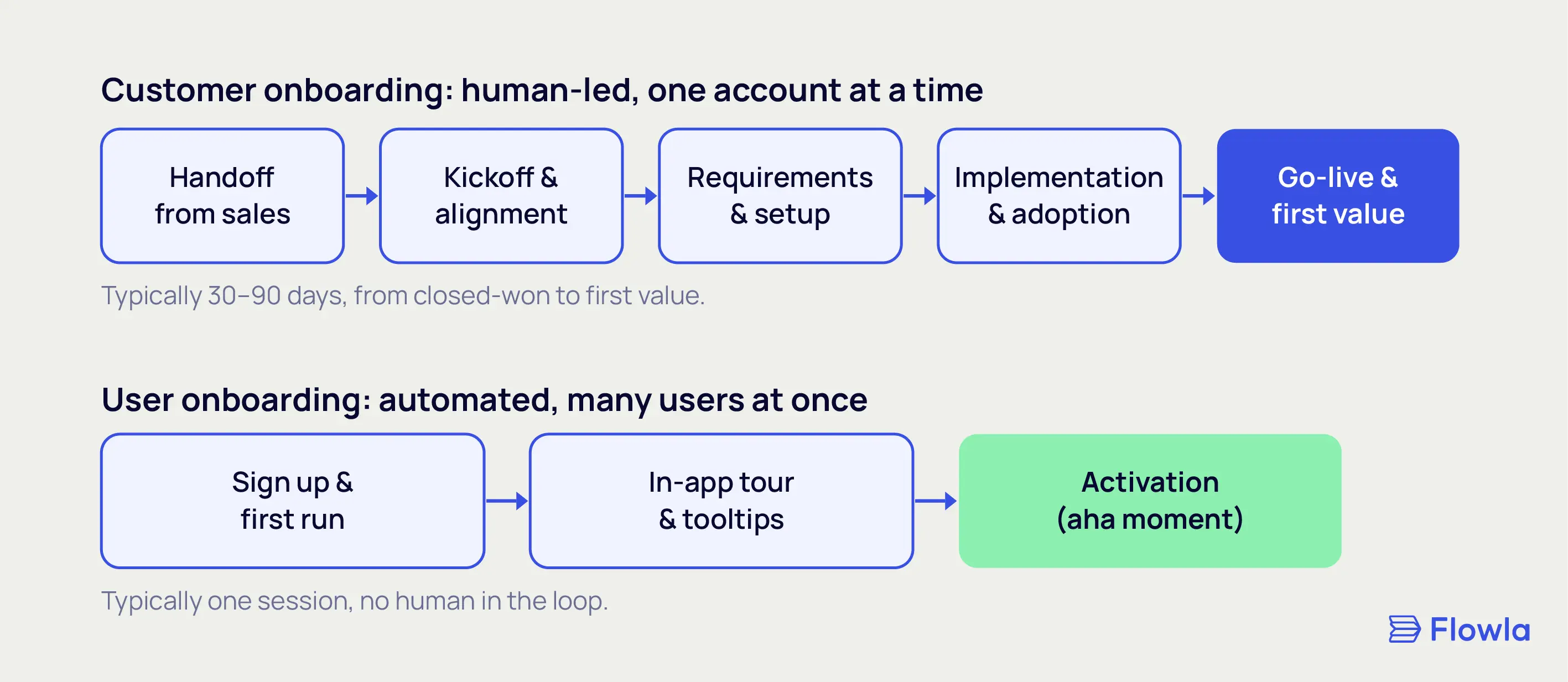
Customer onboarding: five human-led phases
- Handoff from sales. The rep hands over the context: what got promised, who the players are, what "success" means to this customer.
- Kickoff and alignment. A kickoff call locks scope, timeline, owners on both sides, and what go-live actually means.
- Requirements and setup. You gather what you need, configure the product, and line up the integrations and data.
- Implementation and adoption. The account gets built out, people get trained, and the first real workflows go live.
- Go-live and first value. The customer reaches the outcome they bought, and the account rolls into ongoing success.
User onboarding: three automated phases
- Sign-up and first run. Someone creates an account and opens the product for the first time.
- In-app guidance. Tours, tooltips, and a checklist steer them toward the one action that matters first.
- Activation. They take that action and hit the "aha," usually inside a single session.
What you collect in each one
Customer onboarding: what you gather
- The signed contract, and whatever got promised on the way to it
- A stakeholder list with roles: sponsor, admin, technical owner, end users
- Goals, and what success means for this account specifically
- Technical and integration requirements, plus any data that needs migrating
- Access and credentials to get things set up
Most of this you get by asking people for it.
User onboarding: what you gather
- Sign-up basics (email, maybe a role or use case)
- A few segmentation answers, if the flow personalizes
- Behavior in the product: what got clicked, where people dropped
You barely collect any of this by hand. The product logs it as people move through the flow.
How long each one runs
Customer onboarding
Weeks, sometimes a few months. A typical B2B onboarding runs 30 to 90 days from closed-won to first value, and a heavy enterprise rollout runs longer. It has a clear start and a clear end, which is the account being live.
User onboarding
The core flow is minutes, maybe a single session. The in-app layer keeps working quietly after that as people find new features, but there's no CSM clock ticking and no moment anyone declares it "done."
Which one does your team need?
For most teams this is a clean either/or. One motion, one job to buy for. Each is really insurance against a different failure: customer onboarding keeps a signed deal from stalling out before it ever goes live, and user onboarding keeps a signup from logging in once and vanishing. The only hard part is reading your own motion honestly instead of how you wish it looked.
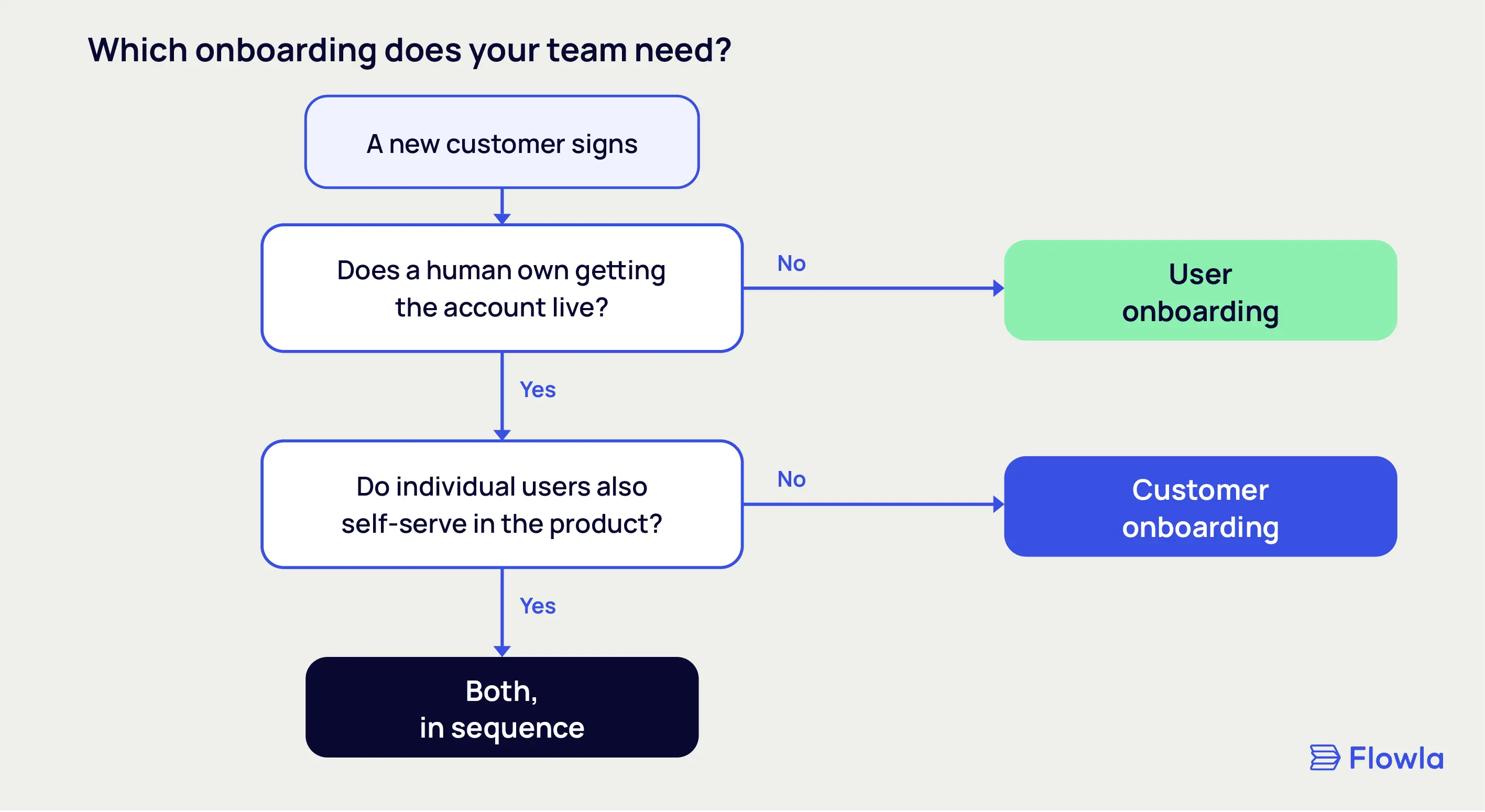
You're running customer onboarding if
A rep closed the deal and now a human owns getting that account live. Some of the setup happens outside the product: data migration, integrations, documents, training. Go-live takes weeks and pulls in more than one person. And you need to know, at a glance, which accounts are moving and which have gone dark. That's customer onboarding, and the tool for it is a digital sales room built for post-sale work.
You're running user onboarding if
People sign up and get going without talking to anyone on your team. Value is something they reach themselves, and you can teach the path inside the product. The motion is self-serve, trial to paid. You're optimizing activation across thousands of users at once.
Where each one stalls
Picking the category isn't the finish line.
The stakes aren't small: 86% of customers say they're more likely to stay loyal to a company that invests in onboarding, and 63% weigh it before they even buy (Wyzowl). Yet both motions die the same quiet death: someone sets the thing up, and then nobody keeps it alive.
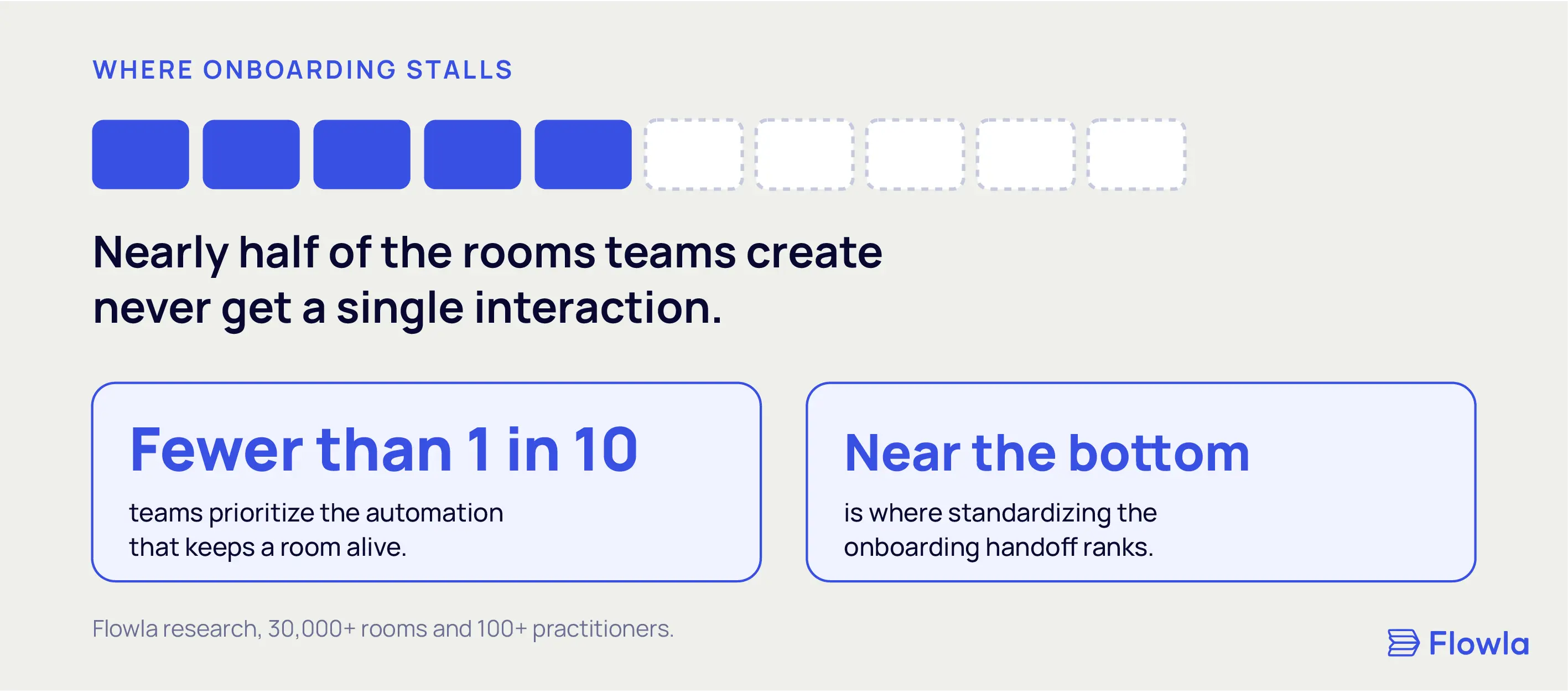
Flowla's research across 30,000+ rooms and 100+ practitioners found that nearly half of all rooms created never get a single interaction. Born dead. Fewer than one in ten teams prioritize the automation that would keep a room current, and standardizing handoffs sat near the bottom of what teams actually put effort into.
The same trap catches both kinds of onboarding. A customer plan nobody updates goes stale, and an in-app flow nobody revisits ages just as fast. Whatever you buy, the budget that counts is the one for keeping it alive, which is where the real onboarding best practices live.
What about a business that does both?
Plenty do, and it usually comes down to segments. Self-serve for the small accounts, sales-led for anyone bigger. HubSpot, Monday, and Notion all run it this way. The logic shows up the moment a big contract lands: the tooltip that works for a 50-dollar-a-month user doesn't come close to what a six-figure buyer expects, which is a kickoff, a named owner, and a plan with real dates on it.
When both exist, they run in sequence. Customer onboarding gets the account configured and the rollout mapped. User onboarding then takes each person that account brought on and carries them to value.
This is the one spot where a real handoff lives, and it's exactly where things break. It fails in two directions. The account goes live, but the people inside it never build the habit, so it lapses quietly. Or the people are ready to go, but the account they log into was never set up for them. Either gap churns the deal. So the rule most teams settle on is a plain one: don't run a single playbook across both. High-touch for the accounts that earn it, in-product for the self-serve base, each with its own owner and its own measure of done.
Run only one motion? Then there's no handoff to manage, and inventing one is work for its own sake. Build for what you've actually got.
Choosing tools for each
Tools for customer onboarding
- Purpose-built onboarding and sales-room platforms: Flowla, Rocketlane, OnRamp, GUIDEcx
- Lightweight client portals: Dock and similar, when the needs are simple
- PSA tools for teams that bill for the implementation work: Rocketlane
- CS platforms that roll onboarding into the wider lifecycle: ChurnZero, Gainsight
Tools for user onboarding
- Digital adoption platforms (DAPs): Pendo, Userpilot, Appcues, WalkMe, Chameleon
- Product analytics beside them to see whether the flow actually works: Mixpanel, Amplitude, PostHog
Where Flowla fits
Flowla is built for the first job: human-led onboarding run in a room. In-app product guidance is a different tool's job.
The line is easy to draw. With something like Pendo, onboarding happens inside the app, click here, do this next. Flowla is the plan the account works through instead, the mutual action plan that says book the kickoff, finish setup, hit go-live.
If in-app product guidance is the real need, a DAP is the better buy, and we'll say so. The job Flowla takes on is the other one, where a human is accountable for the account reaching value.
Where Flowla earns its keep is the account-level work most tools treat as an afterthought. That includes the sales-to-CS handoff, where the same room carries a customer from closed deal into onboarding without anyone starting over.
It shows up in the numbers, too. Mindbody ran its customer onboarding on Flowla and cut onboarding time by 34%, with twice as many customers live in their first week.
FAQ
What's the difference between customer onboarding and user onboarding?
Customer onboarding is the human-led work of getting a whole account live after a deal closes, run by CS or implementation. User onboarding is the automated, in-product push that gets one person to their first useful action. Customer onboarding works at the account level and takes weeks. User onboarding works one user at a time and takes a session.
Do customer and user onboarding use the same tools?
No. Customer onboarding runs on a platform built for account-level, human-led work, an onboarding or digital sales room tool. User onboarding runs on a digital adoption platform that layers guidance into your product. A DAP can't run a multi-stakeholder implementation, and an onboarding platform won't inject tooltips into your app. Teams that need both just run them side by side.
Who owns each in a B2B org?
Customer onboarding sits with customer success, onboarding, or implementation, because it's relationship and project work. User onboarding sits with product and growth, because it lives in the product and gets judged on activation. When a company runs both, the two teams connect through a handoff, each with its own tool.
How long should customer onboarding take?
Most B2B customer onboarding runs 30 to 90 days from closed-won to first value, depending on how complex the product is and how many stakeholders are in the room. The aim is reaching a real outcome quickly enough that early churn never takes hold. User onboarding, for contrast, is usually one session.
Is customer onboarding the same as implementation?
They overlap, but no. Implementation is the technical setup: configuration, integrations, data migration. Customer onboarding is the bigger process wrapped around it, including the kickoff, stakeholder alignment, training, and the push to first value. Implementation is one phase inside customer onboarding, and the wider process covers everything around it.
.webp)
.webp)
.webp)
.webp)
.webp)
.webp)
.svg)

.webp)
.webp)