





- Most client onboarding failures are set before onboarding starts, at the handoff, where what sales learned about the customer rarely reaches the team that takes over.
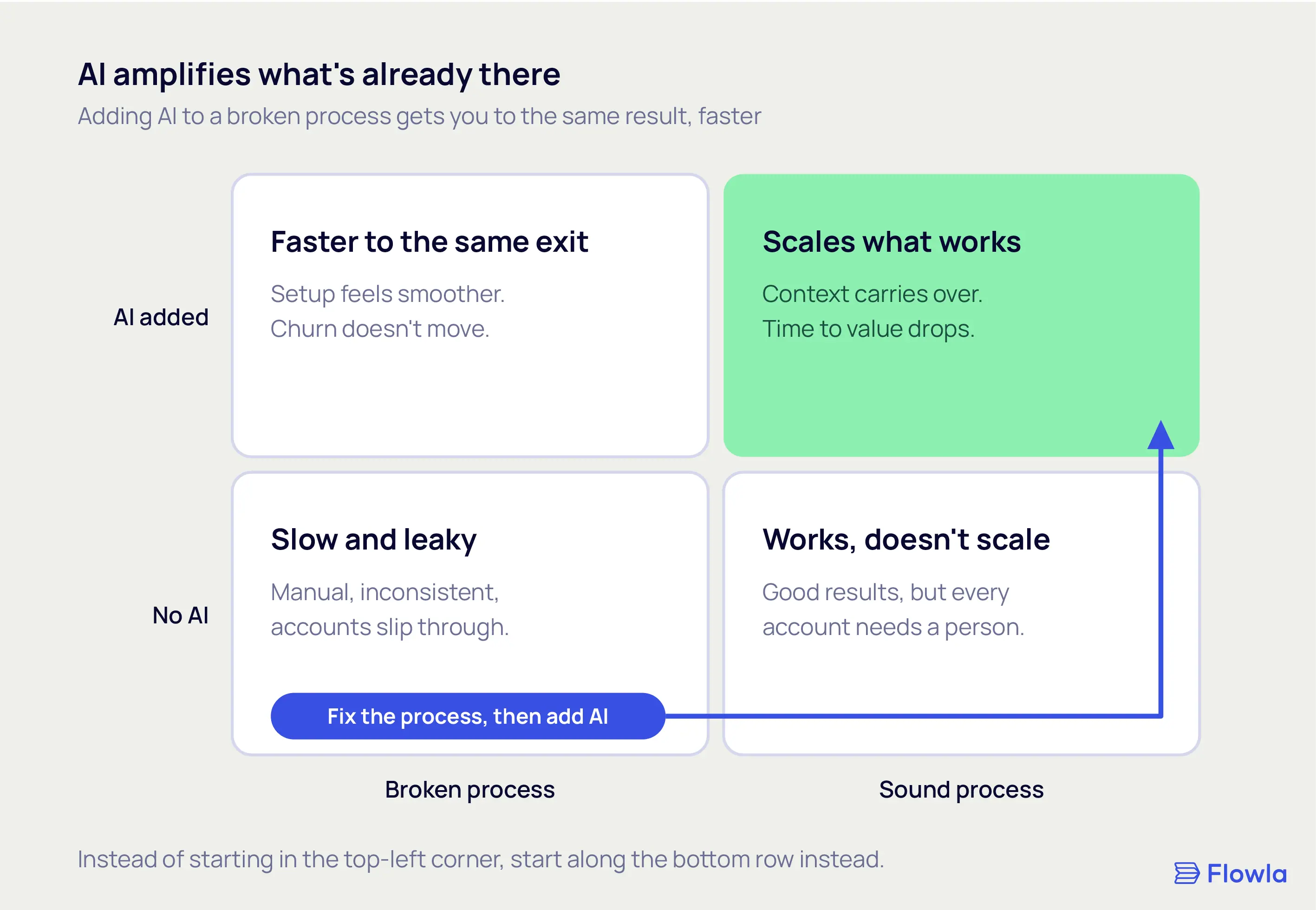
- AI does not improve onboarding on its own. It speeds up whatever process is already there, so a faster version of a weak onboarding just reaches the same result sooner.
- The reliable wins today are coordination (intake, reminders, data entry, status) and early risk signals, while judgment, relationships, and high-stakes moments stay human.
- The highest-leverage place to point AI is the handoff: carry the customer's goals, stakeholders, and the promises made during the sale into the first weeks after it.
Close to half of new customers give up on onboarding when value is slow to arrive. In OnRamp's 2025 survey of 161 customer success and onboarding leaders, 48% of customers abandoned onboarding when they didn't get value quickly. That loss happens in the first weeks of the relationship, the exact window onboarding is supposed to own.
A lot of that gap gets blamed on onboarding, and some of the blame is fair. But plenty of what looks like an onboarding failure started earlier, at the moment the deal closed and the account changed hands. Sales knew why the customer bought, who needed convincing, and what a win looked like in the customer's own words. Very little of that reaches the people who run onboarding.
Most guides on AI onboarding stop at the setup work: collecting documents, chasing signatures, nudging people through intake forms, fielding the same first-week questions. All of it is worth doing, and we get to it below. None of it touches the handoff, and the handoff is where onboarding falls behind before week one is over.
Here's what's below: why AI doesn't improve onboarding on its own, the handoff problem most guides miss, five concrete ways to use AI across the onboarding timeline, and how to add it without making the experience worse.
Part 1: Why AI doesn't automatically improve onboarding
The quickest way to waste money on AI is to bolt it onto a process that was already broken. AI does not fix onboarding. It speeds up whatever onboarding you already have, good or bad.
So before any tooling, it helps to be honest about what AI can and can't do here, and about the one question that decides whether it helps at all.
What is AI client onboarding?
AI client onboarding uses artificial intelligence to automate the coordination work of moving a new customer from signed contract to active use: reading and filing documents, populating records, sending reminders, and answering common setup questions. The stronger versions go further and carry context from the sales process into onboarding, so the customer does not have to start from zero.
If you're still separating the two kinds of onboarding, our guide to customer onboarding vs user onboarding covers where each fits. This post is about the first kind: the project your team runs to get a new account live.
Adoption is still partial, not total. In IBM's research, 47% of customer service executives said they had only partially automated onboarding, which tells you this is early and uneven rather than a solved, switch-it-on capability. The teams getting value are precise about where they point it.
AI amplifies what's already there
Say you swap a clunky, docs-heavy setup for a slick AI-guided flow. Activation looks smoother. A quarter later you check churn, and it hasn't moved.
That happens when onboarding was never the reason customers were leaving. If people churn because the product was oversold, or it's a poor fit, or the value never matched the pitch, a faster setup just walks them to the same exit more efficiently.
AI earns its place when the problem is genuinely one of coordination or speed:
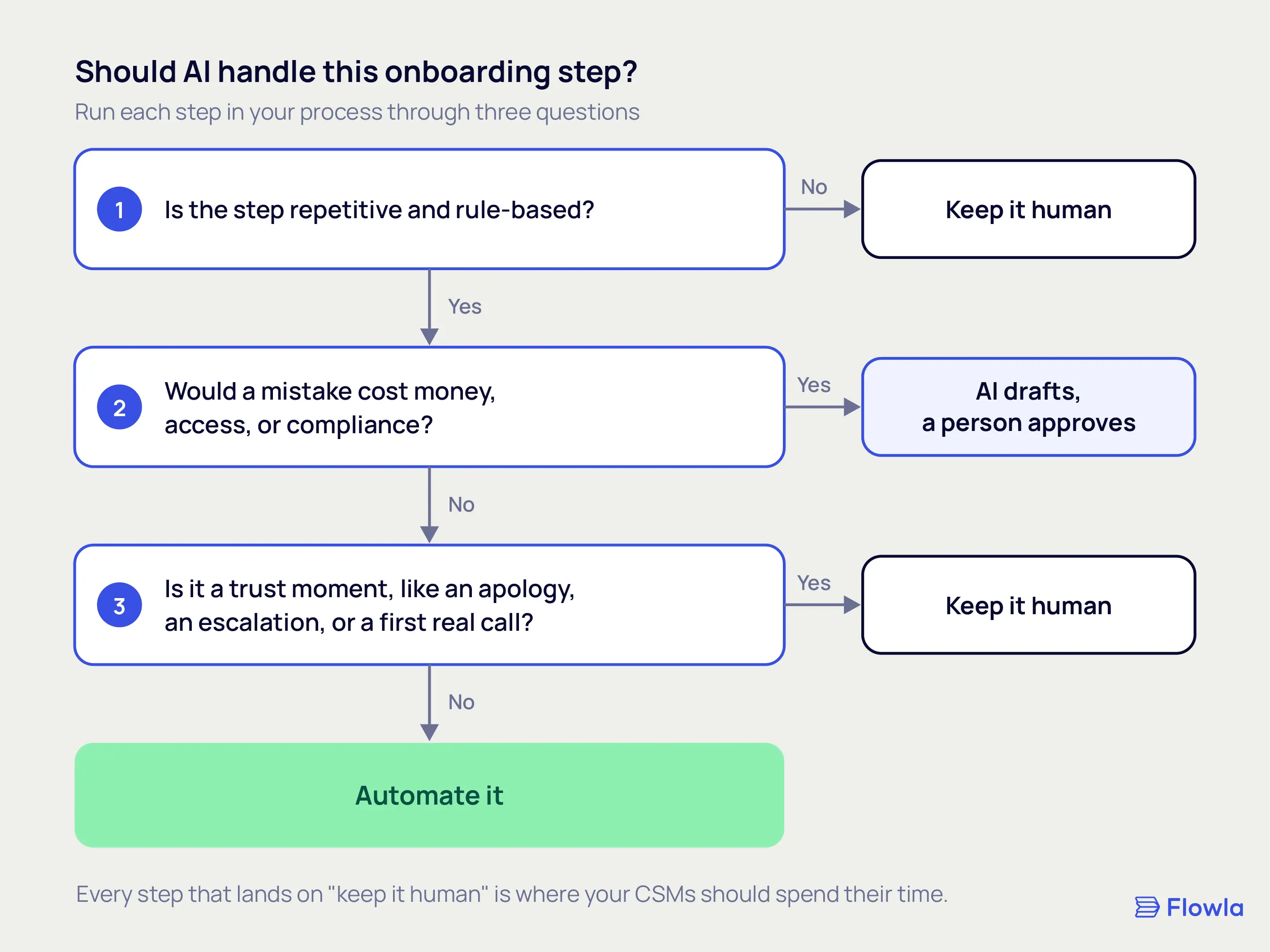
- Repetitive, rule-based steps: document intake, data entry, reminders, status updates.
- Reconstruction work: rebuilding context that someone already had.
- Scale problems: more accounts than your team can personally watch.
It adds close to nothing when the real problem is fit, pricing, or a promise made in the sale that the product can't keep. No amount of automation fixes those. They need a person and an honest conversation.
Name the problem and the metric before you add anything
Before adding AI to any onboarding step, name the specific problem it solves and the metric it should move. If you can't name both, you're adding AI because it's available.
Take "automate the welcome email." It describes a task. You could ship it and still have no idea whether anything improved. Now take "cut the time from signature to first value from 21 days to 10." That is a number you can check in a quarter, and it tells you whether the AI was worth adding. A lot of onboarding AI never gets measured against anything real, which is how teams end up paying for tools that feel productive and leave the numbers flat.
Part 2: The handoff, the part most AI onboarding guides skip
For revenue teams, onboarding breaks most often at one seam: the move from sales to onboarding. The deal is signed, the account changes hands, and the context that made the sale work stays behind.
The generic guides miss this because they're written for agencies and small service firms, where one person often carries the client from pitch to delivery. In a B2B revenue team, the person who closed the deal and the person who onboards the customer are usually different people, sometimes in different departments, occasionally in different time zones. There's a second wrinkle: the stakeholders who signed the deal are often not the people who show up to onboarding, so even the relationships have to be rebuilt.
Why onboarding leaks at the sales-to-onboarding seam
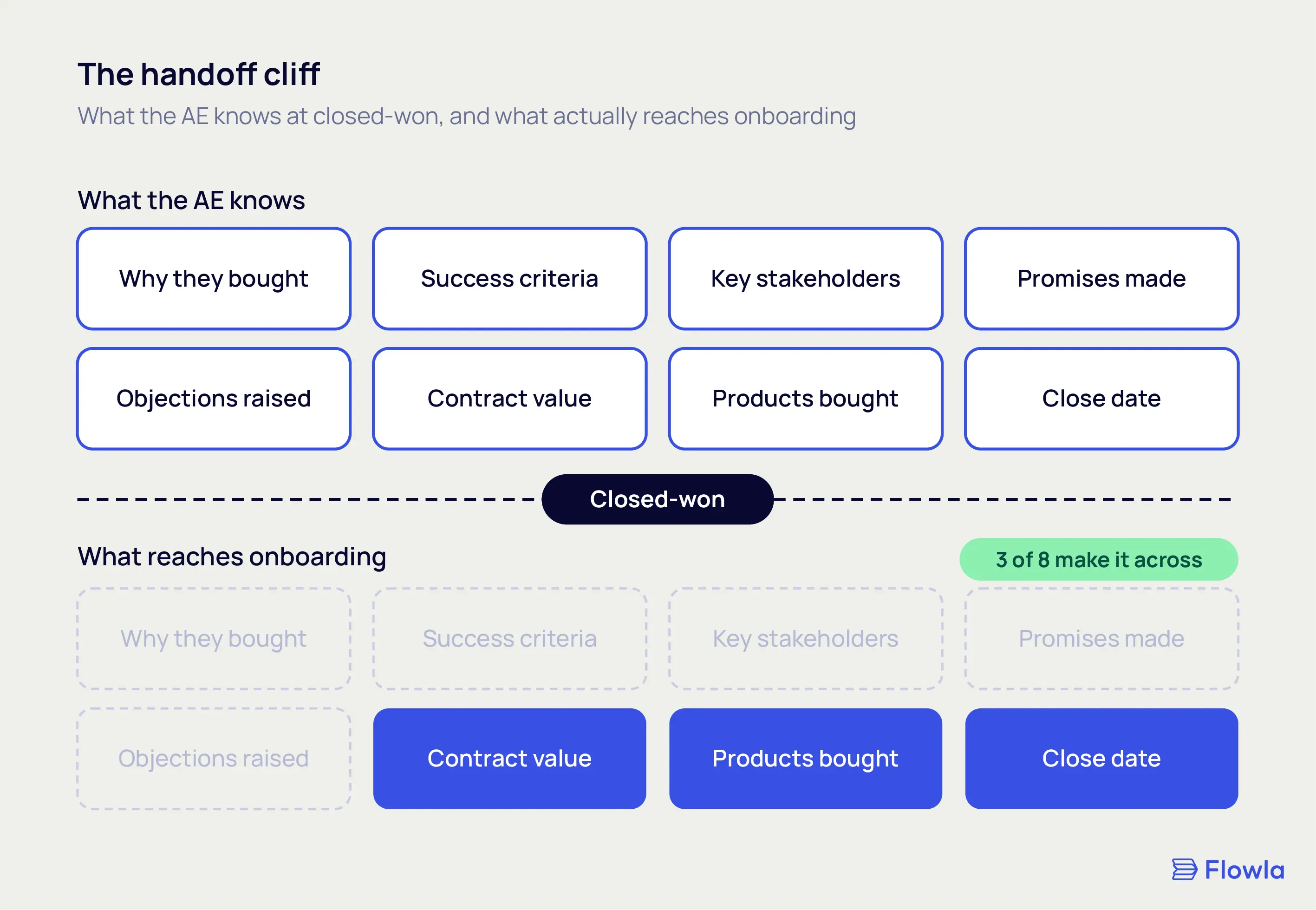
The leak happens because the richest context lives in the least durable place: a salesperson's memory and inbox. The CRM captures the deal amount, the products, and the close date. It rarely captures why the customer bought, what they said success would look like, or the quiet concern the champion raised on the third call. When the account moves, that context doesn't move with it.
A revenue leader we spoke with recently described the gap between his sales and customer success teams as "two separate streets that are in different towns, in different states, in different countries." The two functions touch the same customer weeks apart and act as if the other never existed. That distance is where onboarding starts behind, before anyone has done anything wrong.
This matters because those early weeks decide whether the account sticks. OnRamp's 2026 follow-up research names misalignment between sales and CS among the biggest operational blockers in onboarding. A leaky handoff costs more than goodwill. It burns days in the exact period that decides whether the customer stays.
Our own research into 30,000 deal rooms points the same direction. The rooms that work are the ones kept as the live center of an active deal, not a one-time content drop, and nearly half of all rooms created never get a single view because they were treated as the latter. The same principle holds after the close. Continuity across the whole relationship, rather than a clean break at signature, is what keeps a customer from stalling quietly in week three.
What the AE already knows that onboarding never sees
By the time a deal closes, the account executive is holding a detailed picture of the customer. Almost none of it is written down in a form onboarding can use. The context that usually gets lost at the handoff:
- The real reason they bought, which is usually narrower than the use case on the order form.
- The success criteria the customer named out loud, and the deadline that matters to them.
- Who championed the deal, who pushed back, and who stayed quiet.
- The promises made to get the deal over the line.
- The objections raised, and how they were answered.
The same revenue leader said plainly what he wished moved across: "a handoff or context from transcript that could be helpful in the first 90 days of working with this customer." The first 90 days are when a customer decides whether they made a good call. Sending onboarding in without that context means asking them to prove the value again, cold.
For complex deals, the stakeholder map matters as much as the goals. Our breakdown of the B2B buying committee goes deeper on mapping those roles. When that map is lost at the handoff, the CSM rebuilds it from scratch, slowly, in front of the customer.
Carry the context forward automatically
The bigger use is execution. Instead of standing by as a chatbot that answers setup questions, AI moves the context from the sale into onboarding on its own. The outcomes the customer named in a call become the goals on the onboarding plan. The stakeholder map arrives with the account. The promises that closed the deal sit in front of the CSM before the first kickoff, instead of surfacing weeks later when the customer says "your rep told us."
The teams who get value here have stopped asking what the customer can ask the bot. The question underneath is simpler: what did we already learn that the next team needs, and can the system carry it over without anyone retyping it?
At Flowla, this is the problem we build around. Because a Flowla room can run from the sales process into onboarding as one continuous space, the context the buyer and seller built together is already there when the account goes live. REX, our revenue execution agent, carries it forward: it surfaces what was promised and nudges the next step before anyone has to ask. The goal is simple: nobody should have to rebuild what the company already knew. If you're comparing options, our look at digital sales rooms built for onboarding covers how the main tools handle the post-sale side.
Part 3: Five ways to use AI across your onboarding
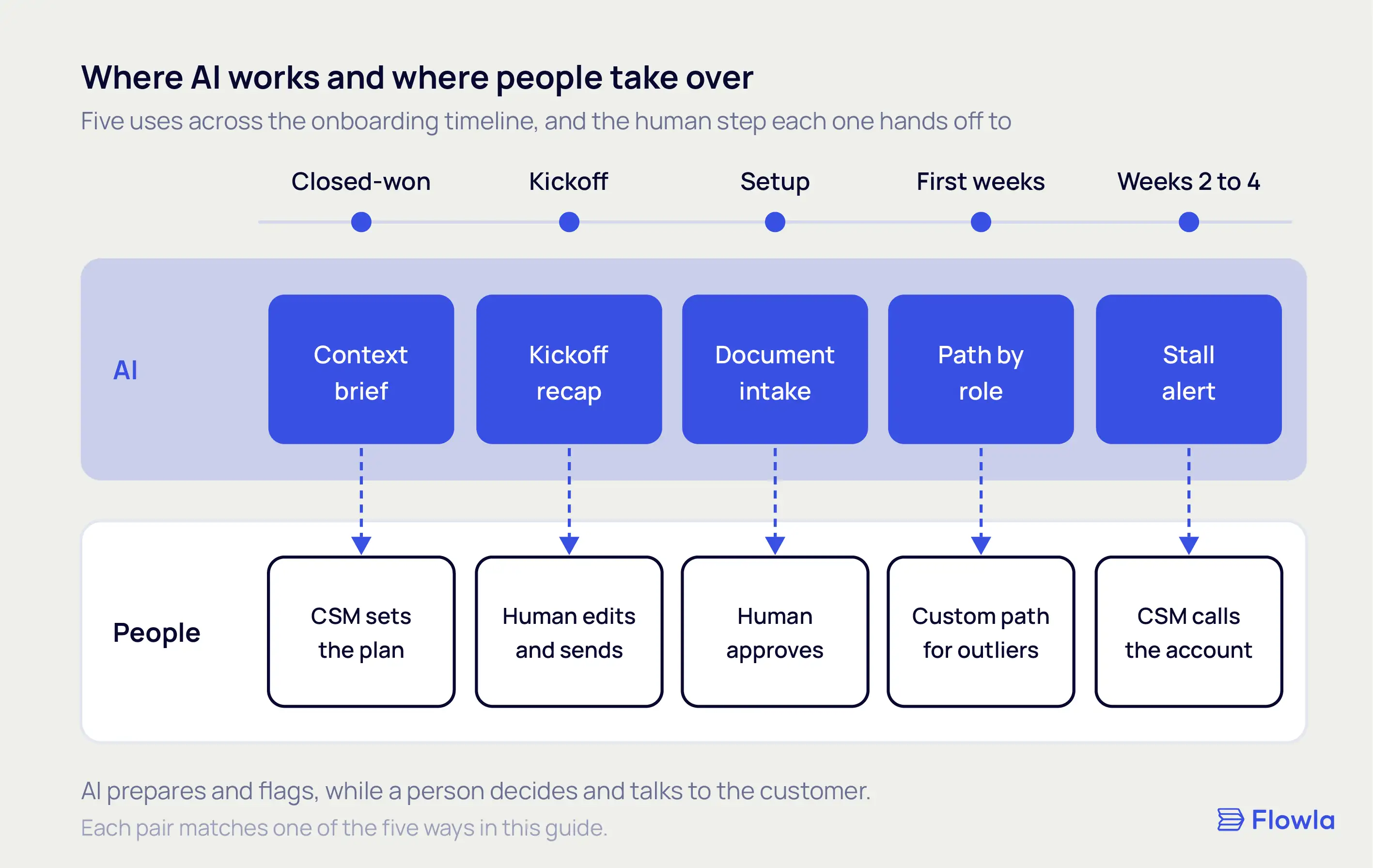
The useful version of this list runs in the order onboarding actually happens, from the handoff through to the weeks after. For each one, the same three questions: what it does, what it looks like in practice, and where it stops being the right tool.
1. Carry the deal context into the kickoff
What it does: pulls the goals, stakeholders, and commitments from the sales process into the onboarding plan, so the first kickoff starts from what the customer already told you.
Picture a CSM who inherits an account on a Monday. The old way, she spends her first days reading old email threads, pinging the AE on Slack, and asking the customer to re-explain their goals on the kickoff call. The AI-assisted way, she opens the account and the context is already there: the three outcomes the buyer named, the champion and the skeptic, the integration promised during the sale. The kickoff starts at step two. Our guide to running an onboarding kickoff meeting covers what that first call should do once the context is in hand.
How to make it work:
- Pull from the real sources: call transcripts, emails, and the deal room, not a form the rep fills in from memory.
- Capture it at closed-won, while it's fresh, not weeks later.
- Put it where the CSM already works, so she doesn't have to go looking for it.
Where it stops: AI can assemble the context, but a person still reads it and sets the plan. The handoff gives the CSM a running start. It doesn't write the plan for her.
2. Automate the coordination layer
What it does: takes the repetitive setup work off people. Document collection and extraction, data entry into your systems, reminders, and a live status both sides can see.
This is the least glamorous and most reliable use. When a customer uploads a contract or an intake form, AI reads it and fills the right fields instead of someone retyping them. It requests what's missing in a sensible order and chases the things a human forgets. If you're mapping these steps for the first time, write down your client onboarding process before you automate any of it.
How to make it work:
- Start with the highest-volume, lowest-judgment tasks, where a mistake is cheap.
- Keep a human approval step on anything that touches money, access, or compliance.
- Measure it on time saved and errors caught.
Where it stops: coordination isn't the relationship. Automating a reminder is fine. Automating the first real conversation with a new customer is a mistake.
3. Personalize the path by role and segment
What it does: adjusts the onboarding path to who the customer is, instead of pushing everyone through one generic checklist.
An enterprise account with a security review and five stakeholders does not need the same first week as a ten-seat team that wants to be live by Friday. AI can route each one down a path that fits, using what you already know: company size, the products bought, the role of the person logging in. A platform admin and an end user who sign in on day one should not land on the same first screen.
How to make it work:
- Segment on things you can act on: role, plan, use case, company size.
- Build the paths from where real customers get stuck, not from guesses.
- Keep one human-written path for the accounts that don't fit a segment.
Where it stops: personalization needs clean data. If your records are thin or inconsistent, fix that before you let AI route anyone.
4. Catch stalls early with proactive signals
What it does: watches engagement and activation signals, then flags an account going quiet so a human can step in before it's lost.
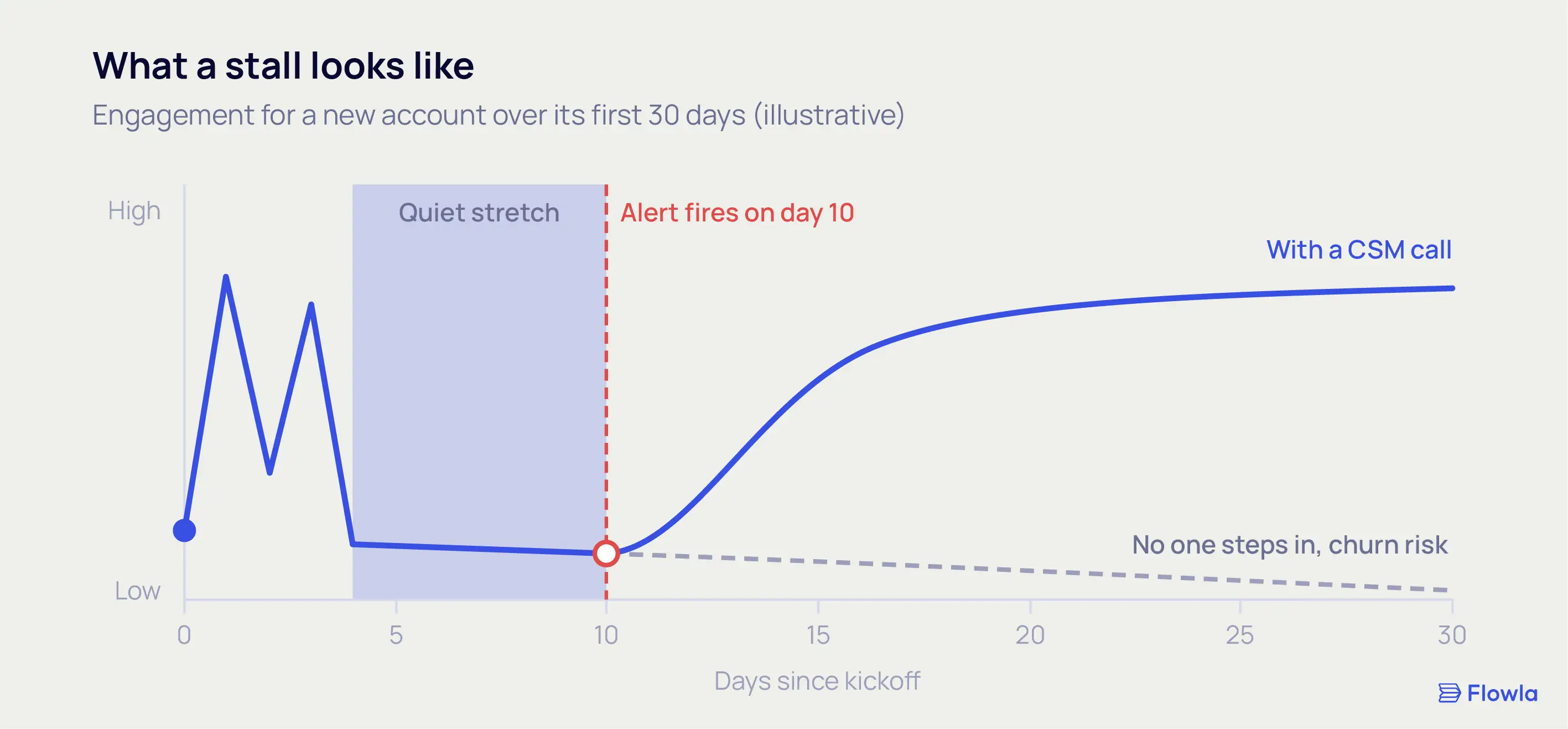
A lot of teams bolt on a chatbot that waits for the customer to ask for help. The stronger move is an agent that notices the customer has gone silent and tells the CSM. Take an account that logs in twice in week one, then goes dark for ten days. That silence is the signal. An account that goes quiet in its first few weeks rarely comes back on its own, so catching the stall on day ten beats finding out at the renewal.
How to make it work:
- Define the activation milestone that actually predicts retention for your product, then watch for accounts that miss it.
- Route the alert to a person with enough context to act, not to a dashboard nobody opens.
- Use the nudge to start a human conversation. Another automated email rarely wakes up a quiet account.
Where it stops: AI can spot the stall. A person still has to make the save.
5. Draft the customer-facing content from real data
What it does: generates the onboarding plan, the recap, the summary, and the weekly status from the context you already have, so your team edits instead of starting from a blank page.
After a kickoff, AI can draft the recap and the mutual plan from the call itself. It can keep the customer's view current without a CSM rebuilding it by hand each week. The team reviews and sends, which is faster than writing from scratch and steadier across accounts.
How to make it work:
- Generate from something real (the transcript, the plan, the account history), not a generic template.
- Keep a human edit before anything reaches the customer.
- Reuse what works: the best recap becomes the pattern for the next one.
Where it stops: a generated apology reads like a generated apology. Keep people on anything emotional or high-stakes.
Part 4: How to add AI without making onboarding worse
Adding AI to onboarding is easy to do badly. A few principles keep it useful.
Start at the handoff, not the welcome email
A lot of AI onboarding projects start with the most visible, least valuable step: the welcome sequence. It demos well and changes little. The higher-leverage place to start is the handoff, because fixing it cuts the reconstruction cost on every account rather than polishing the first email of each one.
Another leader on that same revenue team described the goal as reaching "a source of truth where we just have that information documented and visible across the business." That's the target. Our guides to mastering buyer enablement and automating post-demo follow-ups cover the habits that make it work earlier in the deal.
Where AI is the wrong tool
Some moments should stay human. Naming them protects the rest of the work from feeling automated in the wrong places. Keep a person on:
- High-touch enterprise relationships, where a six-figure customer expects a named human who knows their business.
- Apologies and escalations, especially in the first weeks, when trust is thin and a templated response does real damage.
- Genuinely complex, multi-path products, where one generated flow can't cover the range of real needs.
- High-liability or regulated moments, where a wrong answer creates risk for the customer and for you.
The line isn't hard to draw. Let AI run the coordination and the record-keeping. Let people own the judgment and the relationship. The trouble starts when you cross it. We go deeper on drawing that line in our guide to what to automate in customer onboarding, and what not to. For accounts that need a person at every step, see our guide to high-touch onboarding.
How to tell if it's working
Track the metrics tied to the customer reaching value, not the ones that measure activity:
- Time to first value, in days from signature to the first real outcome.
- Activation rate. For a rough benchmark, Lenny Rachitsky and Yuriy Timen's survey of 500+ companies puts the SaaS average at 36%, though it skews toward self-serve products.
- Onboarding completion, and how it correlates with 90-day retention.
- Handoff completeness: how much of the deal context actually arrives before the CSM takes over.
- The re-ask rate: how often onboarding asks the customer something the customer already told sales. When it falls, context is traveling.
Will AI make client onboarding feel impersonal?
AI makes client onboarding feel impersonal only when it replaces the moments that needed a person. Used on coordination (reminders, document collection, status updates), it frees your team to spend more of their time on the relationship. Used on apologies, complex guidance, or high-stakes calls, it reads as cold. The feel depends entirely on where you draw the line.
FAQ
How does AI improve client onboarding?
AI improves client onboarding by taking out the slow, manual parts: carrying deal context from sales into the kickoff, filling records from documents, sending reminders, and flagging accounts that go quiet. The gains show up as a shorter time to first value and fewer customers asked to repeat themselves, but only when onboarding was the real bottleneck to begin with.
What are examples of AI in client onboarding?
Common examples of AI in client onboarding include a handoff brief generated from sales call transcripts, intake documents read and filed automatically, onboarding paths that change by role or plan, alerts when a new account stops logging in, and kickoff recaps drafted straight from the call. In each case, a person reviews the output before the customer sees it.
How much time does AI client onboarding save?
AI client onboarding saves the most time on repetitive coordination (document collection, data entry, reminders, status updates) and on the reconstruction work at the sales-to-onboarding handoff. The exact saving depends on how manual your current process is, so measure it against your own baseline for time to first value rather than a headline industry number.
Does AI replace the onboarding or CS team?
AI does not replace the onboarding or customer success team. It removes coordination and admin work so that team can spend more time on judgment, relationships, and the accounts that need real attention. The decisions and the hard conversations stay human. Teams that try to automate those parts usually damage the relationship rather than scale it.
What's the difference between AI onboarding and an onboarding chatbot?
An onboarding chatbot answers questions a customer types during setup. AI onboarding, in the fuller sense, runs in the background across the whole process: carrying context from the sale, populating records, coordinating tasks, and flagging risks before anyone asks. The chatbot is one small feature. The more useful version is execution that happens whether or not the customer opens a chat window.
Does AI onboarding work for enterprise and high-touch B2B?
AI onboarding works for enterprise and high-touch B2B, but its job changes with deal size. In high-volume self-serve, AI can run most of the flow. In enterprise, it's better aimed at preparing the humans: briefing the CSM before the kickoff, carrying deal context across the handoff, and flagging risk, so the relationship stays personal while the busywork behind it gets automated.
Is it safe to run AI on our onboarding and customer data?
Running AI on onboarding and customer data is safe when the data stays inside tools that isolate it and meet standards like SOC 2 and GDPR, and when you take extra care in regulated settings. The real risk is feeding customer records into general-purpose models that might retain them. Check where your data goes and who can access it before you connect anything.
Which onboarding tasks should you automate first?
Start with the tasks that are high-volume, low-judgment, and low-risk: document collection, data entry, reminders, and status updates. These save real time and a mistake is cheap. Leave anything involving money, access, compliance, or a real relationship until you have a human approval step in place and a metric to watch.