






- Onboarding tech stacks usually break at the handoffs between tools, so the wiring and its owners matter as much as the tools you buy.
- Most B2B teams need seven layers, connected by six triggers that each have a named owner.
- At many companies with a fully configured CRM, the move from closed-won to onboarding still depends on a Slack message someone types by hand.
- Build the stack in stages, and start with the trigger where your onboardings stall most often.
Only 9% of onboarding leaders have reliable, real-time visibility into project health across their portfolio, according to GUIDEcx's State of Customer Onboarding 2026 survey of 200 onboarding professionals. In the same survey, 28% said they spend more than six hours a week on manual status updates and internal reporting.
Most of those teams already pay for plenty of software. A typical B2B onboarding tech stack includes a CRM and Slack, plus e-signature and a customer success platform. Many also have a dedicated onboarding portal. Information still moves between those tools by hand. Someone copies deal notes into a kickoff doc, someone posts in Slack when a deal closes, and someone rebuilds the status report every Friday.
A revenue operations lead we spoke with this month described the pattern while her leadership team debated replacing their CRM:
"We have multiple systems that don't speak to each other. We try to solve an issue by buying another piece of software [...] there's a lack of process. There's no clear ownership on who owns the data. Like, that's the thing we need to solve for."
This guide is built around that problem. Inside, you'll find:
- A one-table overview of the seven layers of an onboarding tech stack, with example tools for each
- A closer look at every layer: its job, who needs it, what it should send and receive, and the most common mistake
- The six-trigger framework for connecting the layers, with setup steps and a test for each trigger
- A 15-minute audit to find the weakest connection in your current stack
- The minimum stack for three stages of growth, with example tool combinations
Quotes come from calls with onboarding and revenue teams in November 2026 and are anonymized. Flowla makes a customer onboarding portal, so we appear in this guide alongside the other tools in that layer.
The onboarding tech stack at a glance
If you only read one part of this guide, read this table. Each layer has one job, and each one needs to connect to at least one other layer.
What an onboarding tech stack includes
The term gets used for very different things. Some guides use it for in-app product tours. Others use it for every customer success tool on the market. For B2B teams onboarding customers after a sale, the definition is narrower.
What is an onboarding tech stack?
An onboarding tech stack is the set of connected tools a team uses to take a new customer from signed contract to first value. In B2B, it usually includes a CRM, a customer-facing onboarding portal, team communication, e-signature and forms, adoption tools and a customer success platform, plus the integrations that move information between them.
The integrations at the end of that definition are where most stacks fall short. Picture two companies with identical tools:
- Company A: a deal closes in Salesforce. An onboarding portal opens with the right template, the buyer's contacts and the AE's notes. The onboarding lead gets a Slack alert and assigns an owner the same morning.
- Company B: a deal closes in Salesforce. Two days later the AE remembers to post in Slack. The CSM asks for the discovery notes, builds the plan by hand and emails the customer a spreadsheet.
Both companies own the same software. Company A has connected it.
What tools do you need for customer onboarding?
At minimum, customer onboarding needs a CRM to record what was sold, a customer-facing onboarding portal to run the plan, and a team chat tool such as Slack to alert the right people. Growing teams add e-signature and forms, adoption tools and a customer success platform, connected through native integrations or an iPaaS.
Customer onboarding stack vs user onboarding stack
These two stacks get confused often, and they solve different problems. User onboarding vendors such as Appcues have written detailed guides to the in-product side. This guide covers the customer side.
Most B2B companies need both. For a longer breakdown, see our guide to customer onboarding vs user onboarding.
How is an onboarding system different from a CRM or customer success platform?
A CRM records the commercial relationship: the deal, the contacts and what was sold. A customer success platform tracks account health after go-live. An onboarding system runs the implementation itself, with a plan, tasks and a workspace the customer uses. Each holds different information, so the value comes from how they pass it along.
What's changed in onboarding tech stacks in 2026
Four shifts this year affect how the layers connect:
- Note-takers are on many more customer calls. Gong, Fireflies, Fathom, Granola and the built-in tools in Zoom, Teams and Google Meet now produce a transcript for many onboarding calls. That makes trigger 3 below possible for teams that couldn't build it before. Some industries still block recording, which we cover in trigger 3.
- AI agents can work across tools. MCP connections let an agent read from your CRM, portal and chat in the same task, which only helps if those tools hold current information.
- CRMs ship their own agents. Salesforce Agentforce and HubSpot's Breeze agents now sit inside the system of record. They work best on clean, current CRM data, which is one more reason trigger 2 matters.
- Customers expect a shared Slack channel. Slack Connect channels with customers are increasingly common in B2B onboarding, which raises the stakes on trigger 5.
Erdem Gelal, Flowla's co-founder and CEO, described the dependency on a customer call this month:
"the foundation for any AI to create good results is it having a good set of information, having access to high quality context. And in my, in my point of view, like 80% of that valuable context comes from what's discussed in these calls."
We go deeper on where AI helps onboarding teams in AI in client onboarding.
The 7 layers of an onboarding tech stack
Each layer below follows the same format, so you can compare them quickly. One rule applies to all seven: give each layer one job. Drift usually starts when two tools hold the same information. A common example is an onboarding plan that lives in the workspace and also in a spreadsheet a CSM keeps as a backup. A few weeks in, the dates in the two no longer match.
1. CRM
Its job: hold the commercial facts onboarding starts from.
Example tools: Salesforce, HubSpot, Attio.
Who needs it: every B2B team. Sales has usually chosen the CRM already, so onboarding builds around it.
What it should send to onboarding:
- Products and scope sold, as line items or deal properties
- Contract start, billing start and renewal dates
- Buying contacts and their roles
- The AE's handoff notes: goals, risks, promises made and the real sponsor
What it should receive back:
- Milestone status and the expected go-live date
- New stakeholders who joined during onboarding
- The onboarding outcome at go-live
Common mistake: running the onboarding plan inside the CRM with tasks and notes. Customers can't see any of it, so CSMs end up copying every update into email.
Example: a customer buys two products. The line items on the opportunity tell the onboarding workspace to load the template for those two products, including the integration tasks for each.
Salesforce customer onboarding: what to configure
- A record-triggered Flow on the Opportunity that fires when Stage changes to Closed Won, or to a dedicated implementation stage
- Opportunity Products (line items) mapped to onboarding templates
- Contact Roles on the opportunity, so the champion, decision maker and sponsor carry over with their roles
- Custom fields for go-live date and onboarding status, written back from the workspace
- A Salesforce-native onboarding tool such as Precursive, if you want implementation projects to live inside Salesforce itself
Can Salesforce be your onboarding system?
Salesforce can run onboarding if you add a Salesforce-native tool such as Precursive, which keeps implementation projects inside the CRM. It suits teams deeply committed to Salesforce. The tradeoff is the customer experience. Customers rarely work inside your CRM, so most teams still need a customer-facing workspace connected to it.
HubSpot onboarding automation: what to configure
- A deal-based workflow that fires when the deal stage moves to Closed Won, or to a dedicated implementation stage
- Line items, or a "products purchased" deal property, to select the onboarding template
- An onboarding pipeline built on tickets or a custom object, if you want onboarding stages visible inside HubSpot (custom objects require an Enterprise subscription)
- Deal and contact properties for go-live date and onboarding status
- Associations between the deal, company and contacts, so the right people carry over
2. Customer portal (onboarding workspace)
Its job: give the customer one place to see the plan, complete tasks, submit information and find content.
Example tools: Flowla, GUIDEcx, Rocketlane and OnRamp. Rocketlane leans toward professional services teams that bill for implementation. Our comparison of customer onboarding tools and roundup of client portal software cover pricing and features.
Who needs it: any team running more than a handful of onboardings a month, or any onboarding with several stakeholders on the customer side. Before Mindbody moved onboarding into a dedicated workspace, Madeline Sylvester, their Senior Director of Implementation and Customer Success, described the problem this way: "Customers told us it was difficult to keep track of where they stood. What actions they owed us, and what we owed them."
What to look for:
- Two-way sync with your CRM, including contacts and custom fields
- Templates that change by product or package
- Role-based visibility, so a sponsor sees milestones and the champion sees the full task list
- Notifications by email and Slack, so customers get prompted to come back
- Engagement tracking for each stakeholder
Common mistake: launching the portal and assuming customers will check it. In Flowla's analysis of 30,000+ rooms, about 48% never got any engagement. Those were sales rooms, and onboarding rooms face the same risk. Customers return to a workspace when reminders reach their inbox or chat.
Example: a champion gets a task to upload a user list. The workspace emails a reminder after three days and alerts the CSM in Slack after five.
3. Team communication
Its job: alert people and host discussion.
Example tools: Slack and Microsoft Teams for internal chat, Slack Connect for shared channels with customers, Gmail and Outlook for email.
Who needs it: every team.
What it should receive: closed-won handoffs, stall alerts and customer replies.
What it should send back: decisions that change the plan, such as new dates, scope changes and new owners.
Common mistake: treating a Slack thread as the record. Dates agreed in chat rarely get copied into the plan.
Example: the team agrees in Slack to push go-live back a week. The workspace still shows the old date, and the customer's sponsor books their own launch around it.
4. Paperwork and sign-off
Its job: collect signatures and the information you need before the next step.
Example tools: DocuSign, PandaDoc, Adobe Acrobat Sign, and structured forms inside the workspace.
Typical items: order forms, data processing agreements, security questionnaires, user lists and configuration templates.
Common mistake: sending data templates as spreadsheet attachments. They often come back incomplete or in a different format, and someone on your team has to fix them.
Better approach: forms with required fields inside the workspace. Submitting the form marks the task complete and updates the plan.
5. Adoption and education
Its job: teach individual users how to use the product.
Example tools: Pendo and Appcues for in-app guidance, Guidde and Wistia for video training.
Who needs it: teams with many end users per customer, or products that users learn by doing.
Signal worth wiring into the rest of the stack: repeat views of setup videos weeks after go-live can be a sign that a user needs help and hasn't asked for it.
Common mistake: reporting on video views. Track whether the user completed the action the video teaches.
6. Customer success platform
Its job: track account health, renewals and expansion after go-live.
Example tools: Gainsight for large CS teams, ChurnZero, Planhat and Vitally for lighter setups.
Who needs it: teams where CSMs manage more accounts than they can review personally each week.
What to look for:
- Native sync with your CRM, so health and renewals sit on the same account record
- A way to bring in onboarding data at go-live, natively or through your portal's integration
- Health scores you can build from your own signals
- Playbooks that create tasks when a score drops
What it should receive at go-live:
- The customer's goals for the first 90 days
- Open issues and who owns them
- The stakeholder map, with engagement by person
- How long onboarding took against the original plan
Common mistake: starting the health score at go-live with no onboarding data, which makes the first score a guess.
7. Connective tissue
Its job: move information between the other six layers.
Your options, in order of preference:
- Native integrations: built and maintained by the vendor. Use these first.
- iPaaS tools such as Zapier, Make and Workato: for gaps between tools without a native connection.
- MCP connections and AI agents: let an agent read from and act in several tools at once. Our post on why your deal room needs an MCP explains how this works.
What to look for:
- Native integrations with your CRM and Slack in every tool you buy
- Two-way sync, so updates flow back as well as out
- Field mapping your team can change without engineering
- An alert when a sync fails, so it never breaks unnoticed
Common mistake: building iPaaS workflows nobody documents. They stop working quietly when someone renames a field.
A note on AI agents: an agent can only act on context it can reach. If the sales handoff never captured what was promised, the agent has nothing to work with. We cover where AI helps and where it falls short in AI in client onboarding.
The six-trigger framework for onboarding integration
According to OnRamp's 2026 State of Onboarding report, one in three CS leaders admit they don't know where customers stand in onboarding at any given time. In most cases the information exists in one of their tools. It never reached the person who needed it.
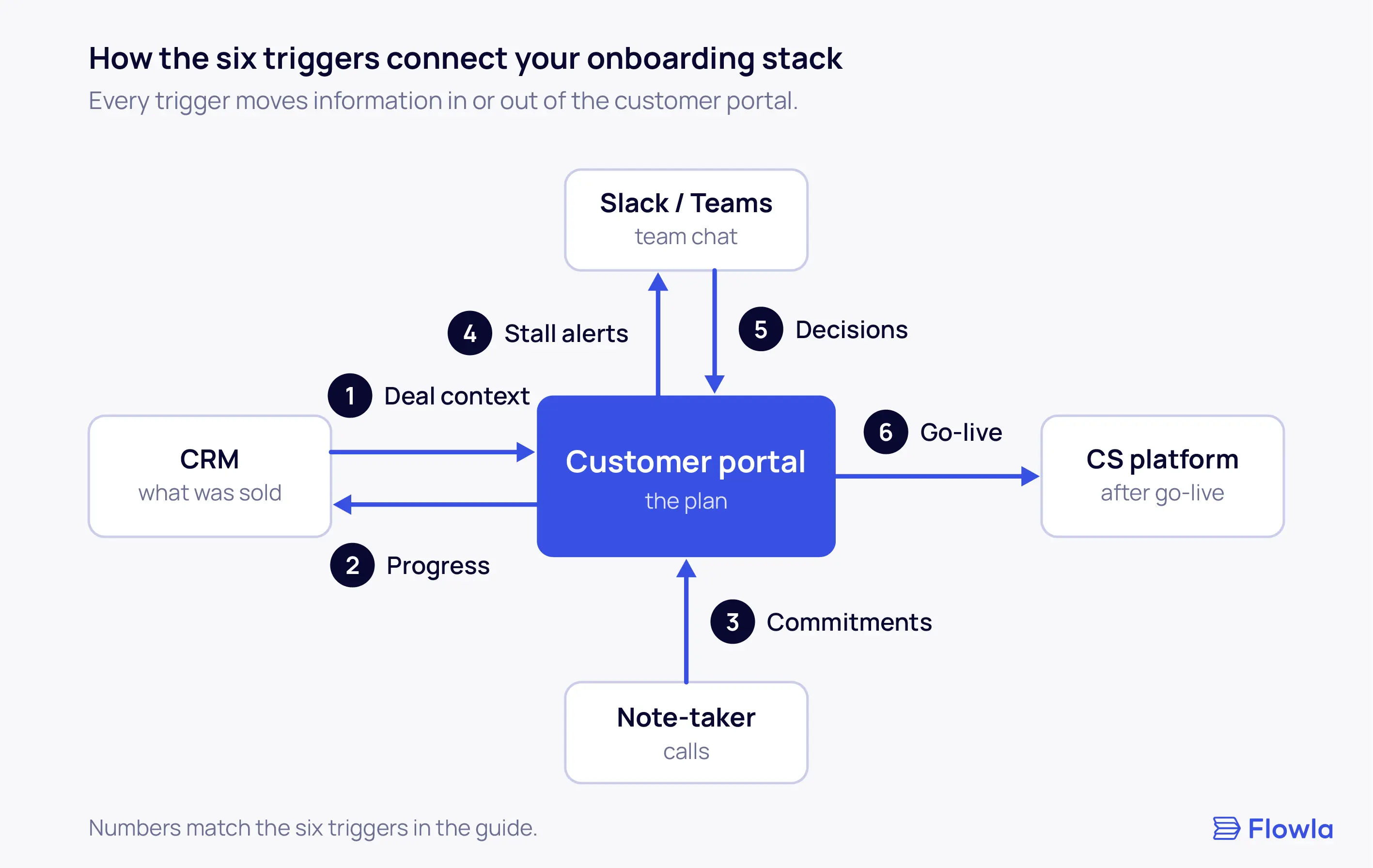
Each trigger below connects two layers. Here's the full framework, followed by a closer look at each trigger.
Trigger 1: Closed-won starts the CRM onboarding workflow
Fires when: an opportunity moves to closed-won in the CRM.
What needs to move:
- Products and scope sold, which select the onboarding template
- Buying contacts and their roles
- The AE's notes on goals, risks, promises made and the real sponsor
- A handoff alert to the onboarding team, with the AE copied
Who owns it: RevOps builds the trigger. The onboarding lead still assigns the project owner by hand.
Why assignment stays manual: an onboarding leader at a customer engagement platform, who runs a large implementation team, told us her leads assign every project themselves. They match each customer to a person based on project size, team capacity and context. That's a sensible line to draw. Automate the setup work and leave the assignment to someone who knows the team.
What it looks like when it breaks: the same leader described how her team hears about a new customer today:
"The sales team will inform us. So normally we are notified over Slack."
Asked whether sales sends those messages by hand, she said that's usually the case. Her company's CRM already creates an implementation project automatically. The context about the customer still travels in a message someone has to remember to post. GUIDEcx's research found that 16% of onboarding teams name a poor sales-to-onboarding handoff as their single biggest challenge.
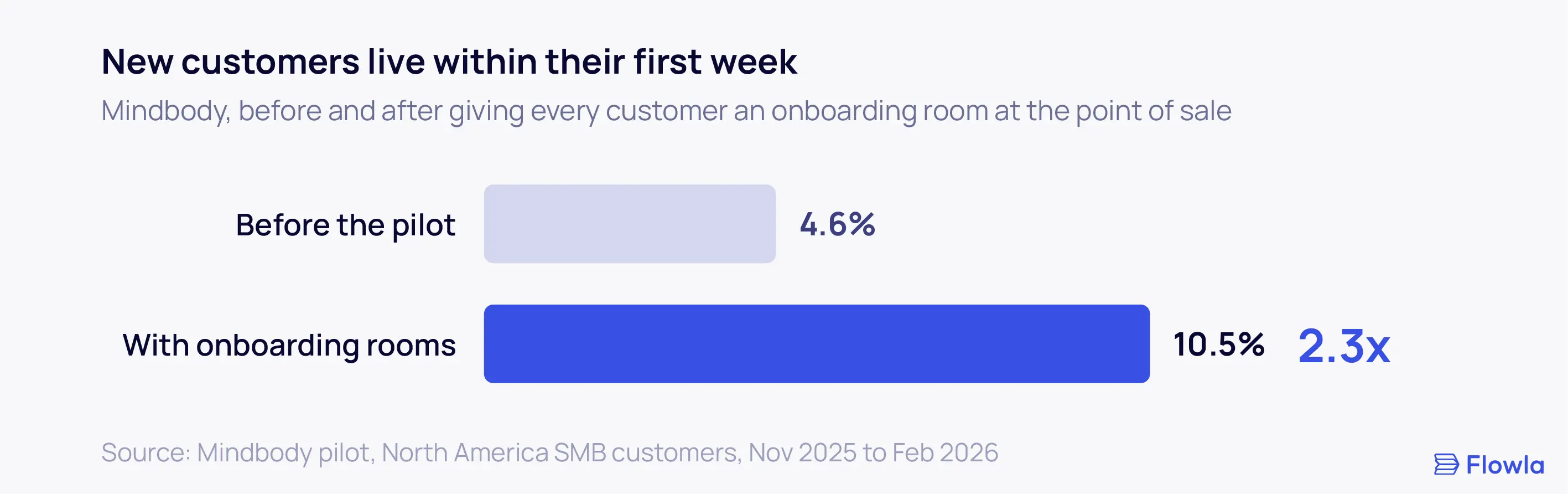
What it looks like when it works: Mindbody gives every new customer in North America an onboarding room at the point of sale, with milestones, required documents and booked sessions already inside. Forms in the room collect each customer's requirements before the first call, so specialists start the kickoff with context. In the pilot, the share of customers going live within their first week rose from 4.6% to 10.5%. Their product manager's advice to other teams was to involve sales from day one, since the handoff from sales to onboarding is a critical point for engagement. The full story is in the Mindbody case study.
In HubSpot, the same trigger can fire from a different stage. One Flowla customer that sells to insurance companies sends the onboarding portal from a dedicated "implementation" deal stage, so it goes to the primary contacts once the deal is ready to start. Their team described it on a call this month:
"As soon as we change a deal on HubSpot to the stage called implementation and we push that room out [...] That works great. No problems there whatsoever."
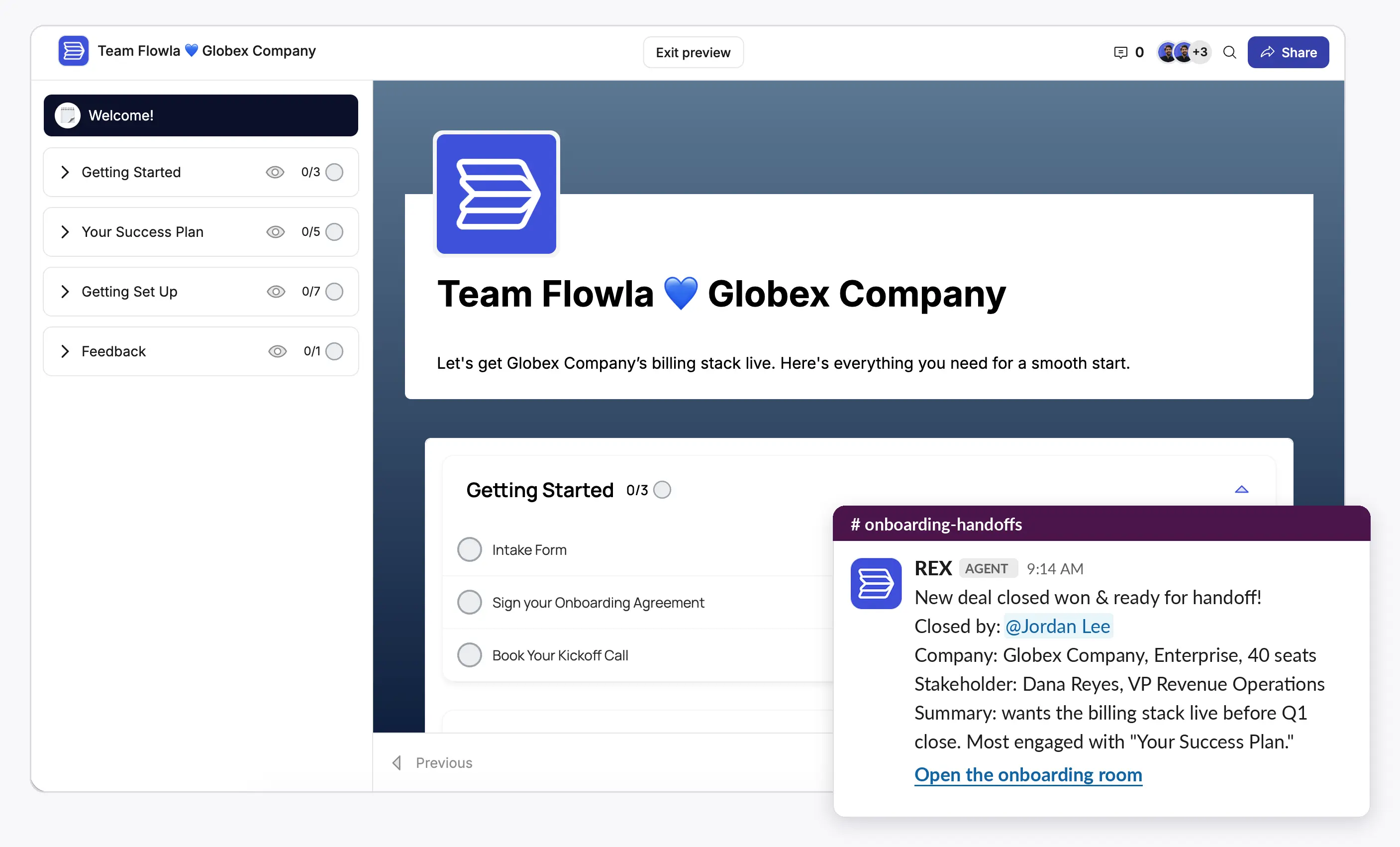
How to set it up:
- Map each product or package to an onboarding template.
- Add handoff fields to the opportunity (goals, risks, promised dates, sponsor) and make them required before a deal can move to closed-won.
- Trigger portal creation from the stage change. Some teams use closed-won, and others add a dedicated implementation stage so the portal only goes out once the deal is ready to start.
- Send the handoff alert to the onboarding team's Slack channel, with the AE tagged and the handoff fields included.
- Once the onboarding lead assigns an owner, notify that person automatically.
How to test it: close a test opportunity. The workspace should exist with the right template and contacts, and the Slack alert should include the AE's notes. Our sales to CS handoff guide includes a template for the handoff fields.
Trigger 2: Customer activity updates the CRM
Fires when: the customer completes a task, submits a form, signs a document, or a new person joins the workspace.
What needs to move:
- Milestone status
- The expected go-live date, every time it changes
- New contacts, with their titles, added to the account
- Engagement by stakeholder role
Who owns it: RevOps, because it writes to the system of record.
What it looks like when it breaks: an account manager opens the CRM before a renewal call and sees the account as it looked on signing day. Stakeholders are the usual gap. GUIDEcx found that 68% of onboarding projects involve four or more stakeholders, and several of them often join halfway through.
Example: in week four, the customer's IT security lead joins the workspace to review single sign-on. If she never reaches the CRM, the renewal team has no idea she exists, even though she may have a say in whether the customer expands.
How to set it up:
- Pick the four to six workspace milestones that matter to sales and finance, and map each to a CRM field.
- Ask each person to enter their email the first time they open the portal, so new stakeholders show up by name instead of as anonymous viewers. Then sync them to the CRM as contacts on the account.
- Write the go-live date back to the CRM whenever it changes.
How to test it: add a test contact to a workspace and complete a milestone. Both should appear in the CRM without anyone typing them in.
Trigger 3: Calls update the plan
Fires when: a meeting transcript is ready, or an email arrives that changes the plan.
What needs to move:
- Commitments made by either side, with an owner and a date
- Changed dates
- New requirements or scope changes
Who owns it: the onboarding manager approves each proposed change before it reaches the plan.
What it looks like when it breaks: none of the stack guides we reviewed cover this connection, and it produced the most painful story in our research. The onboarding leader from trigger 1 described a critical issue raised in a week-one check-in, where her team promised to get back to the customer within three days:
"Maybe the team doesn't lock it in [...] Maybe they didn't even send an email to the customer. Two months later the customer come back. Where is my issue being resolved? Oh, nobody knows about that."
The commitment was recorded in a transcript. No step moved it into the plan, so it never got an owner or a due date.
How to set it up:
- Record every customer call with a note-taker such as Gong, Fireflies, Fathom or Gemini.
- Send transcripts to your workspace, or to an agent that can read them.
- Have it propose new tasks and date changes based on what was said.
- Ask the onboarding manager to approve or edit each proposal before the plan changes.
How to test it: on a test call, promise a follow-up by Friday. A task with that date should appear for approval.
When calls can't be recorded: some customers won't allow it. The insurance-focused customer from trigger 1 told us that "a vast number of prospective clients now are not allowing us to record calls," and none of their insurance prospects will allow a Teams call to be recorded. In regulated industries, have the onboarding manager log commitments in the plan before the call ends, then send a short written recap for the customer to confirm.
Trigger 4: Stalls alert the owner
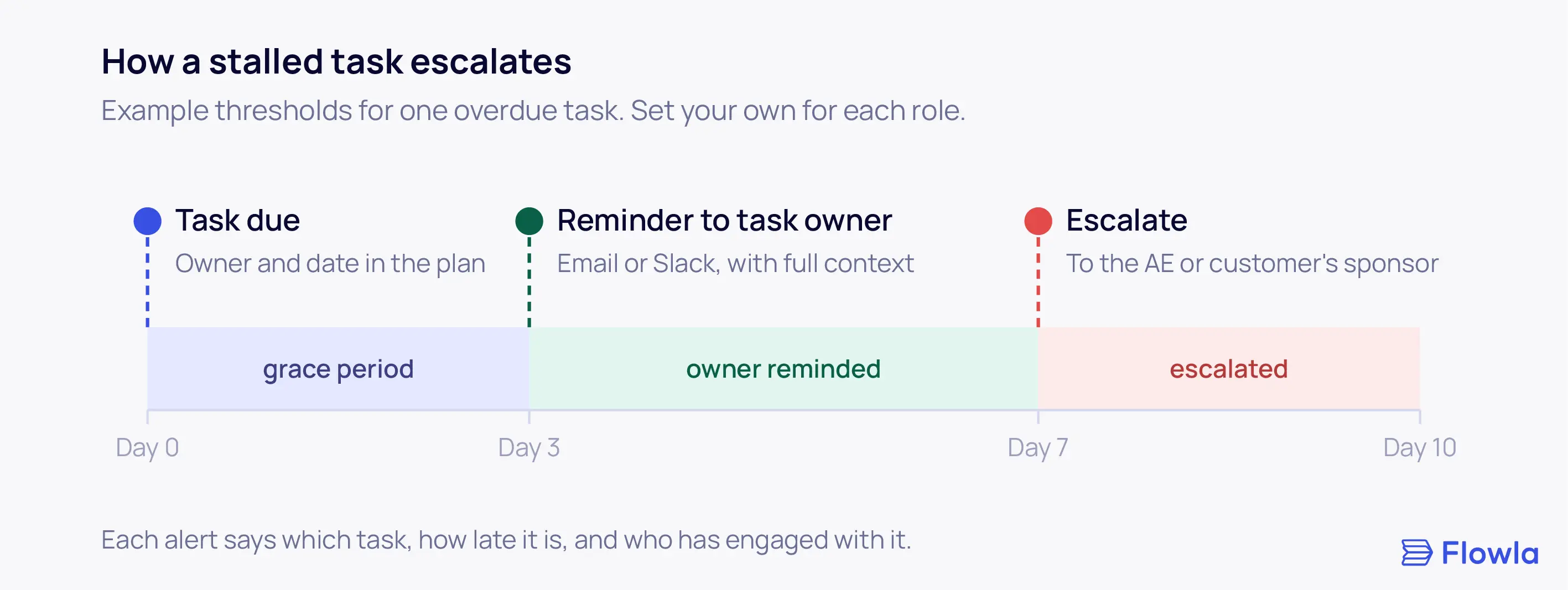
Fires when: a task passes its due date, a milestone gets close without progress, or a key stakeholder stops engaging for a set period.
What needs to move:
- An alert to the task owner in Slack, Teams or email
- Enough context to act on: which task, how late it is, and who has engaged with it
- An escalation to the AE or the customer's executive sponsor once a second threshold passes
Who owns it: CS Ops, or the onboarding lead in smaller teams, sets the rules for what counts as a stall.
What it looks like when it breaks: timelines slip without anyone noticing. Stalled onboardings also hurt retention. At Mindbody, customers who didn't complete onboarding churned at 1.5 times the rate of those who did. The same onboarding leader from trigger 1 described integrations agreed at kickoff:
"the team just focus on doing the integration itself with the customer without even monitoring it. But that it was aligned at the beginning, that it takes three weeks but turns out now it's already five weeks."
Sponsors create a related problem. Budget holders, she said, "can disappear for like two months," then come back unhappy with progress. Her answer was to define meaningful engagement for each role:
- Champion: completes tasks and joins working sessions
- Decision maker: attends milestone meetings and signs off key decisions
- Sponsor: opens progress reviews and performance reports
Alert on those signals and leave everything else out of reporting. When alerts are rare, people act on them.
How to set it up:
- Give every task an owner and a due date. A mutual action plan is the simplest way to do this.
- Set two thresholds: one for a reminder to the owner, one for escalation.
- Define meaningful engagement for each stakeholder role.
- Route each alert to the channel that person reads most.
How to test it: let a test task go overdue. Check who gets alerted, through which channel and how quickly.
Trigger 5: Chat decisions reach the workspace
Fires when: a decision is made in Slack, Teams, a Slack Connect channel with the customer, or an email thread.
What needs to move:
- The decision itself (a new date, a scope change or a new owner) into the workspace plan
- Workspace events (completed tasks, overdue items, new comments) back into Slack as notifications
Who owns it: the onboarding manager on each account.
What it looks like when it breaks: your team agrees a new go-live date in Slack. The workspace still shows the old one, and the customer's sponsor plans their internal launch around it. Slack Connect channels make this more likely, because customers treat a shared channel as official.
The rule: make the workspace the record. Use chat for discussion and alerts.
How to set it up:
- Post workspace events to one Slack channel per account or per team.
- Agree on a team habit: any decision about dates, scope or owners goes into the workspace the same day.
- If you use an agent, have it flag decisions made in Slack that aren't in the plan yet.
How to test it: in your next team review, compare the dates mentioned in the last two weeks of Slack threads against the dates in each plan.
Trigger 6: Go-live sets the health baseline
Fires when: the customer goes live or reaches their first agreed value milestone.
What needs to move:
- What the customer set out to achieve
- Open issues and their owners
- The stakeholder map, with engagement by person
- How long onboarding took against the plan
Who owns it: the onboarding lead, who hands over to the CSM.
What it looks like when it breaks: the CSM starts from nothing and asks the customer questions they already answered in discovery four months earlier.
How to set it up:
- Define what go-live means for each product before onboarding starts.
- Create a short go-live summary with the four items above.
- Push it to the CS platform and the CRM, and set the first health score from it.
How to test it: pick a customer who went live recently. Their CSM should be able to explain what the customer wanted to achieve without asking them. Our guide to customer success metrics covers which baselines to set at this point.
Who owns each connection?
The revenue operations lead quoted at the top of this guide named missing ownership as the root problem. Each trigger sits between two teams, which makes it easy for each team to assume the other one has it covered. A split that works for most companies:
Write the owner next to each trigger, along with the date someone last tested it. If you're reviewing the wider revenue stack at the same time, our guide to optimizing your RevOps tech stack covers the sales side.
Audit your onboarding stack in 15 minutes
Answer each question for your last five onboardings. Start fixing at the first question where the answer is no.
The minimum onboarding stack at each stage
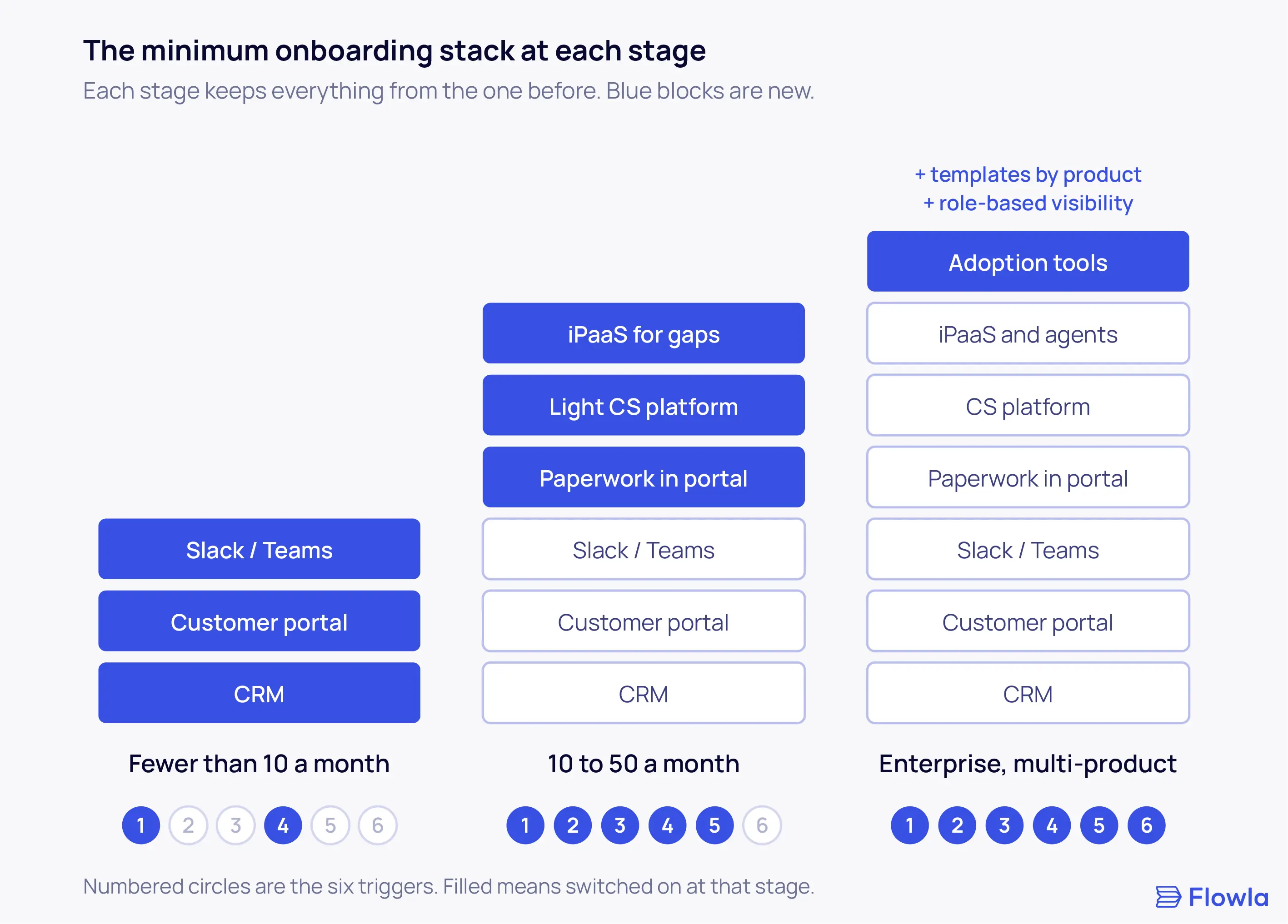
Seven layers and six triggers on day one would be overkill for most teams. Add them in the order your onboardings stall.
Fewer than 10 onboardings a month
A CRM, a customer workspace and Slack cover this stage. Switch on trigger 1 so every closed-won deal opens a workspace with the sales context inside, and trigger 4 so overdue tasks reach their owner automatically. At this volume one person can still hold most of the context, and that habit is what breaks first as you grow. Our post on scaling onboarding past 10 clients a month covers the usual problems.
10 to 50 onboardings a month
Manual reporting starts to eat into the week here. Move signatures and data collection inside the workspace. Add trigger 2 so the CRM stays current, trigger 3 so commitments from calls get tracked, and trigger 5 so chat decisions reach the plan. A lighter CS platform such as Vitally or ChurnZero usually earns its place at this stage. Use an iPaaS for gaps, and keep a written list of every workflow it runs.
Enterprise and multi-product onboarding
Every layer and every trigger, plus two additions. Templates need to change by product, because a customer buying two products needs a different plan from one buying five. Visibility needs to change by role, so a sponsor sees milestones while the champion works through the full task list.
What this looks like in Flowla
Flowla is built for the enterprise stage, and it covers several triggers inside one workspace:
- Trigger 1: closing a deal in Salesforce or HubSpot creates the onboarding room from the right template, with contacts and context pulled in. The handoff goes to the onboarding team in Slack or email, with the AE copied.
- Trigger 2: room activity and new stakeholders sync back to the CRM.
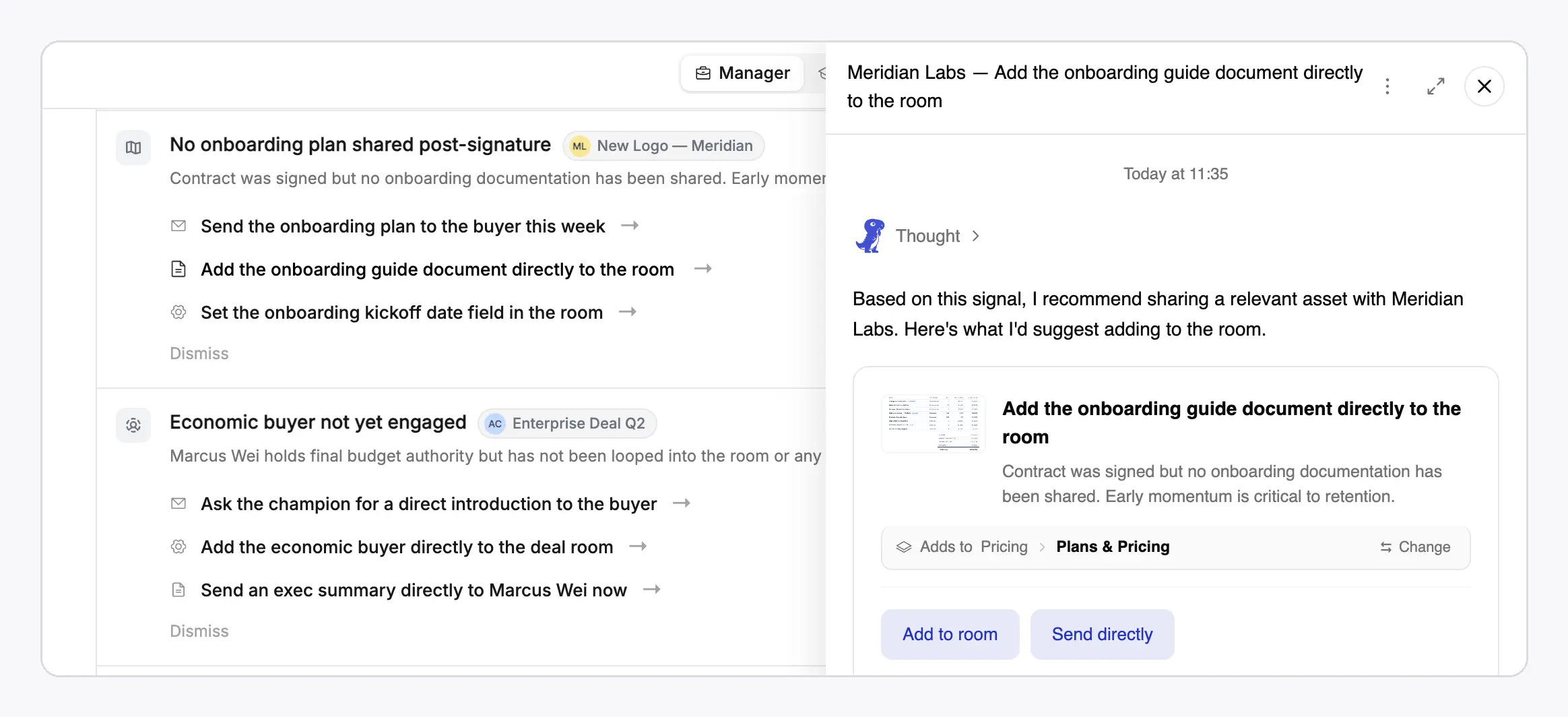
- Trigger 3: REX, Flowla's revenue execution agent, reads transcripts and emails for changed commitments and proposes plan updates for a person to approve.
- Trigger 4: REX flags stalled tasks and quiet sponsors in Slack, Teams or email, with the context needed to act.
- Role-based visibility: sponsors, champions and internal teams each see the parts of the room relevant to them.
In Mindbody's pilot, median time to go live fell by 34%, and customers who used their onboarding room were 66% more likely to complete onboarding (pilot data for North America SMB customers, November 2025 to February 2026). Supy cut time-to-completion by 25% after centralizing client materials and engagement tracking in one room.
FAQ
Do you need an iPaaS like Zapier or Workato for onboarding?
You need an iPaaS like Zapier, Make or Workato only when your core tools lack a native integration for a trigger you rely on. Start with the native connections between your CRM, onboarding workspace and Slack. Add an iPaaS for the gaps, and document every workflow it runs, because they stop working quietly when someone renames a field.
Can you run customer onboarding in Asana or Monday?
You can run the internal side of onboarding in Asana or Monday, and many teams start there. The limits show up on the customer side. Customers rarely log into your project tool, so tasks, data requests and reminders drift back into email. Once you pass a handful of onboardings a month, a customer-facing workspace usually pays off.
Should onboarding integrations be native or custom-built?
Use native integrations wherever they cover the trigger, since the vendor maintains them when APIs change. Build custom integrations only for data specific to your business, such as product-level scope fields or an internal provisioning system. Every custom integration needs a named owner, so it gets fixed quickly when something upstream changes.
HubSpot or Salesforce for customer onboarding?
Both work as the system of record for customer onboarding. HubSpot is quicker to configure and suits teams without a dedicated admin. Salesforce handles more complex objects, product lines and permissions, which matters for multi-product enterprise onboarding. Pick the one your sales team already uses, and check that your onboarding workspace syncs with it in both directions.