















- A deal desk is the cross-functional team or process, usually run by RevOps, that reviews and approves non-standard deals before terms reach the buyer.
- Build it on an approval matrix keyed to total contract value, with one named approver per cell, parallel reviews and a turnaround SLA for each tier.
- Every complex deal has a second approval chain inside the buyer. Map it the day the deal reaches the desk and measure the desk through to signature.
- Write approved terms to the CRM as fields, then use the most common exceptions to shrink the queue every quarter.
According to G2's 2026 Buyer Behavior Report, IT security review is the single biggest source of delay after a buyer has picked a vendor. 39% of buyers cite it. Among enterprise buyers, half do.
A deal desk usually gets measured on the other side of the deal. It signs off a 25% discount in a day, routes a liability redline to the right lawyer and stops finance from discovering a ramp deal after it books. Then the approved quote goes to the buyer and waits weeks in a security review the desk never saw coming.
This guide covers both approval chains. It starts with what a deal desk is and when you need one, then introduces the 5R model (Route, Review, Reconcile, Relay, Refine), the RevOps systems behind it, the metrics, and copy-paste templates.
Who this guide is for:
- RevOps managers building a first deal desk
- Deal desk analysts looking for benchmarks, a job spec and templates
- CROs and sales leaders deciding whether to staff one
- CS and finance leaders who inherit whatever terms the desk approves
In this guide:
- Part 1: What a deal desk is, who runs it and when you need one
- Part 2: The 5R model, with one deal followed through all five stages
- Part 3: The RevOps operating layer: roles, systems, a 90-day build plan, CRM fields and AI
- Part 4: Metrics, ROI and the seven ways deal desks fail
- Part 5: Templates you can copy
Part 1: What a deal desk is and what it does
A lot of people first meet the deal desk as a Slack channel where reps ask for discounts. At scale it decides which deals get special treatment, who signs off, how fast, and what happens to the terms after the contract is signed.
What is a deal desk?
A deal desk is a cross-functional team or process that reviews, structures and approves non-standard deals before terms reach the buyer. It handles discounts above policy, custom payment terms, multi-year ramps, legal redlines and product commitments. Standard deals skip it. In most mid-market companies, the deal desk is RevOps working an approval queue rather than a separate team.
Quick facts:
- Also called: deal support, sales deal desk, pricing desk
- Usually owned by: RevOps, sales ops or finance
- Handles: non-standard pricing, contract terms, legal and delivery commitments
- Skips: standard deals at list price on standard paper
- Staffed by: one analyst or manager, plus part-time reviewers from finance, legal, product and CS
- Success looks like: fast decisions, protected margin, and terms delivery can honor
What a good desk adds beyond approval: it shapes the deal. When a rep asks for 30% off, an analyst might come back with 15% off plus a three-year term. The buyer reaches a similar annual number and the company keeps margin. Salesforce's guide, written by a deal desk manager at Copado, describes the same advisory role.
What does a deal desk do?
A deal desk handles any request outside the standard price list, contract or delivery model. It checks the request, routes it to the right approvers and returns a decision the rep can use with the buyer. Typical requests include discounts above policy, custom payment terms, multi-year ramps, legal redlines, security requirements and renewal exceptions.
The five jobs:
- Guide deal structure: propose alternatives to a flat yes or no
- Protect margin: hold discount and payment-term discipline
- Coordinate approvals: one request in, one decision out
- Check compliance and delivery: legal terms, revenue recognition, product and support commitments
- Learn from patterns: turn repeat exceptions into standard options
Common requests:
The last three rows come from the buyer's own process, and they land on the desk anyway. The desk's work reaches past your company's edge.
What are the benefits of a deal desk?
A deal desk speeds up complex deals, protects margin, keeps contracts consistent and gives post-sales teams the terms they have to deliver. It also produces data: which exceptions repeat, which approvals stall and where discounts drift. The cost is a queue, so the benefits hold only when thresholds are sensible and reviews run in parallel.
- Faster complex deals: one request, one decision, parallel review. Watch approval turnaround and approval to signature.
- Margin protection: discount tiers keyed to total contract value, and a "get" for each concession. Watch average discount, requested against approved.
- Consistent contracts: pre-approved fallbacks replace one-off clauses. Watch the share of deals on standard paper and unapproved terms.
- Smoother handoffs: approved terms written to the CRM. Watch onboarding escalations traced to deal terms.
- Cleaner forecasts: approval status and buyer steps sit on the deal. Watch forecast accuracy on desk deals.
The downsides to plan for:
- A queue forms in high-volume weeks, especially at quarter-end
- Rigid rules can stall a rare, urgent, high-value deal
- Reps start sending routine requests to the desk
- An incomplete intake adds a handoff instead of removing one
Each has a fix in the failure table in Part 4. Salesforce's guide lists the first three as the usual challenges.
Is a deal desk the same as RevOps?
A deal desk is a function inside RevOps, usually owned by it. RevOps runs the whole revenue system: CRM, forecasting, territories, data and process across sales, marketing and customer success. The deal desk focuses on approving and structuring individual non-standard deals. Smaller companies often have one RevOps person doing both jobs.
CPQ and the deal desk get mixed up most. CPQ enforces rules: a quote inside the guardrails goes through. A quote outside them stops and asks a person, and the deal desk is that person. For more on where quoting tools end, see our post on the shift from CPQ to deal rooms.
Who runs the deal desk, and where does it sit?
The deal desk usually sits in RevOps, finance or sales operations, and its reporting line shapes its instincts. Under finance it protects margin first. Under sales it protects the close date first. Pave's data shows Operations is the most common RevOps reporting line, and deal desk job postings spread across RevOps, G&A and finance.
- Under finance: leans toward margin and revenue recognition. Watch for slow decisions near quarter-end. Publish SLAs and protect Tier 1 auto-approval.
- Under RevOps: leans toward process and data quality. Watch for a desk with no authority to say no. Name a senior tie-breaker (CRO or CFO).
- Under sales ops or sales leadership: leans toward close dates. Watch for discount creep. Report discount trends to finance monthly.
What the data shows:
- Pave's analysis of 746 companies found RevOps reports to Operations most often, with Finance at roughly 9 to 20% and Sales rising to 33% at companies above 3,000 employees.
- An analysis of deal desk job postings found Starburst's deal desk director reporting to a VP of Revenue Operations, Datadog running the function from G&A and RealPage placing its analyst in Finance.
Who sits on the desk:
- Finance: margin, payment terms, revenue recognition, credit risk
- Legal: liability, indemnity, data terms, buyer's paper
- Security: questionnaires, certifications, data residency, SSO
- Product: custom features, roadmap dates, integrations
- Customer success: whether support and onboarding can deliver the terms
- Executive sponsor: tie-breaks and Tier 3 approvals
What does a deal desk analyst do?
A deal desk analyst runs the desk day to day. They check each request is complete, route it to approvers, model pricing and revenue impact, propose alternative structures and chase decisions against the SLA. They also track desk metrics and convert repeat exceptions into standard options. The role is internal and rarely speaks to buyers directly.
Day to day:
- Bounce incomplete requests back to the rep with a list of what's missing
- Model the revenue impact of discounts, ramps and payment terms
- Draft counter-offers with a one-line rationale the rep can use
- Chase approvers when a decision passes its SLA
- Write approved terms to the CRM and flag anything finance should see
- Report weekly: queue size, turnaround, exceptions by type
Skills to hire for:
- Commercial accounting: revenue recognition and ASC 606 come up often in deal desk postings and almost never in sales ops ones
- Contract fluency: enough to tell a fallback clause from a new risk
- Calm negotiation: telling a rep no in a way that keeps the deal alive
- CRM administration: workflow rules, required fields, reporting
Job posting pattern: the same posting analysis found SaaS companies account for more than half the deal desk postings it reviewed and about a quarter of the sales ops ones. Multi-year commitments and ramp schedules generate exceptions that a published price list never does.
Who it's for: RevOps leads writing their first deal desk job description, and analysts deciding whether the role fits them.
Do you need a deal desk yet?
You need a deal desk when non-standard terms become routine, approvals start stalling deals, discounts drift upward or post-sales teams keep finding promises nobody told them about. A company selling one product at list price on one contract can approve the odd discount in Slack. Once exceptions become routine, that habit breaks down quickly.
Signals to watch for:
- Exceptions are routine: a quarter or more of deals carry a non-standard term
- Approvals stall deals: reps chase three people in Slack for one discount
- Discounts drift: the average discount rises each quarter with no policy change
- Terms surprise post-sales: CS learns about a custom SLA at kickoff
- Enterprise buyers arrive: buyers send their own paper, security questionnaires and procurement portals
- Finance finds problems late: revenue recognition issues surface at month-end close
- Expansion abroad: multi-currency pricing, regional tax and compliance questions land on the same desk
Team size sets how formal the desk needs to be. Under 10 reps, a founder or finance lead approving in Slack is enough. Between 50 and 200 reps, most teams need a dedicated analyst. The staffing table in Part 3 shows each stage.
Where deal desks show up:
- SaaS: multi-year commits, ramp pricing, usage tiers, custom integrations
- Healthcare and pharma: regulated terms, government pricing, volume discounts
- Financial services and fintech: multi-entity deals, revenue recognition, regulatory review
- Telecom and hardware: custom configurations, financing, long-term service terms
- Professional services: scope, pricing and expectations on large engagements
Sources for this list: Salesforce's guide and DealHub's deal desk glossary.
Part 2: The deal desk process in five stages (the 5R model)
Most deal desk guides describe a process that starts when a rep submits a request and ends at approval. The 5R model runs from the moment a deal needs special treatment to the moment its terms are delivered, then feeds what it learned back into the rules.
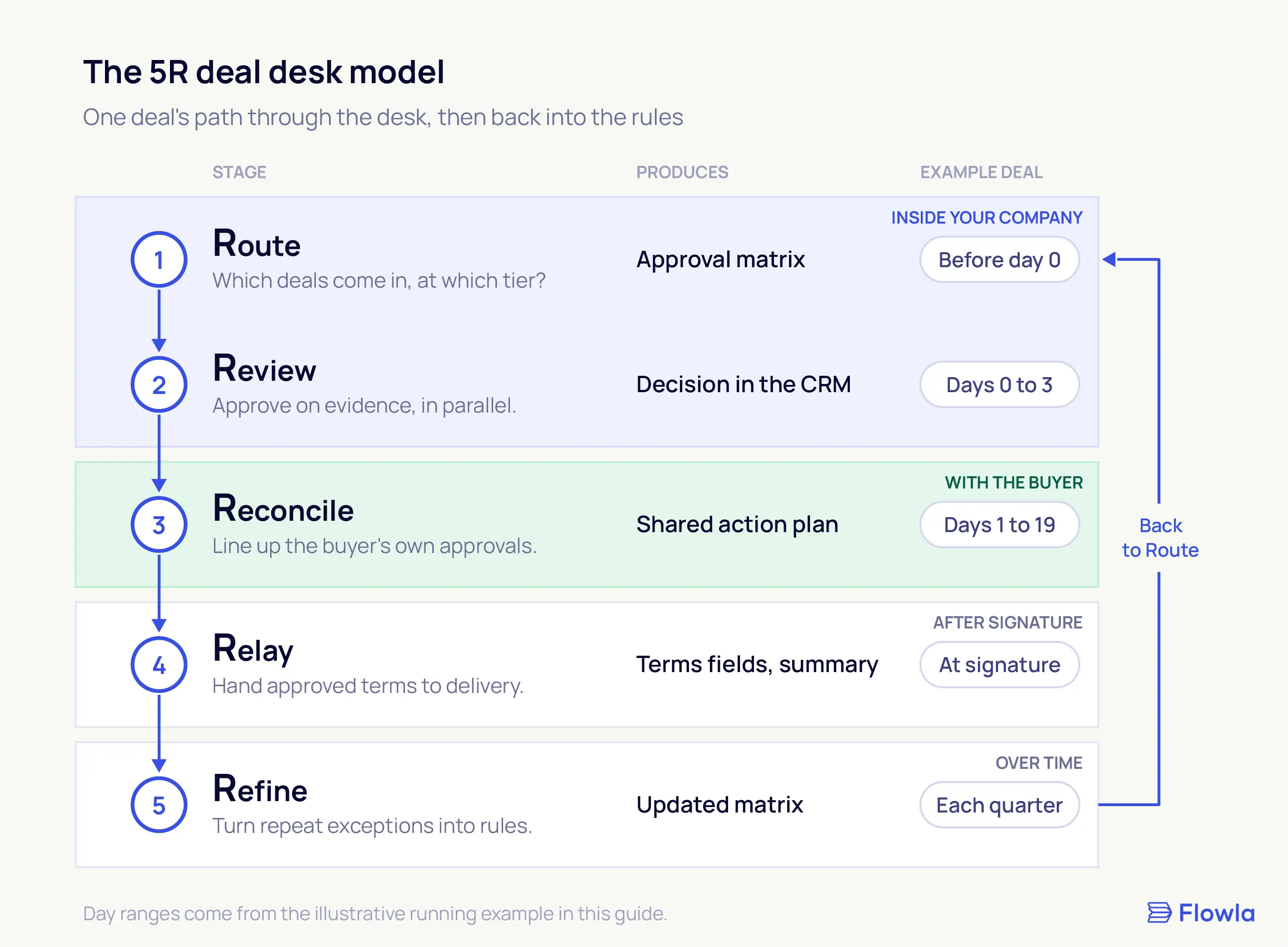
The running example. To keep this concrete, we follow one illustrative deal through all five stages. Every number is invented for the example.
- A 400-person logistics company is buying on a three-year term
- List price: $80K a year, so total contract value is $240K
- The rep asks for 18% off, quarterly billing and a liability cap of two times annual fees
- The buyer sends a 150-question security questionnaire and requires registration in its procurement portal
- The buyer's CFO signs anything above $100K
1. Route: decide what enters the desk and at which tier
What it does: decides which deals need the desk at all and how much review each one gets.
Owner: the RevOps lead writes and maintains the matrix. Finance and legal approve it.
Steps:
- List every exception reps ask for. Pull the last two quarters from CRM notes, Slack and email.
- Group them into levers: discount, payment terms, contract length, legal terms, product and SLA, security and data.
- Set three tiers for each lever: auto-approve, desk review, executive.
- Name exactly one accountable approver per cell.
- Publish the matrix, then encode it in the CRM so deals route themselves.
Salesforce's Trailhead module on pricing tools describes the discount approval matrix as the document showing what a rep can offer alone and who approves anything higher. An illustrative version:
These numbers are examples. Set yours from your margin targets and your history of what reps actually ask for.
Design rules:
- Key discounts to total contract value. Kognitos points out that a deep discount on a multi-year deal compounds, so an annual figure understates the concession.
- One accountable approver per cell. "Finance and legal" as a joint owner means nobody owns the decision.
- Highest tier wins. A deal with a Tier 1 discount and a Tier 3 legal term goes to Tier 3 for the legal term only. Other levers keep their own tier.
- Re-approve only what changed. If the buyer changes payment terms mid-negotiation, finance re-reviews. Legal does not.
- Keep the matrix in an editable table. Who approves a 15% discount changes more often than the workflow does.
- Write red lines. List the terms no tier can approve, such as unlimited liability or exclusivity, so reps never promise them.
Triggers that skip the dollar check:
- Strategic or logo accounts
- Competitive displacement
- First deal in a new region
- Any request on the buyer's paper
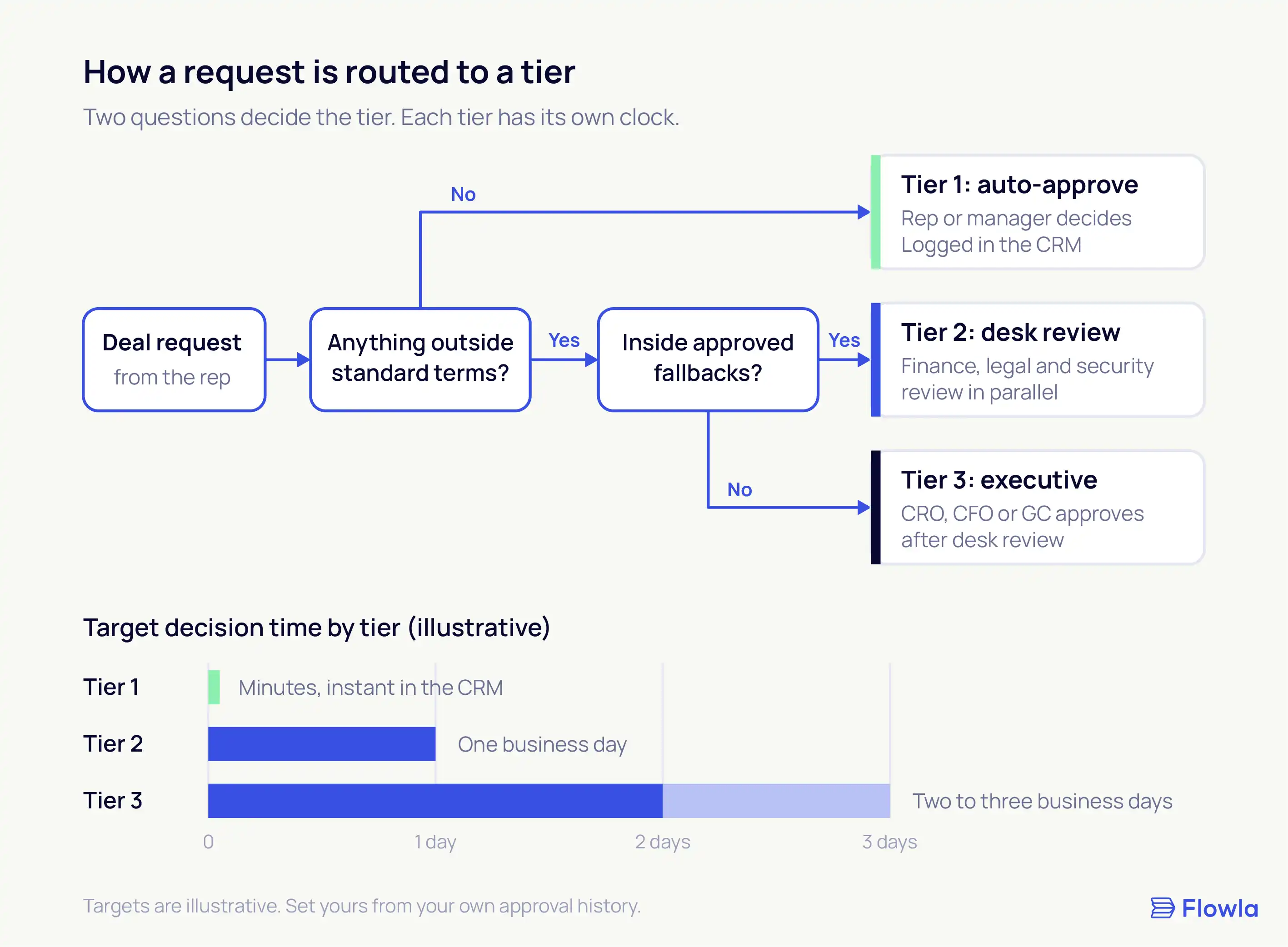
Running example: the 18% discount on $240K total contract value lands in Tier 2. Quarterly billing is Tier 2. The liability cap at two times fees is inside the legal fallback, so Tier 2. The security questionnaire is Tier 2. The whole deal is Tier 2, with finance, legal and security as parallel reviewers.
Done when: every exception type has a tier and one approver, and a rep can check where a request lands in under two minutes.
Common mistakes:
- Thresholds set too low, so every deal queues. Rework's guide warns that without clear thresholds everything becomes a request and the desk becomes a bottleneck.
- The matrix lives in a PDF nobody opens.
- Approvers are named by team instead of by person.
2. Review: approve on evidence, in parallel
What it does: turns a request into a decision with reasoning. The evidence comes from outside the rep's own account of the deal.
Owner: the desk analyst.
Steps:
- Completeness check. Incomplete requests go straight back to the rep.
- Triage. Confirm the tier and send the request to each reviewer at the same time.
- Parallel review. Finance, legal and security each answer for their own lever.
- Decision. The analyst merges the answers into one decision.
- Write-back. Record the decision, the reason and the approver in the CRM.
Serial against parallel: take four reviews that need 1, 2, 3 and 1 days (illustrative). Run one after another, the decision is ready on day 7. Run finance, legal and security together and add the executive sign-off, and it is ready on day 4.
SLAs by tier. DealHub's sample targets are 24 hours for standard deals, 48 for complex and 72 for strategic ones. GitLab publishes its own: a six-hour target for case resolution, with quarterly actuals of 4 hours 15 minutes and 8 hours 16 minutes, and a 95% target for approval accuracy.
A workable starting point: Tier 1 decides instantly in the CRM, Tier 2 within one business day and Tier 3 within two to three business days. The routing chart above shows the same targets.
Four possible decisions:
- Approve: the request goes through as asked
- Approve with changes: a counter-structure, such as a smaller discount for a longer term
- Decline with an alternative: a no always comes with something the rep can offer instead
- Escalate: the request exceeds desk authority
Every decision except a plain approval includes one sentence the rep can say to the buyer.
Examples of "gets" to ask for in return:
- A longer term or a multi-year commit
- Annual or upfront payment
- A case study or named reference
- Faster signature (inside the quarter)
- A larger scope or an added product line
The evidence packet. The desk needs more than the rep's story. A CS leader at an enterprise software company described the deal desk her team was setting up this way:
"Honestly, it's going to be a little bit more hacky I guess, for lack of a better word, and kind of pulling what the sales team brings to the table."
She went on to name the risk: the desk relies on one part of the team to make the case for the deal. The approver sees what the rep chose to send. They don't see that the economic buyer hasn't opened anything in three weeks, or that the champion is the only contact. Our guide to multithreading in sales and customer success covers how to widen it. In Flowla's analysis of 30,000+ deal rooms, the average room involved 2.9 stakeholders, almost certainly fewer than the real buying committee.
- Deal record (amount, total contract value, term, close date, stage): sets the tier
- The exception requested, in the rep's words: shows what the rep believes the buyer needs
- Buyer contacts by role, and who engaged in the last 30 days: shows whether the decision-maker is involved
- The give and the get: shows what the buyer offers in return
- The buyer's open approval steps and status: shows how far from signature the deal is
- Latest call notes or recording: lets the reviewer check the story
The rep's case still counts. A RevOps lead at a B2B software company, asked about automating MEDDPICC fields, said filling them in by hand is what makes a rep think through a deal. The packet keeps that thinking and adds what the rep can't see.
Fit review for Tier 3. Aircall's 2018 deal desk post describes a meeting where account executives defend a large deal's fit to product, CS and marketing, and teams can say no. For the biggest deals, add four questions:
- Does the buyer match the ICP?
- Can delivery support the promises being made?
- Does anything in the deal change the product roadmap?
- What is the reference value of winning it?
Running example: the desk gets finance's answer on day 1, legal's on day 2 and security's on day 3. Decision on day 3: approve 15% instead of 18% in exchange for the three-year commit, quarterly billing at net 45, and the liability cap at one times annual fees. The rep gets a one-line rationale for the buyer: "We can move on price because of the longer term."
Done when: the decision, reason and approver are in the CRM within the tier SLA.
Common mistakes:
- Approvals that run in a chain
- Decisions made in direct messages that never reach the CRM
- Approving a discount with no "get" attached
3. Reconcile: line up your approvals with the buyer's
What it does: maps the buyer's approval chain and runs it in parallel with yours.
Owner: the AE owns the relationship and asks the questions. The desk analyst tracks the buyer's steps against dates.
When to start: the day the deal enters Tier 2 or 3, or at verbal yes, whichever comes first. A fitgap workflow guide recommends opening procurement and security intake within 48 hours of a verbal yes.
While your desk works through finance and legal, the buyer runs its own chain. G2's July 2026 survey of 1,038 buyers puts numbers on how much that matters: 39% name IT security review as the biggest post-selection delay (50% among enterprise buyers), 49% say their CFO vetoed an already-approved purchase in the last 12 months, and 40% call evaluation the longest stage of the purchase.
What buyers typically need to approve:
The finance step goes faster when your champion can present the case in ten minutes. Our guide to building a business case your champion can present shows how.
Questions to ask in the same conversation as the exception:
- "Walk me through what happens after your team decides to move forward." (A line revenue.io's procurement guide suggests, because the answer reveals vendor registration, questionnaires, legal review and routing by deal size.)
- Who reviews security, and have they seen our documentation?
- Will legal redline our paper or send theirs?
- Does anyone above you need to approve this? Who signs?
- Is there a date this has to be live by, and what drives it?
Steps:
- Ask the questions above and write the answers into a shared mutual action plan. Our mutual action plan template is a starting point.
- Give each buyer step an owner on the buyer's side, a date and the document they need from you. Our mutual action planning guide covers how to build a plan buyers use.
- Start the buyer's steps while your own review is running. Send security answers and the DPA before the discount is approved.
- Track the buyer's steps with the same discipline as your SLAs.
A Flowla account executive described this on a recent buyer call: "I'll put that legal and technical sign off to run in the background." On the same call the buyer's onboarding lead said legal review typically takes weeks and mostly covers commercial terms. Both facts went into the plan on day one.
Who actually decides. The buyer's chain is not a row of equal gates. A head of onboarding at a marketing technology company explained how approvals worked there:
"If I get [the founder's] approval, it will happen regardless of what legal say, regardless of what security says."
The same person said getting approvals is "painful, not impossible." The job is to find out who decides and in what order, then put your effort there. Our stakeholder mapping guide and our breakdown of B2B buying committee roles cover how.
Surfacing hidden reviewers: keep most of the room open, then gate security documents and detailed pricing behind an email entry. When your champion forwards the room, the new reviewers identify themselves. You learn who is reviewing which section.
A limit: senior buyers don't all work in a shared plan. A RevOps lead at a B2B software company said senior stakeholders "live in emails" during contracting. Keep the shared plan as the source of truth for your champion and reviewers, and send executives a short email summary drawn from it.
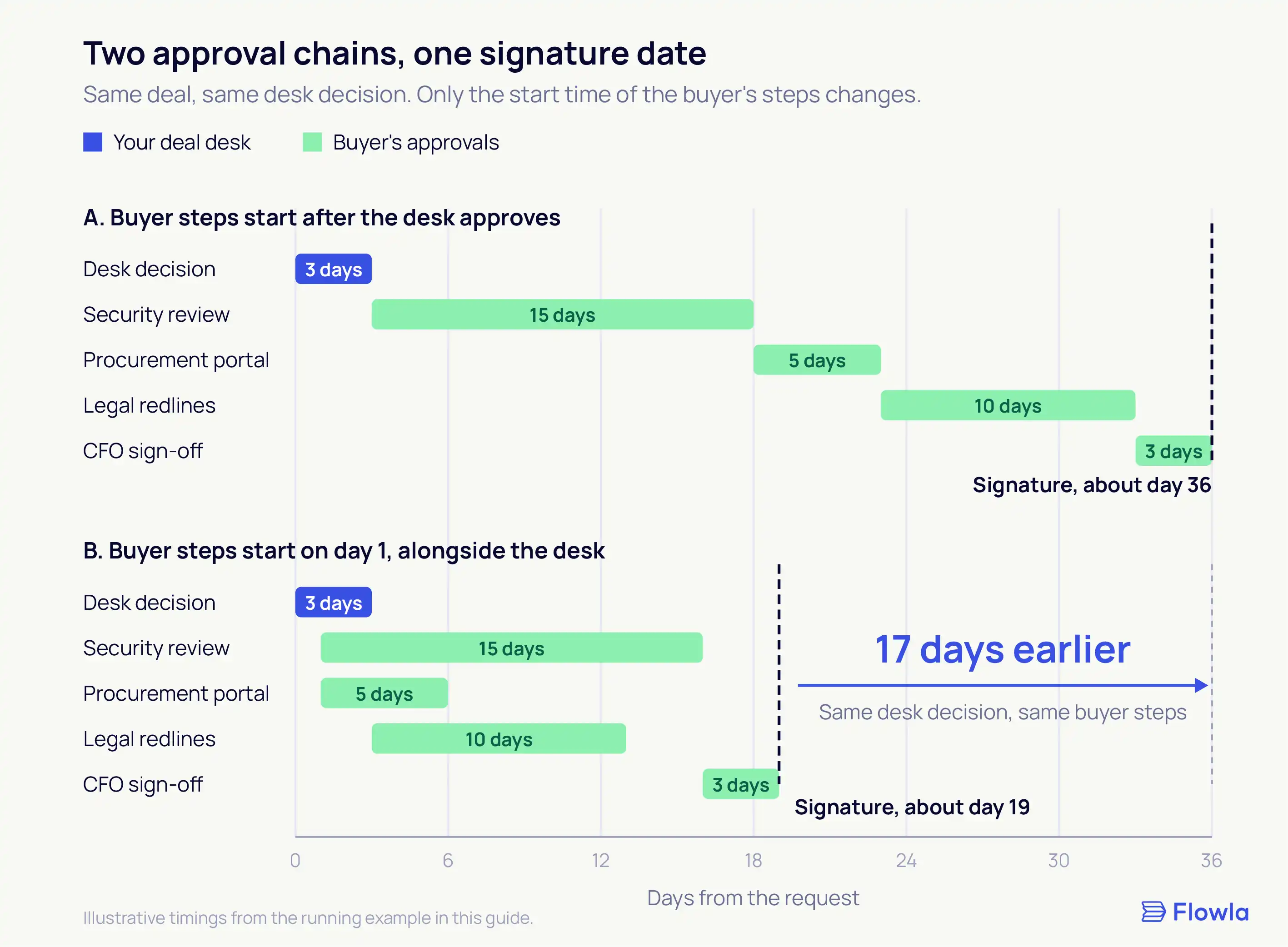
Running example: the logistics buyer has four steps after the desk decision: a security review (about 15 days), a procurement portal (5 days), legal redlines (10 days) and CFO sign-off (3 days). In sequence, signature lands around day 36. Started together, it lands around day 19: security and procurement start on day 1, legal on day 3, and the CFO signs once the slowest step finishes.
The desk's own decision takes three days in both versions. The difference comes entirely from starting the buyer's steps early. These timings are invented for the example and will vary by buyer.
Done when: each buyer step has an owner, a date and a status in the shared plan.
Common mistakes:
- Treating security and procurement as post-signature work
- Listing buyer steps without owners or dates
- Giving every buyer reviewer equal weight
4. Relay: hand approved terms to contract, billing and CS
What it does: turns approved terms into structured data that everyone who delivers can see.
Owner: the desk analyst and the deal owner.
Every approval is a promise someone else keeps. A ramp changes billing. A custom SLA changes support. A roadmap date changes the product team's quarter. A CS leader at an enterprise software company put the failure this way: "the biggest issue is after all that's done like making sure that the person responsible also has visibility."
Who needs to know what:
Steps:
- Write approved terms to CRM fields at the moment of approval.
- Generate a one-page terms summary for CS and finance. A template is in Part 5.
- Attach the summary to the account before the kickoff is scheduled.
- Check the signed contract against the approved terms before booking.
Our sales to customer success handoff guide covers the rest of what a good handoff includes.
Running example: the CRM records 15% off, three-year commit, quarterly billing at net 45, and liability at one times annual fees. The terms summary goes to finance and CS the same day. Billing is set up before kickoff.
Done when: CS, finance and legal have the terms before the kickoff is booked.
Health check: the number of signed contracts containing terms the desk never approved. Kognitos calls this the sharpest deal desk metric. A number meaningfully above zero means the desk is being bypassed.
Common mistakes:
- Terms live in a Slack thread
- The signed contract differs from the approved quote and nobody checks
- CS learns about a custom SLA at kickoff
5. Refine: shrink the queue every quarter
What it does: turns what the desk approved into better rules.
Owner: the RevOps lead.
Quarterly review agenda:
- Which exception types came up most often?
- What share of requests did the desk approve as asked?
- Which reps submit the most exceptions, and what do they have in common?
- How much slower did approvals get in the last two weeks of the quarter?
- Which contracts closed with terms the desk never saw?
- What did CS escalate after kickoff that traces back to a deal term?
What the data tells you:
- The desk approves net 60 for enterprise buyers nine times in ten: make net 60 a standard enterprise option
- One lever generates half the queue: move its common values down a tier
- The approval rate sits above roughly 95%: raise thresholds, because the desk is rubber-stamping (Kognitos's rule of thumb)
- One rep submits twice the average: coach on structuring deals before submission
- Quarter-end turnaround doubles: publish cutoffs and pre-approve repeat patterns
- Legal redlines repeat the same clause: add it to the approved fallbacks
Done when: the matrix has changed and the top two or three exceptions are now standard options.
Common mistakes:
- Reviewing the numbers and changing nothing
- Treating the matrix as permanent
Part 3: The RevOps operating layer
The 5R model describes what happens to a deal. This part covers what RevOps builds to make it run.
Who does what
R means responsible, A accountable, C consulted, I informed. Adjust it to your org.
Staffing the desk as you scale
Start with one owner, even part-time. A desk with no owner reverts to a Slack channel within a quarter.
Hiring for volume alone is a mistake. A desk drowning in requests often has a thresholds problem, and another analyst processes more of the same requests. For the wider question of staffing RevOps, see our guide to scaling revenue operations without scaling headcount. Teams between 10 and 50 reps will also want to know which sales processes to standardize first.
The systems behind a deal desk
You need fewer tools than vendors suggest. Our guide to optimizing your RevOps tech stack covers how to cut the clutter first.
HubSpot: quote approvals can trigger on discount amount, line item discounts or e-signature use. Standard approvals allow up to 10 approvers. Advanced approvals, which need Enterprise, allow up to five sequences with ten approvers each.
Salesforce: CPQ is end of sale, not end of life. Existing customers keep support, and new development has moved to Revenue Cloud. Many desks are rebuilding approval logic now. Use the move to simplify the matrix before you rebuild it, so you don't migrate years of one-off rules.
What to look for in deal desk software:
- Intake fields on the deal record, so requests don't live in email
- Routing rules that send each request to the right tier and approver
- Parallel approvals with timers against your SLAs
- The decision, reason and approver written back to the deal
- Approved terms carried into the contract and the handoff to CS
How this looks in Flowla:
- Mutual action plan with buyer-owned steps: due dates, assignees and automatic reminders when a task goes overdue. See how mutual action plans work in Flowla.
- Restricted visibility: security documents and pricing visible only to the people reviewing them, inside your digital sales room
- Internal view: meetings, emails and notes your team uses, never shown to the buyer
- REX: Flowla's revenue execution agent flags stalled steps, such as a security review that has gone quiet, and can update deal records in HubSpot or Salesforce. Anything that leaves the building waits for your approval.
- Closed Won handoff workflow: builds the onboarding room from the deal, so approved terms carry into kickoff. Teams using it report 25% fewer kickoff delays. See the sales-to-CS handoff workflow.
- E-signature: collect signatures inside the room, so the signed version lives alongside the rest of the deal.
Flowla does not run discount approvals. Keep those in your CRM or CPQ, and use the room for the buyer's side and the handoff.
Your first 90 days
DealHub's glossary suggests a 30 to 60 day pilot alongside the existing process before full launch. If you're new to a revenue leadership role, our 90-day CRO playbook covers the wider audit.
How to get reps to use the desk
Reps skip a desk that feels like paperwork. Adoption comes from making the desk faster than the alternative.
- Explain the why: faster approvals and better odds of closing
- Involve a few reps in designing the intake form
- Keep submission to one form inside the CRM
- Publish the SLAs and hit them
- Share wins, such as a counter-structure that closed a deal
- Train reps on which requests they can approve alone
Who it's for: RevOps leads rolling out a desk to a sales team that used to approve in Slack.
The CRM fields every request should write
Keeping requested and approved discount in separate fields shows how much the desk negotiates. Together, the fields also give finance an audit trail for revenue recognition reviews. The matrix version tells you which rules a deal was approved under, which matters when someone asks why last March's deal got terms you no longer allow.
Operating rhythm
Four meetings keep the desk honest. Keep them short.
- Daily: the desk analyst triages the queue and chases anything near its SLA
- Weekly: a deal council (analyst, finance, legal and a CRO delegate) reviews Tier 3 requests, stuck approvals and large deals coming up
- Monthly: the RevOps lead and finance review turnaround, approval rate and unapproved terms
- Quarterly: the RevOps lead, finance, legal and sales leadership run the Refine review and change the matrix
Quarter-end
Every desk has the same bad week. Reps who sat on deals for a month submit them all in the last ten days.
- Publish cutoffs: Tier 2 requests by day 20 of the last month, Tier 3 by day 15
- Pre-approve the patterns you see every quarter-end, so they drop to Tier 1 for those weeks
- Block approver time in the last two weeks, especially finance and legal
- Track quarter-end slowdown as its own metric
A deal approved on day 28 with a three-week security review ahead was never going to close this quarter. Knowing that on day 10 changes the forecast.
What desk data tells your forecast
- Approved but open: a deal approved internally with open buyer steps is a risk to the commit
- Approval to signature: the field shows how long the gap usually runs by segment, and which deals are already past it
- Rounds of approval: three rounds in two weeks can mean a buyer negotiating hard or a weak business case. Check engagement before deciding which, and see our post on late-stage buying signals for the signals worth trusting.
Our posts on sales forecasting and building a pipeline that doesn't leak cover how to use signals like these.
AI in the deal desk
Vendors now pitch AI for quote drafting, deal summaries and approval routing. Some of that work suits automation. Some needs a person.
In REX, anything that leaves the building waits for your approval, which fits this split. For the bigger picture on AI agents in the revenue stack, see our take on revenue action orchestration.
Who it's for: RevOps leads deciding where an AI tool belongs on the desk.
Part 4: How to measure a deal desk
Measure the desk against its job: moving non-standard deals to signature quickly while protecting margin and delivering what was promised. A desk can approve everything in an hour and still lose deals.
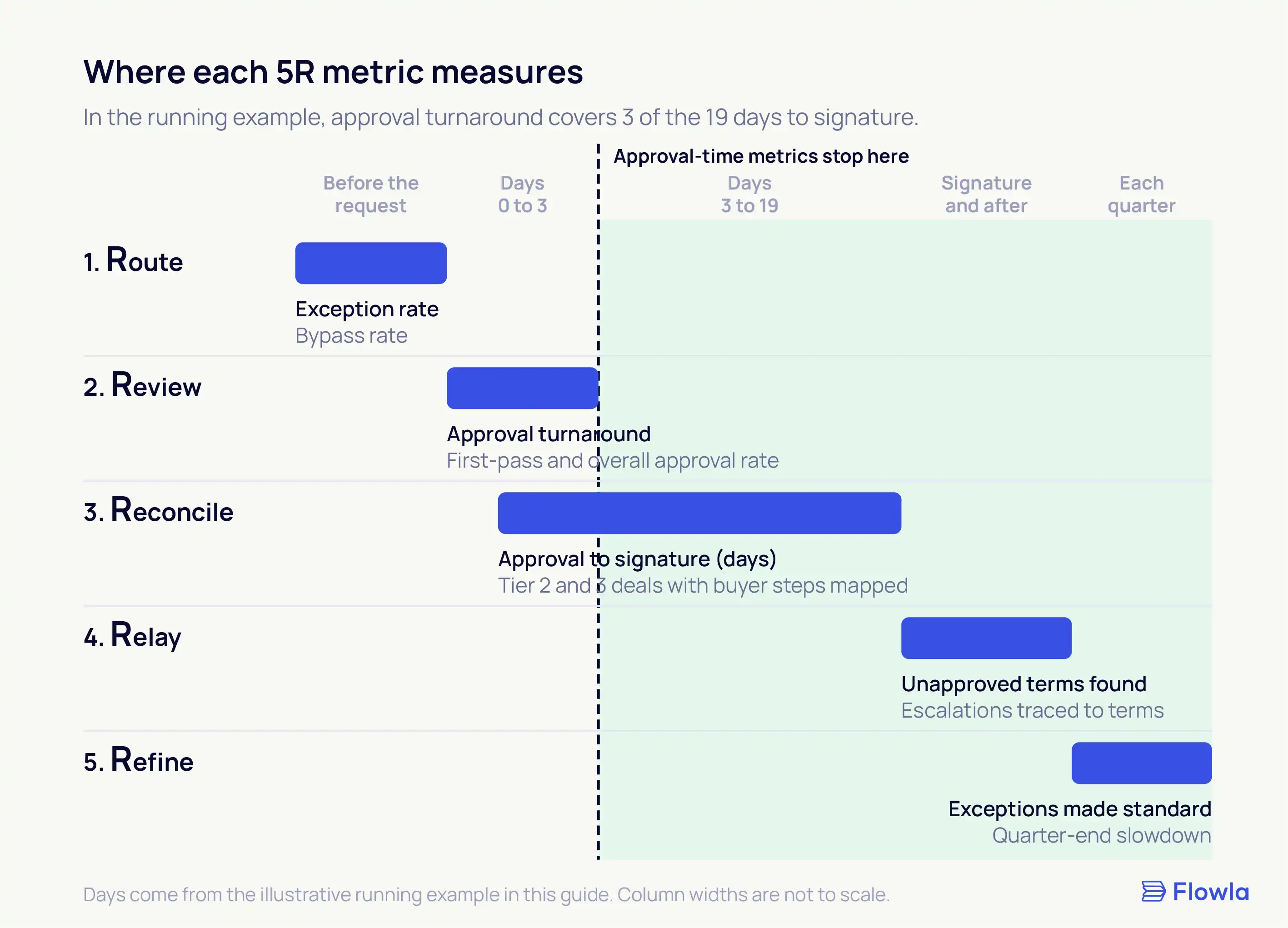
Metrics for each 5R stage
Start with five: approval turnaround, first-pass approval rate, approval to signature, unapproved terms and exception rate.
Deal desk best practices at a glance
Eight habits separate a desk that speeds deals up from one that adds a queue.
- Route by rule: publish an approval matrix keyed to total contract value, with one approver per cell
- Decide in parallel: start every reviewer on the same day and publish an SLA for each tier
- Attach a "get" to every concession: a longer term, upfront payment, a reference or a faster signature
- Review on evidence: carry engagement data and buyer contacts into the packet, beyond the rep's own account
- Map the buyer's approvals early: start security and procurement while your own review runs
- Write terms to the CRM: structured fields travel with the deal into contract, billing and CS
- Track approval to signature: measure the desk through to the signed contract
- Shrink the queue every quarter: turn repeat exceptions into standard options
How to calculate deal desk ROI
Three components, each against what the desk costs to run:
- Margin protected: the reduction in average discount multiplied by annual contract value
- Cycle time: days removed from approval, converted into rep capacity and deals that did not slip a quarter
- Leakage avoided: contracts that would have shipped with unapproved terms
Illustrative calculation:
- Annual contract value closed through the desk: $10M
- Average discount before and after the desk: 17% and 14%
- Margin protected: $10M × 3 points = $300K
- Cost of one analyst plus tooling: $150K
- Net return before cycle-time gains: $150K
These figures are invented to show the arithmetic. Use your own discount history.
Seven ways deal desks fail
The last two come from Salesforce's list of deal desk challenges. A desk can avoid all seven and still watch approved deals stall inside the buyer, which is the gap Reconcile exists to close.
Two patterns that come up in complex deals
Budget is the stated blocker. When a buyer says budget is the obstacle, a deeper discount is the usual reflex. A paid proof of concept with a break clause and a phased rollout can work better: it gives the buyer a lower-risk way to say yes and leaves list pricing intact. Our post on proving value faster with a proof of concept covers the structure.
The approval chain is long and mostly legal. When legal review is expected to take weeks, mostly on commercial terms, put legal and technical sign-off in the mutual action plan as steps that run in the background. Place them next to a Q&A with the buyer's team and a call with the internal decision-maker. Both the timing and the owners are then visible before the proposal goes out.
Part 5: Templates you can copy
Deal desk request form
- Account and opportunity link
- Total contract value, term and close date
- Exception requested (pick from the matrix levers)
- Requested value (for example, 18% discount)
- Reason, in the rep's words
- What the buyer offers in return
- Buyer contacts by role, and who engaged in the last 30 days
- Buyer approval steps and their status (security, procurement, legal, budget, signatory)
- Link to the latest call notes or recording
- Requested decision date
Requests missing the buyer fields go back to the rep.
Filled-in example: the running deal
The request, decision and handoff for the logistics deal from Part 2, using the templates in this section. Illustrative.
Request:
- Account: 400-person logistics company, three-year term, total contract value $240K
- Exception requested: 18% discount, quarterly billing, liability cap at two times annual fees
- Reason: the buyer's CFO signs anything above $100K and wants a lower year-one cost
- Offered in return: three-year commitment and a reference call
- Buyer steps: security questionnaire (150 questions), procurement portal, counsel review, CFO sign-off
- Requested decision date: day 3
Decision note:
- Decision: approved with changes
- Approved terms: 15% discount, quarterly billing at net 45, liability cap at one times annual fees
- Reason: the discount fits Tier 2 once the three-year commitment is attached. Legal keeps two times annual fees as the second fallback if the buyer pushes back.
- Line for the rep: "We can move on price because of the longer term."
- Approver: desk analyst, with finance and legal sign-off, day 3
Terms handoff summary:
- Customer and term: logistics company, three years
- Pricing: 15% off list, quarterly billing, net 45
- Commitments: liability cap at one times annual fees, standard SLA
- Open items at signature: SSO setup, scheduled for kickoff
- Buyer contacts: IT security lead (reviewer), procurement, CFO (signatory)
Decision note
- Decision: approved, approved with changes, declined, escalated
- Approved terms (exact values)
- Reason, in one or two sentences
- The line the rep can use with the buyer
- Conditions (for example, signature by a set date)
- Approver and time of decision
Terms handoff summary
- Customer, deal owner, close date, contract term
- Pricing: list, discount, ramp schedule, payment terms
- Commitments: SLA, security, product or roadmap items
- Open items at signature
- Buyer contacts and their role in the decision
- What the buyer said they expect in the first 90 days
Quarterly review agenda
- Volume and turnaround by tier
- Top exception types and their approval rates
- Matrix changes proposed
- Unapproved-terms findings
- Quarter-end retrospective
- Actions and owners
FAQ
How long should a deal desk approval take?
A deal desk approval for a standard, in-policy exception should take one business day or less. A complex deal with several approvers should take two to three business days. Publish the SLA for each tier. If approvals regularly run longer, look for serial approvals or incomplete requests before adding approvers or headcount.
Does a deal desk slow down sales?
A well-run deal desk speeds up complex deals because it removes the back-and-forth reps would otherwise do alone. It slows sales when thresholds are too low, reviews run in sequence or requests arrive incomplete. Track approval turnaround and approval to signature together. If both rise, the desk is adding delay.
Do you need CPQ to run a deal desk?
You don't need CPQ to run a deal desk. Many teams start with a written approval matrix, CRM approval workflows such as HubSpot quote approvals, and a contract tool. CPQ pays off when product configuration and pricing rules get complex enough that reps regularly build quotes incorrectly. The matrix and the desk's judgment come first either way.
What is the difference between a deal desk and a deal room?
A deal desk is your internal team for approving non-standard deals. A deal room is a shared space you use with the buyer for the proposal, mutual action plan, security documents and contract. They work best together: the desk decides what you offer, and the deal room tracks the buyer's approval steps until signature. Our guide to building a perfect deal room shows the layout.
What is the purpose of a deal desk?
The purpose of a deal desk is to move complex, non-standard deals to signature faster while protecting margin, legal terms and delivery. It does this by routing each exception to the right approvers, deciding against written rules, and recording the terms so post-sales teams can honor them. Done well, it also shows which exceptions repeat and should become standard options.
What is a deal desk manager?
A deal desk manager leads the deal desk function. They own the approval matrix, set SLAs, manage analysts, report desk metrics to the CRO or CFO and run the quarterly review. Smaller companies often combine this role with RevOps or sales operations. At larger companies it sits under RevOps or finance and manages analysts by region or segment.
What is deal desk review?
Deal desk review is the step where the desk checks a non-standard request against the approval matrix, gathers input from finance, legal, security or product, and returns a decision. The outcome is an approval, an approval with changes, a decline with an alternative, or an escalation. Every review should leave a recorded decision and reason in the CRM.